Troubleshooting ‘Rattle’ (R library) Installation on Ubuntu

This post pertains to Ubuntu / Debian users only.

rattle is a free graphical interface for data mining with R. I wanted to visualize decision trees and had to install this library.
> install.packages('rattle')
got me the following error message:

configure: error: GTK version 2.8.0 required
ERROR: configuration failed for package ‘RGtk2’

rattle_installationNonZeroExit

This error occurs when attempting to install the RGtk2 package. The install is looking for the header files for GTK. Possibly they are not yet. Luckily the problem can be solved quite easily. Open Terminal (Ctrl + Alt + T) and type in the following commands:


sudo apt-get update
wajig install libgtk2.0-dev

Go back and try installing rattle now with the same command as earlier. It should work. It did for me! As you can see below, decision trees are visualized lot better with rattle than if you used just rpart.

rattle

Spot the Difference — It’s NumPy!

My first brush with NumPy happened over writing a block of code to make a plot using pylab. ⇣


pylab is part of matplotlib (in matplotlib.pylab) and tries to give you a MatLab like environment. matplotlib has a number of dependencies, among them numpy which it imports under the common alias np. scipy is not a dependency of matplotlib.


I had a tuple (of lows and highs of temperature) of lengh 2 with 31 entries in each (the number of days in the month of July), parsed from this text file:

Boston July Temperatures
-------------------------
Day High Low
------------
1 91 70
2 84 69
3 86 68
4 84 68
5 83 70
6 80 68
7 86 73
8 89 71
9 84 67
10 83 65
11 80 66
12 86 63
13 90 69
14 91 72
15 91 72
16 88 72
17 97 76
18 89 70
19 74 66
20 71 64
21 74 61
22 84 61
23 86 66
24 91 68
25 83 65
26 84 66
27 79 64
28 72 63
29 73 64
30 81 63
31 73 63
view raw julyTemps.txt hosted with ❤ by GitHub

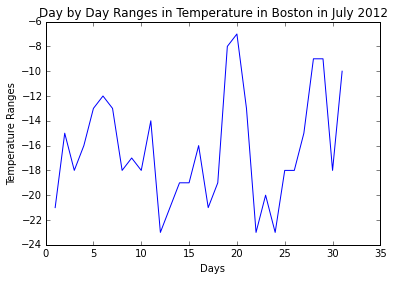
Given below, are 2 sets of code that do the same thing; one without NumPy and the other with NumPy. They output the following graph using PyLab:

differenceTemp

Code without NumPy

import pylab
def loadfile():
inFile = open('julyTemps.txt', 'r')
high =[]; low = []
for line in inFile:
fields = line.split()
if len(fields) < 3 or not fields[0].isdigit():
pass
else:
high.append(int(fields[1]))
low.append(int(fields[2]))
return low, high
def producePlot(lowTemps, highTemps):
diffTemps = [highTemps[i] - lowTemps[i] for i in range(len(lowTemps))]
pylab.title('Day by Day Ranges in Temperature in Boston in July 2012')
pylab.xlabel('Days')
pylab.ylabel('Temperature Ranges')
return pylab.plot(range(1,32),diffTemps)
producePlot(loadfile()[1], loadfile()[0])
view raw withoutNumPy.py hosted with ❤ by GitHub

Code with NumPy
import pylab
import numpy as np
def loadFile():
inFile = open('julyTemps.txt')
high = [];vlow = []
for line in inFile:
fields = line.split()
if len(fields) != 3 or 'Boston' == fields[0] or 'Day' == fields[0]:
continue
else:
high.append(int(fields[1]))
low.append(int(fields[2]))
return (low, high)
def producePlot(lowTemps, highTemps):
diffTemps = list(np.array(highTemps) - np.array(lowTemps))
pylab.plot(range(1,32), diffTemps)
pylab.title('Day by Day Ranges in Temperature in Boston in July 2012')
pylab.xlabel('Days')
pylab.ylabel('Temperature Ranges')
pylab.show()
(low, high) = loadFile()
producePlot(low, high)
view raw withNumPy.py hosted with ❤ by GitHub

The difference in code lies in how the variable diffTemps is calculated.

diffTemps = list(np.array(highTemps) - np.array(lowTemps))

seems more readable than

diffTemps = [highTemps[i] - lowTemps[i] for i in range(len(lowTemps))]

Notice how straight forward it is with NumPy. At the core of the NumPy package, is the ndarray object. This encapsulates n-dimensional arrays of homogeneous data types, with many operations being performed in compiled code for performance. element-by-element operations are the “default mode” when an ndarray is involved, but the element-by-element operation is speedily executed by pre-compiled C code.

MITx 6.00.2x Introduction to Computational Thinking and Data Science (Fall 2015)

MIT’s Fall 2015 iteration of 6.00.2x starts today. After an enriching learning experience with 6.00.1x, I have great expectations from this course. As the course website mildly puts it, 6.00.2x is an introduction to using computation to understand real-world phenomena. MIT OpenCourseware (OCW) mirroring the material covered in 6.00.1x and 6.00.2x can be found here.

The course follows this book by John Guttag (who happens to be one of the instructors for this course). However, purchasing the book isn’t a necessity for this course.

Introduction to Computation and Programming Using Python

One thing I loved about 6.00.1x was its dedicated Facebook group, which gave a community / classroom-peergroup feel to the course. 6.00.2x also has a Facebook group. Here’s a sneak peak:

descriptionUpdate

The syllabus and schedule for this course is shown below. The course is spread out over 2 months which includes 7 weeks of lectures.

MITx 6.00.2x Fall 2015 Course Calendar

The prerequisites for this course are pretty much covered in this set of tutorial videos that have been created by one of the TAs for 6.00.1x. If you’ve not taken 6.00.1x in the past, you can go through these videos (running time < 1hr) to judge whether or not to go ahead with 6.00.2x.

So much for the update. Got work to do! 🙂

Funny Python

If a programming language is named after a sketch comedy troupe, one knows what to expect. Python IS a funny language with its own bag of surprises.

pythonMonty
Monty Python’s Flying Circus

For instance, If you’ve just moved from a language such as C to Python and you’re missing curly braces (how can one not want whitespaces!!), and you try this:

>>> from __future__ import braces

from __future__ import braces
Click Image for Larger View

Or say, if you try importing this.

>>> import this

import this
A sense of humour is required for proper interpretation

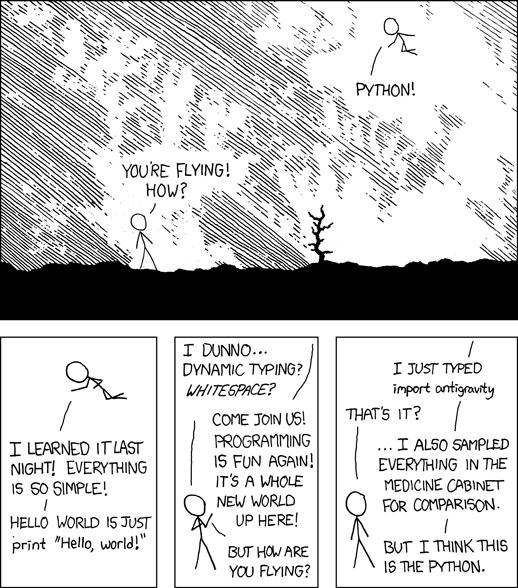
Or if you ever wanted to know why XKCD’s Cueball left Perl for Python, you should know, that it was for gravity defying stunts that he couldn’t perform anywhere else. Just import antigravity!

>>> import antigravity

You’re led to this webcomic on your browser.

import antigravity

So the upshot is that you can get tickled and trolled by Python every now and then, keeping in line with its rich tradition of doing so (check out video below).


Comedians!

Python to the Rescue

Another journal-like entry

Programming as a profession is only moderately interesting. It can be a good job, but you could make about the same money and be happier running a fast food joint. You’re much better off using code as your secret weapon in another profession.

People who can code in the world of technology companies are a dime a dozen and get no respect. People who can code in biology, medicine, government, sociology, physics, history, and mathematics are respected and can do amazing things to advance those disciplines.

Advice from an Old Programmer

I was reading a paper today, written by MIT’s Esther Duflo, part of a homework assignment on a MOOC on development policy (Foundations of Development Policy: Advanced Development Economics) offered by Duflo and Abhijit Banerjee. So I opened the paper and started copying important lines from the PDF to a text editor to make notes. I could copy the text, but when I pasted it onto a text editor, it turned out to be gibberish (you can try it too!).

For instance, instead of pasting

Between 1973 and 1978 the Indonesian Government constructed over 61,000 primary schools throughout the county

I got:

Ehwzhhq 4<:6 dqg 4<:;/ wkh Lqgrqhvldq Jryhuqphqw frqv wuxfwhg ryhu 94/333 sulpdu| vfkrrov wkurxjkrxw wkh frxqwu|

It was a good thing the cipher used for this text wasn’t too complicated. After some perusal, I found that ‘B’ became ‘E’, ‘e’ became ‘h’, ‘t’ became ‘w’ and so on. So I copied the entire content of the PDF to a text file and named the encrypted file estherDuflo.txt. I noticed that the encryption had been implemented only on the first 1475 lines. The remaining was plain English.

So I wrote a Python script to decrypt the gibberish, rather than simply typing out my notes. It took 20 minutes writing the code and 8 ms to execute (of course!). I didn’t want to spend a lot of time ensuring a thorough decryption, so the result wasn’t perfect, but then I’m going to make do. I named the decrypted file estherDufloDecrypted.txt.

Sample from the Encrypted File

5U LL*?} @?_ w@MLh @h!i| L?ti^ i?Uit Lu 5U LL*
L?t|h U|L? ? W?_L?it@G ,_i?Ui uhL4 @? N? t @* L*U)
, Tih4i?|
,t| ih # L
W
Devwudfw
Ehwzhhq 4<:6 dqg 4<:;/ wkh Lqgrqhvldq Jryhuqphqw frqvwuxfwhg ryhu 94/333 sulpdu|
vfkrrov wkurxjkrxw wkh frxqwu|1 Wklv lv rqh ri wkh odujhvw vfkrro frqvwuxfwlrq surjudpv rq
uhfrug1 L hydoxdwh wkh hhfw ri wklv surjudp rq hgxfdwlrq dqg zdjhv e| frpelqlqj glhuhqfhv
dfurvv uhjlrqv lq wkh qxpehu ri vfkrrov frqvwuxfwhg zlwk glhuhqfhv dfurvv frkruwv lqgxfhg
e| wkh wlplqj ri wkh surjudp1 Wkh hvwlpdwhv vxjjhvw wkdw wkh frqvwuxfwlrq ri sulpdu| vfkrrov
ohg wr dq lqfuhdvh lq hgxfdwlrq dqg hduqlqjv1 Fkloguhq djhg 5 wr 9 lq 4<:7 uhfhlyhg 3145 wr
314< pruh |hduv ri hgxfdwlrq iru hdfk vfkrro frqvwuxfwhg shu 4/333 fkloguhq lq wkhlu uhjlrq
ri eluwk1 Xvlqj wkh yduldwlrqv lq vfkrrolqj jhqhudwhg e| wklv srolf| dv lqvwuxphqwdo yduldeohv
iru wkh lpsdfw ri hgxfdwlrq rq zdjhv jhqhudwhv hvwlpdwhv ri hfrqrplf uhwxuqv wr hgxfdwlrq
udqjlqj iurp 91; shufhqw wr 4319 shufhqw1 +MHO L5/ M64/ R48/ R55,
Wkh txhvwlrq ri zkhwkhu lqyhvwphqw lq lqiudvwuxfwxuh lqfuhdvhv kxpdq fdslwdo dqg uhgxfhv
sryhuw| kdv orqj ehhq d frqfhuq wr ghyhorsphqw hfrqrplvwv dqg srolf|pdnhuv1 Iru h{dpsoh/
dydlodelolw| ri vfkrrolqj lqiudvwuxfwxuh kdv ehhq vkrzq wr eh srvlwlyho| fruuhodwhg zlwk frpsohwhg
vfkrrolqj ru hquroophqw e| Qdqf| Elugvdoo +4<;8, lq xuedq Eud}lo/ Ghqqlv GhWud| +4<;;, dqg Ohh
view raw estherDuflo.txt hosted with ❤ by GitHub

My Code
from string import *
# create decipher dictionary
l = letters[:26]
decipher = "".join([l[(i+3)%26] for i in range(len(l))])
decipher = dict(zip(decipher,l))
# open and read encrypted text
filename = 'estherDuflo.txt'
f = open(filename, 'rw')
lines = f.readlines()
lines = [l[:-1] for l in lines]
# use first 1475 lines only
newlines = lines[:1475]
# apply decryption on those 1475 lines
decipheredLines = []
for line in newlines:
x = line.lower()
s = []
for letter in x:
if letter in letters:
s.append(decipher[letter])
else:
s.append(letter)
s.append('\n')
decipheredLines.append(''.join(s))
# write deciphered text to new text file
decipheredFile = 'estherDufloDeciphered.txt'
df = open(decipheredFile, 'w')
for line in decipheredLines:
df.write("%s" % line)
# close both text files
f.close()
df.close()
view raw estherDuflo.py hosted with ❤ by GitHub

Sample from the Decrypted File
5r ii*?} @?_ t@jie @e!f| i?qf^ f?rfq ir 5r ii*
i?q|e r|i? ? t?_i?fq@d ,_f?rf rei4 @? k? q @* i*r)
, qfe4f?|
,q| fe # i
t
abstract
between 4<:6 and 4<:;/ the indonesian government constructed over 94/333 primar|
schools throughout the countr|1 this is one of the largest school construction programs on
record1 i evaluate the eect of this program on education and wages b| combining dierences
across regions in the number of schools constructed with dierences across cohorts induced
b| the timing of the program1 the estimates suggest that the construction of primar| schools
led to an increase in education and earnings1 children aged 5 to 9 in 4<:7 received 3145 to
314< more |ears of education for each school constructed per 4/333 children in their region
of birth1 using the variations in schooling generated b| this polic| as instrumental variables
for the impact of education on wages generates estimates of economic returns to education
ranging from 91; percent to 4319 percent1 +jel i5/ j64/ o48/ o55,
the question of whether investment in infrastructure increases human capital and reduces
povert| has long been a concern to development economists and polic|makers1 for e{ample/
availabilit| of schooling infrastructure has been shown to be positivel| correlated with completed
schooling or enrollment b| nanc| birdsall +4<;8, in urban bra}il/ dennis detra| +4<;;, and lee

Karatsuba Multiplication Algorithm – Python Code

Motivation for this blog post

I’ve enrolled in Stanford Professor Tim Roughgarden’s Coursera MOOC on the design and analysis of algorithms, and while he covers the theory and intuition behind the algorithms in a surprising amount of detail, we’re left to implement them in a programming language of our choice.

And I’m ging to post Python code for all the algorithms covered during the course!

The Karatsuba Multiplication Algorithm

Karatsuba’s algorithm reduces the multiplication of two n-digit numbers to at most  n^{\log_23}\approx n^{1.585} single-digit multiplications in general (and exactly n^{\log_23} when n is a power of 2). Although the familiar grade school algorithm for multiplying numbers is how we work through multiplication in our day-to-day lives, it’s slower (\Theta(n^2)\,\!) in comparison, but only on a computer, of course!

Here’s how the grade school algorithm looks:
(The following slides have been taken from Tim Roughgarden’s notes. They serve as a good illustration. I hope he doesn’t mind my sharing them.)

gradeSchoolAlgorithm

…and this is how Karatsuba Multiplication works on the same problem:

exampleKaratsuba

recursiveKaratsuba

A More General Treatment

Let x and y be represented as n-digit strings in some base B. For any positive integer m less than n, one can write the two given numbers as

x = x_1B^m + x_0
y = y_1B^m + y_0,

where x_0 and y_0 are less than B^m. The product is then

xy = (x_1B^m + x_0)(y_1B^m + y_0)
xy = z_2B^{2m} + z_1B^m + z_0

where

z_2 = x_1y_1
z_1 = x_1y_0 + x_0y_1
z_0 = x_0y_0

These formulae require four multiplications, and were known to Charles Babbage. Karatsuba observed that xy can be computed in only three multiplications, at the cost of a few extra additions. With z_0 and z_2 as before we can calculate

z_1 = (x_1 + x_0)(y_1 + y_0) - z_2 - z_0

which holds since

z_1 = x_1y_0 + x_0y_1
z_1 = (x_1 + x_0)(y_1 + y_0) - x_1y_1 - x_0y_0

A more efficient implementation of Karatsuba multiplication can be set as xy = (b^2 + b)x_1y_1 - b(x_1 - x_0)(y_1 - y_0) + (b + 1)x_0y_0, where b = B^m.

Example

To compute the product of 12345 and 6789, choose B = 10 and m = 3. Then we decompose the input operands using the resulting base (Bm = 1000), as:

12345 = 12 · 1000 + 345
6789 = 6 · 1000 + 789

Only three multiplications, which operate on smaller integers, are used to compute three partial results:

z2 = 12 × 6 = 72
z0 = 345 × 789 = 272205
z1 = (12 + 345) × (6 + 789) − z2z0 = 357 × 795 − 72 − 272205 = 283815 − 72 − 272205 = 11538

We get the result by just adding these three partial results, shifted accordingly (and then taking carries into account by decomposing these three inputs in base 1000 like for the input operands):

result = z2 · B2m + z1 · Bm + z0, i.e.
result = 72 · 10002 + 11538 · 1000 + 272205 = 83810205.

Pseudocode and Python code

procedure karatsuba(num1, num2)
if (num1 < 10) or (num2 < 10)
return num1*num2
/* calculates the size of the numbers */
m = max(size_base10(num1), size_base10(num2))
m2 = m/2
/* split the digit sequences about the middle */
high1, low1 = split_at(num1, m2)
high2, low2 = split_at(num2, m2)
/* 3 calls made to numbers approximately half the size */
z0 = karatsuba(low1,low2)
z1 = karatsuba((low1+high1),(low2+high2))
z2 = karatsuba(high1,high2)
return (z2*10^(2*m2))+((z1-z2-z0)*10^(m2))+(z0)

def karatsuba(x,y):
"""Function to multiply 2 numbers in a more efficient manner than the grade school algorithm"""
if len(str(x)) == 1 or len(str(y)) == 1:
return x*y
else:
n = max(len(str(x)),len(str(y)))
nby2 = n / 2
a = x / 10**(nby2)
b = x % 10**(nby2)
c = y / 10**(nby2)
d = y % 10**(nby2)
ac = karatsuba(a,c)
bd = karatsuba(b,d)
ad_plus_bc = karatsuba(a+b,c+d) - ac - bd
# this little trick, writing n as 2*nby2 takes care of both even and odd n
prod = ac * 10**(2*nby2) + (ad_plus_bc * 10**nby2) + bd
return prod
view raw karatsuba.py hosted with ❤ by GitHub

Getting Started with R on MIT’s 14.74x (Foundations of Development Policy)

I noticed that a major grievance of many students enrolled in MIT‘s latest edX course on development policy (Foundations of Development Policy: Advanced Development Economics) was that there wasn’t enough done to get them going with the R assignments. I have posted the R code for the homework (past the deadline, of course) of the first 2 weeks, so that others get a hang of the level of R that might be needed to solve these assignments in the following weeks. I’m willing to help out those needing help getting up to speed with R required for this course. For specific queries, leave your message in the comments section.

A great place to get spend time learning R before taking Foundations of Development Policy (14.74x) would be another edX course that’s been getting great reviews recently: Introduction to R Programming

R Code for Home Work (Week 1)

# set working directory to local directory where the data is kept
setwd("~/IGIDR/Development Economics - MIT/Homework Assignment 01")
# read the data
wb_dev_ind = read.csv("wb_dev_ind.csv")
# summarize data
summary(wb_dev_ind)
# Question 1
# What is the Mean of GDP per capita? What is the standard deviation of GDP per capita?
meanGDPperCapita = mean(wb_dev_ind$gdp_per_capita, na.rm = TRUE)
print(round(meanGDPperCapita))
sdGDPperCapita = sd(wb_dev_ind$gdp_per_capita, na.rm = TRUE)
print(round(sdGDPperCapita))
# Question 2
# What is the mean illiteracy rate across all countries? What is the standard deviation?
illiteracy_all = numeric(nrow(wb_dev_ind))
wb_dev_ind$illiteracy_all = illiteracy_all
wb_dev_ind$illiteracy_all = 100 - wb_dev_ind$literacy_all
meanIlliteracy = mean(wb_dev_ind$illiteracy_all, na.rm = TRUE)
print(round(meanIlliteracy))
sdIlliteracy = sd(wb_dev_ind$illiteracy_all, na.rm = TRUE)
print(round(sdIlliteracy))
# Question 3
# What is the mean infant mortality rate across all countries? What is the standard deviation?
meanInfantMortality = mean(wb_dev_ind$infant_mortality, na.rm = TRUE)
print(round(meanInfantMortality))
sdInfantMortality = sd(wb_dev_ind$infant_mortality, na.rm = TRUE)
print(round(sdInfantMortality))
# Question 4
# What is the mean male illiteracy rate? What is the mean female illiteracy rate?
illiteracy_male = numeric(nrow(wb_dev_ind))
wb_dev_ind$illiteracy_male = illiteracy_male
wb_dev_ind$illiteracy_male = 100 - wb_dev_ind$literacy_male
meanIlliteracyMale = mean(wb_dev_ind$illiteracy_male, na.rm = TRUE)
print(round(meanIlliteracyMale))
sdIlliteracyMale = sd(wb_dev_ind$illiteracy_male, na.rm = TRUE)
print(round(sdIlliteracyMale))
illiteracy_female = numeric(nrow(wb_dev_ind))
wb_dev_ind$illiteracy_female = illiteracy_female
wb_dev_ind$illiteracy_female = 100 - wb_dev_ind$literacy_female
meanIlliteracyFemale = mean(wb_dev_ind$illiteracy_female, na.rm = TRUE)
print(round(meanIlliteracyFemale))
sdIlliteracyFemale = sd(wb_dev_ind$illiteracy_female, na.rm = TRUE)
print(round(sdIlliteracyFemale))
# Question 5
# What are the mean, minimum, and maximum illiteracy rate among the 50 richest countries
richest50 = wb_dev_ind[order(wb_dev_ind$gdp_per_capita, decreasing = TRUE),][1:50,]
summary(richest50)
# Question 6
# What are the mean, minimum, and maximum illiteracy rate among the 50 poorest countries?
poorest50 = wb_dev_ind[order(wb_dev_ind$gdp_per_capita),][1:50,]
summary(poorest50)
# Question 7
# What are the mean, minimum, and maximum infant mortality rate among the 50 richest countries?
summary(richest50)
# Question 8
# What are the mean, minimum, and maximum infant mortality rate among the 50 poorest countries?
summary(poorest50)
# Question 9
# What is the median GDP per capita?
summary(wb_dev_ind)
# Question 10-12
# Regress the infant mortality rate on per capita GDP, and then answer questions 10-12
model1 = lm(infant_mortality ~ gdp_per_capita, data = wb_dev_ind)
summary(model1)
# Question 13
# Regress the illiteracy rate on GDP per capita. Is the coefficient on per capita GDP significantly different from zero at the 5% level?
model2 = lm(illiteracy_all ~ gdp_per_capita, data = wb_dev_ind)
summary(model2)
# Question 14
# Regress the infant mortality rate on the illiteracy rate. Graph a scatter plot of the data as well as the regression line.
model3 = lm(infant_mortality ~ illiteracy_all, data = wb_dev_ind)
summary(model3)
plot(wb_dev_ind$illiteracy_all, wb_dev_ind$infant_mortality)
abline(model3)
view raw HW01.R hosted with ❤ by GitHub

R Code for Home Work (Week 2)

# Set working directory to local directory where the data is kept
setwd("~/IGIDR/Development Economics - MIT/Homework Assignment 02")
# read data
migueldata = read.csv("ted_miguel_worms.csv", header = TRUE)
attach(migueldata)
# Question 6
# How many observations are there per pupil? (Enter a whole number of 0 or higher)?
length(migueldata$pupid)
length(unique(migueldata$pupid))
# Question 7
# What percentage of the pupils are boys? (Answers within 0.50 percentage points of the correct answer will be accepted. For instance, 67 would be accepted if the correct answer is 67.45%)
mean(sex, na.rm = TRUE)
# Question 8
# What percentage of pupils took the deworming pill in 1998? (Answers within 0.50 percentage points of the correct answer will be accepted. For instance, 67 would be accepted if the correct answer is 67.45%)
mean(pill98, na.rm = TRUE)
# Question 9
# Was the percentage of schools assigned to treatment in 1998 greater than or less than the percentage of pupils that actually took the deworming pill in 1998?
mean(treat_sch98, na.rm = TRUE)
mean(treat_sch98, na.rm = TRUE) > mean(pill98, na.rm = TRUE) # Ans = Greater Than
# Question 10
# Which of the following variables from the dataset are dummy variables? (Check all that apply.)
summary(migueldata)
# Question 11
# Using the data, find and enter the difference in outcomes (Y: school participation) between students who took the pill and students who did not in 1998. (Enter your answer as a difference in proportions. For instance, if the proportion in one group is 0.61 and the proportion in the other group is 0.54, enter 0.07. Answers within 0.05 of the correct answer will be accepted. For instance, 0.28 would be accepted if the correct answer is 0.33.)
took_pill_98 = mean(migueldata[migueldata$pill98 == 1,]$totpar98, na.rm = TRUE)
no_pill_98 = mean(migueldata[migueldata$pill98 == 0,]$totpar98, na.rm = TRUE)
diff = took_pill_98 - no_pill_98
diff
# Question 12
# Since schools were randomly assigned to the deworming treatment group, the estimate calculated in the previous answer is an unbiased estimate of taking the pill on school attendance.
# False
# Explanation
# The estimated impact of 13 percentage points calculated in the previous answer might not be a good estimate of the effect of taking the pill. Many students in the randomly assigned treatment schools did not actually take the pills, so those who took the pills would not have been randomly selected at all. For instance, kids who attend school more anyway might have been more likely to be there when the pills were handed out, meaning that omitted variables would be correlated with taking the pill and future school attendance. This would bias the estimate upward i.e. the 13 percentage point difference might overstate the impact of deworming on attendance.
# Question 13
# Using the data, find and enter the difference in outcomes (Y: school participation) between students in treatment schools and students not in treatment schools in 1998, regardless of whether or not they actually took the pill. (Enter your answer as a difference in proportions. For instance, if the proportion in one group is 0.61 and the proportion in the other group is 0.54, enter 0.07. Answers within 0.05 of the correct answer will be accepted. For instance, 0.28 would be accepted if the correct answer is 0.33.)
in_treatment_sch = mean(migueldata[migueldata$treat_sch98 == 1,]$totpar98, na.rm = TRUE)
non_treatment_sch = mean(migueldata[migueldata$treat_sch98 == 0,]$totpar98, na.rm = TRUE)
diff_treatment_sch = in_treatment_sch - non_treatment_sch
diff_treatment_sch
# Question 14
# Using the data, calculate the difference in the probability of taking the pill given that a student was in a treatment school and the probability of taking it if a student was not in a treatment school. (Enter your answer as a difference in proportions. For instance, if the proportion in one group is 0.61 and the proportion in the other group is 0.54, enter 0.07. Answers within 0.05 of the correct answer will be accepted. For instance, 0.28 would be accepted if the correct answer is 0.33.)
pr_pill_treatment_sch = mean(migueldata[migueldata$treat_sch98 == 1,]$pill98, na.rm = TRUE)
pr_pill_no_treatment_sch = mean(migueldata[migueldata$treat_sch98 == 0,]$pill98, na.rm = TRUE)
diff_pr_pill_treatment_sch = pr_pill_treatment_sch - pr_pill_no_treatment_sch
# Question 15
# Using the data, derive the Wald Estimator of taking the pill on school attendance. (Enter your answer as a difference in proportions. For instance, if the proportion in one group is 0.61 and the proportion in the other group is 0.54, enter 0.07. Answers within 0.05 of the correct answer will be accepted. For instance, 0.28 would be accepted if the correct answer is 0.33.)
waldRatio = diff_treatment_sch/diff_pr_pill_treatment_sch
waldRatio
view raw HW02.R hosted with ❤ by GitHub

I hope this helps!

Teach Yourself Machine Learning the Hard Way!

This formula is kick-ass!

darshanhegde's avatarDarshan Hegde

It has been 3 years since I have steered my interests towards Machine Learning. I had just graduated from college with a Bachelor of Engineering in Electronics and Communication Engineering. Which is, other way of saying that I was:

  • a toddler in programming.
  • little / no knowledge of algorithms.
  • studied engineering math, but it was rusty.
  • no knowledge of modern optimization.
  • zero knowledge of statistical inference.

I think, most of it is true for many engineering graduates (especially, in India !). Unless, you studied mathematics and computing for undergrad.

Lucky for me, I had a great mentor and lot of online materials on these topics. This post will list many such materials I found useful, while I was learning it the hard way !

All the courses that I’m listing below have homework assignments. Make sure you work through each one of them.

1. Learn Python

If you are new to programming…

View original post 507 more words

Why Parselmouth Harry Potter is also Parsermouth Harry Potter

If you’re a Pythonista or just a coder, you may have come across this web cartoon:

Its creator Ryan Sawyer has been working as a full-time graphic designer and freelance illustrator for the past 10 years. His projects have been featured on websites such as /Film, io9, BoingBoing, Uproxx, MusicRadar, SuperPunch, IGN, and PackagingDigest.

I recently came across an interesting thread on Reddit on the origins of this cartoon. Basically, the cartoonist, ergo Python-speaking-Harry, got their code from this Stack Overflow forum for short, useful Python code snippets! Convenient, right?!

What’s funny is that the forum later got closed as it was deemed not constructive!

ParsermouthStackOverflow
Click Image to Enlarge

The code is supposed to print a recursive count of lines of python source code from the current working directory, including an ignore list – so as to print total sloc. Don’t blame me though, if the code doesn’t work!

# prints recursive count of lines of python source code from current directory
# includes an ignore_list. also prints total sloc
import os
cur_path = os.getcwd()
ignore_set = set(["__init__.py", "count_sourcelines.py"])
loclist = []
for pydir, _, pyfiles in os.walk(cur_path):
for pyfile in pyfiles:
if pyfile.endswith(".py") and pyfile not in ignore_set:
totalpath = os.path.join(pydir, pyfile)
loclist.append( ( len(open(totalpath, "r").read().splitlines()),
totalpath.split(cur_path)[1]) )
for linenumbercount, filename in loclist:
print "%05d lines in %s" % (linenumbercount, filename)
print "\nTotal: %s lines (%s)" %(sum([x[0] for x in loclist]), cur_path)
view raw sloc.py hosted with ❤ by GitHub

Properly Uninstalling Canopy Python Installation from Linux

Motivation for this blog post:

I had downloaded Canopy at the insistence of the instructors of MIT’s introductory course on computer science using Python. That said, I rarely ever used it. I’ve all along been working on Python using a text editor and command line only. I also downloaded Anaconda and started working on IPython since I began working on a new machine learning MOOC offered by the University of Washington via Coursera. Anaconda is awesome! It has all the best scientific libraries and I love IPython compared to PyCharm or Canopy, which pale in comparison to IPython, especially if you’re using Python for Machine Learning.

Anyway, I was working on IPython, trying to import matplotlib, when I got the following ImportError:

ImportError in importing matplotlib in IPython notebook

I noticed that the matplotlib library was trying to be accessed in Canopy’s Enthought directory. Since I never used or liked Canopy anyway, I decided to uninstall, bitch!

Step by step process of uninstalling Canopy from Linux:

1) From the Canopy preferences option in the Edit menu, mark off Canopy as your default Python (this step is not available on very early versions of Canopy).

2) Restart your computer.

3) Remove the “~/Canopy” directory (or the directory where you installed Canopy).
rm -rf Canopy

4) For each Canopy user, delete one or more of the directories below, which contain that user’s “System” and “User” virtual environments, and any user macros.

  • Deleting “System” removes the environment where the Canopy GUI application runs; it will be re-created the next time that you start Canopy.
  • Deleting “User” removes all your installed Python packages; it will be re-created with only the packages bundled into the Canopy installer, the next time that you start Canopy.
  • Deleting the third directory will remove any Canopy macros which you may have written. It is usually empty. I did this from the desktop home directory itself.

(for 32-bit Canopy, replace “64bit” with “32bit”):

~/Enthought/Canopy_64bit/System
~/Enthought/Canopy_64bit/User
~/canopy

For a 64 bit system:
cd Enthought/Canopy_64bit

for a 32 bit system:
cd Enthought/Canopy_32bit

rm -rf System
rm -rf User

5) Delete the file “locations.cfg” from each user’s Canopy configuration / preferences directory. For complete Canopy removal, delete this directory entirely; if you do so, the user will lose individual preferences such as fonts, bookmarks, and recent file list.

cd ~/.canopy
cd ..
rm -rf .canopy

6) If you are uninstalling completely, edit the following files to delete any lines which reference Canopy (usually, the Canopy-related lines will have been commented out by step 1 but on some system configurations the lines might remain):

For this step, refer to my blog post on opening files in a text editor from the CMD / Terminal (Using Python).

~/.bashrc
~/.bash_profile
~/.profile

7) Restart your computer.

All these steps in one:

Screenshot from 2015-09-26 11:48:43

Once I was done with these steps, I no longer encountered any issues importing matplotlib on IPython anymore.

Screenshot from 2015-09-26 12:06:47