Author: Anirudh

  • Getting Started with R on MIT’s 14.74x (Foundations of Development Policy)

    Getting Started with R on MIT’s 14.74x (Foundations of Development Policy)

    I noticed that a major grievance of many students enrolled in MIT‘s latest edX course on development policy (Foundations of Development Policy: Advanced Development Economics) was that there wasn’t enough done to get them going with the R assignments. I have posted the R code for the homework (past the deadline, of course) of the first 2 weeks, so that others get a hang of the level of R that might be needed to solve these assignments in the following weeks. I’m willing to help out those needing help getting up to speed with R required for this course. For specific queries, leave your message in the comments section.

    A great place to get spend time learning R before taking Foundations of Development Policy (14.74x) would be another edX course that’s been getting great reviews recently: Introduction to R Programming

    R Code for Home Work (Week 1)

    # set working directory to local directory where the data is kept
    setwd("~/IGIDR/Development Economics – MIT/Homework Assignment 01")
    # read the data
    wb_dev_ind = read.csv("wb_dev_ind.csv")
    # summarize data
    summary(wb_dev_ind)
    # Question 1
    # What is the Mean of GDP per capita? What is the standard deviation of GDP per capita?
    meanGDPperCapita = mean(wb_dev_ind$gdp_per_capita, na.rm = TRUE)
    print(round(meanGDPperCapita))
    sdGDPperCapita = sd(wb_dev_ind$gdp_per_capita, na.rm = TRUE)
    print(round(sdGDPperCapita))
    # Question 2
    # What is the mean illiteracy rate across all countries? What is the standard deviation?
    illiteracy_all = numeric(nrow(wb_dev_ind))
    wb_dev_ind$illiteracy_all = illiteracy_all
    wb_dev_ind$illiteracy_all = 100 – wb_dev_ind$literacy_all
    meanIlliteracy = mean(wb_dev_ind$illiteracy_all, na.rm = TRUE)
    print(round(meanIlliteracy))
    sdIlliteracy = sd(wb_dev_ind$illiteracy_all, na.rm = TRUE)
    print(round(sdIlliteracy))
    # Question 3
    # What is the mean infant mortality rate across all countries? What is the standard deviation?
    meanInfantMortality = mean(wb_dev_ind$infant_mortality, na.rm = TRUE)
    print(round(meanInfantMortality))
    sdInfantMortality = sd(wb_dev_ind$infant_mortality, na.rm = TRUE)
    print(round(sdInfantMortality))
    # Question 4
    # What is the mean male illiteracy rate? What is the mean female illiteracy rate?
    illiteracy_male = numeric(nrow(wb_dev_ind))
    wb_dev_ind$illiteracy_male = illiteracy_male
    wb_dev_ind$illiteracy_male = 100 – wb_dev_ind$literacy_male
    meanIlliteracyMale = mean(wb_dev_ind$illiteracy_male, na.rm = TRUE)
    print(round(meanIlliteracyMale))
    sdIlliteracyMale = sd(wb_dev_ind$illiteracy_male, na.rm = TRUE)
    print(round(sdIlliteracyMale))
    illiteracy_female = numeric(nrow(wb_dev_ind))
    wb_dev_ind$illiteracy_female = illiteracy_female
    wb_dev_ind$illiteracy_female = 100 – wb_dev_ind$literacy_female
    meanIlliteracyFemale = mean(wb_dev_ind$illiteracy_female, na.rm = TRUE)
    print(round(meanIlliteracyFemale))
    sdIlliteracyFemale = sd(wb_dev_ind$illiteracy_female, na.rm = TRUE)
    print(round(sdIlliteracyFemale))
    # Question 5
    # What are the mean, minimum, and maximum illiteracy rate among the 50 richest countries
    richest50 = wb_dev_ind[order(wb_dev_ind$gdp_per_capita, decreasing = TRUE),][1:50,]
    summary(richest50)
    # Question 6
    # What are the mean, minimum, and maximum illiteracy rate among the 50 poorest countries?
    poorest50 = wb_dev_ind[order(wb_dev_ind$gdp_per_capita),][1:50,]
    summary(poorest50)
    # Question 7
    # What are the mean, minimum, and maximum infant mortality rate among the 50 richest countries?
    summary(richest50)
    # Question 8
    # What are the mean, minimum, and maximum infant mortality rate among the 50 poorest countries?
    summary(poorest50)
    # Question 9
    # What is the median GDP per capita?
    summary(wb_dev_ind)
    # Question 10-12
    # Regress the infant mortality rate on per capita GDP, and then answer questions 10-12
    model1 = lm(infant_mortality ~ gdp_per_capita, data = wb_dev_ind)
    summary(model1)
    # Question 13
    # Regress the illiteracy rate on GDP per capita. Is the coefficient on per capita GDP significantly different from zero at the 5% level?
    model2 = lm(illiteracy_all ~ gdp_per_capita, data = wb_dev_ind)
    summary(model2)
    # Question 14
    # Regress the infant mortality rate on the illiteracy rate. Graph a scatter plot of the data as well as the regression line.
    model3 = lm(infant_mortality ~ illiteracy_all, data = wb_dev_ind)
    summary(model3)
    plot(wb_dev_ind$illiteracy_all, wb_dev_ind$infant_mortality)
    abline(model3)
    view raw HW01.R hosted with ❤ by GitHub

    R Code for Home Work (Week 2)

    # Set working directory to local directory where the data is kept
    setwd("~/IGIDR/Development Economics – MIT/Homework Assignment 02")
    # read data
    migueldata = read.csv("ted_miguel_worms.csv", header = TRUE)
    attach(migueldata)
    # Question 6
    # How many observations are there per pupil? (Enter a whole number of 0 or higher)?
    length(migueldata$pupid)
    length(unique(migueldata$pupid))
    # Question 7
    # What percentage of the pupils are boys? (Answers within 0.50 percentage points of the correct answer will be accepted. For instance, 67 would be accepted if the correct answer is 67.45%)
    mean(sex, na.rm = TRUE)
    # Question 8
    # What percentage of pupils took the deworming pill in 1998? (Answers within 0.50 percentage points of the correct answer will be accepted. For instance, 67 would be accepted if the correct answer is 67.45%)
    mean(pill98, na.rm = TRUE)
    # Question 9
    # Was the percentage of schools assigned to treatment in 1998 greater than or less than the percentage of pupils that actually took the deworming pill in 1998?
    mean(treat_sch98, na.rm = TRUE)
    mean(treat_sch98, na.rm = TRUE) > mean(pill98, na.rm = TRUE) # Ans = Greater Than
    # Question 10
    # Which of the following variables from the dataset are dummy variables? (Check all that apply.)
    summary(migueldata)
    # Question 11
    # Using the data, find and enter the difference in outcomes (Y: school participation) between students who took the pill and students who did not in 1998. (Enter your answer as a difference in proportions. For instance, if the proportion in one group is 0.61 and the proportion in the other group is 0.54, enter 0.07. Answers within 0.05 of the correct answer will be accepted. For instance, 0.28 would be accepted if the correct answer is 0.33.)
    took_pill_98 = mean(migueldata[migueldata$pill98 == 1,]$totpar98, na.rm = TRUE)
    no_pill_98 = mean(migueldata[migueldata$pill98 == 0,]$totpar98, na.rm = TRUE)
    diff = took_pill_98 – no_pill_98
    diff
    # Question 12
    # Since schools were randomly assigned to the deworming treatment group, the estimate calculated in the previous answer is an unbiased estimate of taking the pill on school attendance.
    # False
    # Explanation
    # The estimated impact of 13 percentage points calculated in the previous answer might not be a good estimate of the effect of taking the pill. Many students in the randomly assigned treatment schools did not actually take the pills, so those who took the pills would not have been randomly selected at all. For instance, kids who attend school more anyway might have been more likely to be there when the pills were handed out, meaning that omitted variables would be correlated with taking the pill and future school attendance. This would bias the estimate upward i.e. the 13 percentage point difference might overstate the impact of deworming on attendance.
    # Question 13
    # Using the data, find and enter the difference in outcomes (Y: school participation) between students in treatment schools and students not in treatment schools in 1998, regardless of whether or not they actually took the pill. (Enter your answer as a difference in proportions. For instance, if the proportion in one group is 0.61 and the proportion in the other group is 0.54, enter 0.07. Answers within 0.05 of the correct answer will be accepted. For instance, 0.28 would be accepted if the correct answer is 0.33.)
    in_treatment_sch = mean(migueldata[migueldata$treat_sch98 == 1,]$totpar98, na.rm = TRUE)
    non_treatment_sch = mean(migueldata[migueldata$treat_sch98 == 0,]$totpar98, na.rm = TRUE)
    diff_treatment_sch = in_treatment_sch – non_treatment_sch
    diff_treatment_sch
    # Question 14
    # Using the data, calculate the difference in the probability of taking the pill given that a student was in a treatment school and the probability of taking it if a student was not in a treatment school. (Enter your answer as a difference in proportions. For instance, if the proportion in one group is 0.61 and the proportion in the other group is 0.54, enter 0.07. Answers within 0.05 of the correct answer will be accepted. For instance, 0.28 would be accepted if the correct answer is 0.33.)
    pr_pill_treatment_sch = mean(migueldata[migueldata$treat_sch98 == 1,]$pill98, na.rm = TRUE)
    pr_pill_no_treatment_sch = mean(migueldata[migueldata$treat_sch98 == 0,]$pill98, na.rm = TRUE)
    diff_pr_pill_treatment_sch = pr_pill_treatment_sch – pr_pill_no_treatment_sch
    # Question 15
    # Using the data, derive the Wald Estimator of taking the pill on school attendance. (Enter your answer as a difference in proportions. For instance, if the proportion in one group is 0.61 and the proportion in the other group is 0.54, enter 0.07. Answers within 0.05 of the correct answer will be accepted. For instance, 0.28 would be accepted if the correct answer is 0.33.)
    waldRatio = diff_treatment_sch/diff_pr_pill_treatment_sch
    waldRatio
    view raw HW02.R hosted with ❤ by GitHub

    I hope this helps!
  • Teach Yourself Machine Learning the Hard Way!

    Teach Yourself Machine Learning the Hard Way!

    This formula is kick-ass!

    darshanhegde's avatarDarshan Hegde

    It has been 3 years since I have steered my interests towards Machine Learning. I had just graduated from college with a Bachelor of Engineering in Electronics and Communication Engineering. Which is, other way of saying that I was:

    • a toddler in programming.
    • little / no knowledge of algorithms.
    • studied engineering math, but it was rusty.
    • no knowledge of modern optimization.
    • zero knowledge of statistical inference.

    I think, most of it is true for many engineering graduates (especially, in India !). Unless, you studied mathematics and computing for undergrad.

    Lucky for me, I had a great mentor and lot of online materials on these topics. This post will list many such materials I found useful, while I was learning it the hard way !

    All the courses that I’m listing below have homework assignments. Make sure you work through each one of them.

    1. Learn Python

    If you are new to programming…

    View original post 507 more words

  • Why Parselmouth Harry Potter is also Parsermouth Harry Potter

    Why Parselmouth Harry Potter is also Parsermouth Harry Potter

    If you’re a Pythonista or just a coder, you may have come across this web cartoon:

    https://twitter.com/EightballArt/status/515195030546690048

    Its creator Ryan Sawyer has been working as a full-time graphic designer and freelance illustrator for the past 10 years. His projects have been featured on websites such as /Film, io9, BoingBoing, Uproxx, MusicRadar, SuperPunch, IGN, and PackagingDigest.

    I recently came across an interesting thread on Reddit on the origins of this cartoon. Basically, the cartoonist, ergo Python-speaking-Harry, got their code from this Stack Overflow forum for short, useful Python code snippets! Convenient, right?!

    What’s funny is that the forum later got closed as it was deemed not constructive!

    ParsermouthStackOverflow
    Click Image to Enlarge

    The code is supposed to print a recursive count of lines of python source code from the current working directory, including an ignore list – so as to print total sloc. Don’t blame me though, if the code doesn’t work!

    # prints recursive count of lines of python source code from current directory
    # includes an ignore_list. also prints total sloc
    import os
    cur_path = os.getcwd()
    ignore_set = set(["__init__.py", "count_sourcelines.py"])
    loclist = []
    for pydir, _, pyfiles in os.walk(cur_path):
    for pyfile in pyfiles:
    if pyfile.endswith(".py") and pyfile not in ignore_set:
    totalpath = os.path.join(pydir, pyfile)
    loclist.append( ( len(open(totalpath, "r").read().splitlines()),
    totalpath.split(cur_path)[1]) )
    for linenumbercount, filename in loclist:
    print "%05d lines in %s" % (linenumbercount, filename)
    print "\nTotal: %s lines (%s)" %(sum([x[0] for x in loclist]), cur_path)
    view raw sloc.py hosted with ❤ by GitHub
  • Properly Uninstalling Canopy Python Installation from Linux

    Properly Uninstalling Canopy Python Installation from Linux

    Motivation for this blog post:

    I had downloaded Canopy at the insistence of the instructors of MIT’s introductory course on computer science using Python. That said, I rarely ever used it. I’ve all along been working on Python using a text editor and command line only. I also downloaded Anaconda and started working on IPython since I began working on a new machine learning MOOC offered by the University of Washington via Coursera. Anaconda is awesome! It has all the best scientific libraries and I love IPython compared to PyCharm or Canopy, which pale in comparison to IPython, especially if you’re using Python for Machine Learning.

    Anyway, I was working on IPython, trying to import matplotlib, when I got the following ImportError:

    ImportError in importing matplotlib in IPython notebook

    I noticed that the matplotlib library was trying to be accessed in Canopy’s Enthought directory. Since I never used or liked Canopy anyway, I decided to uninstall, bitch!

    Step by step process of uninstalling Canopy from Linux:

    1) From the Canopy preferences option in the Edit menu, mark off Canopy as your default Python (this step is not available on very early versions of Canopy).

    2) Restart your computer.

    3) Remove the “~/Canopy” directory (or the directory where you installed Canopy).
    rm -rf Canopy

    4) For each Canopy user, delete one or more of the directories below, which contain that user’s “System” and “User” virtual environments, and any user macros.

    • Deleting “System” removes the environment where the Canopy GUI application runs; it will be re-created the next time that you start Canopy.
    • Deleting “User” removes all your installed Python packages; it will be re-created with only the packages bundled into the Canopy installer, the next time that you start Canopy.
    • Deleting the third directory will remove any Canopy macros which you may have written. It is usually empty. I did this from the desktop home directory itself.

    (for 32-bit Canopy, replace “64bit” with “32bit”):

    ~/Enthought/Canopy_64bit/System
    ~/Enthought/Canopy_64bit/User
    ~/canopy

    For a 64 bit system:
    cd Enthought/Canopy_64bit

    for a 32 bit system:
    cd Enthought/Canopy_32bit

    rm -rf System
    rm -rf User

    5) Delete the file “locations.cfg” from each user’s Canopy configuration / preferences directory. For complete Canopy removal, delete this directory entirely; if you do so, the user will lose individual preferences such as fonts, bookmarks, and recent file list.

    cd ~/.canopy
    cd ..
    rm -rf .canopy

    6) If you are uninstalling completely, edit the following files to delete any lines which reference Canopy (usually, the Canopy-related lines will have been commented out by step 1 but on some system configurations the lines might remain):

    For this step, refer to my blog post on opening files in a text editor from the CMD / Terminal (Using Python).

    ~/.bashrc
    ~/.bash_profile
    ~/.profile

    7) Restart your computer.

    All these steps in one:

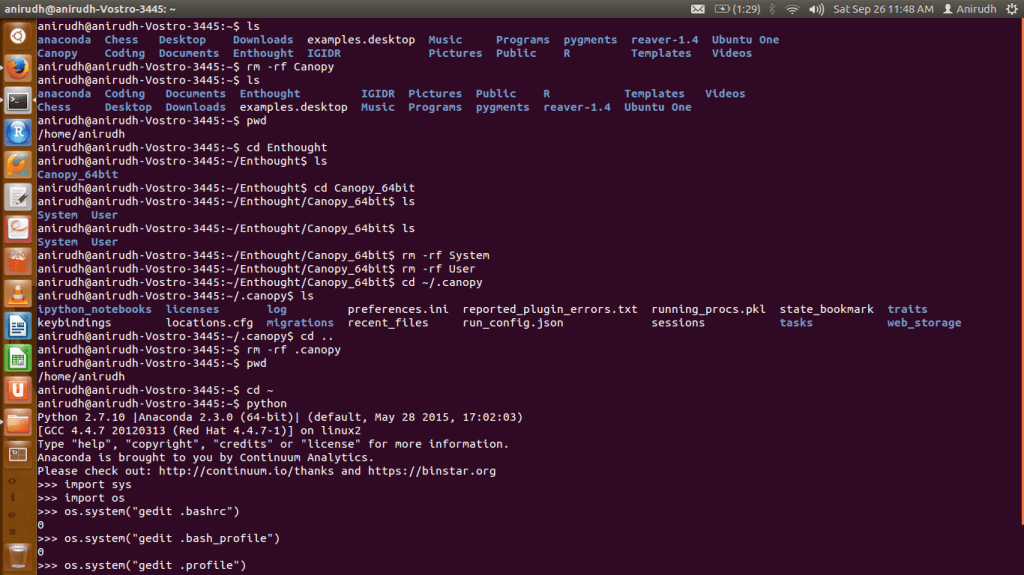
    Screenshot from 2015-09-26 11:48:43

    Once I was done with these steps, I no longer encountered any issues importing matplotlib on IPython anymore.

    Screenshot from 2015-09-26 12:06:47

  • Opening Files in a Text Editor from the CMD / Terminal (Using Python)

    Opening Files in a Text Editor from the CMD / Terminal (Using Python)

    Motivation for this blog post:

    I recently had to edit the .bashrc file in Ubuntu and comment / delete a subset of its contents. The file .bashrc had to be located (home directory) and opened in a text editor. The file isn’t visible in the desktop environment, so it can’t be opened from there, so I had to use bash. I’m no command line expert, so I used Python to open and edit the file. I intended to open the file in gedit text editor, so I had to run Python from the directory containing .bashrc. [Click image below to enlarge]

    openGeditFromPythonInCommandPrompt

    Which opened up .bashrc

    Screenshot from 2015-09-26 13:46:01

    Put simply:

    Opening a file in text editor is a matter of two simple lines of code. First, navigate to the directory containing the file you wish to open in a text editor (such as gedit) in bash or terminal or CMD. Then type the following:


    $ python
    >>> import sys, os
    >>> os.system("<text editor> <file name with extension>")

    That’s all there is to it!

  • Scatter Plot Bug Fix in Dato’s GraphLab Create ML Package in Python

    Scatter Plot Bug Fix in Dato’s GraphLab Create ML Package in Python

    I have been using Dato’s GraphLab Create for Coursera’s new Machine Learning Specialization that uses Python. Like me, if you’ve been facing trouble obtaining scatter plots on your canvas in GraphLab Create despite the following code:

    graphlab.canvas.set_target('ipynb')

    …then no worries, there is a quick fix. I’ve been deliberately lousy with the presentation, so sorry about that. Chances are that no one’s going to end up reading this anyway. I saw this problem being discussed on a Dato forum, so I decided to blog about the fix.

    EDIT: Note that this problem is in GraphLab Create v1.6 only. They came up with v1.6.1 a few days after the problem was escalated on their forum, so a good option would be to upgrade GraphLab Create.

    The problem you face should looks something like this (click images below to enlarge):Screenshot from 2015-09-25 14:10:20

    To solve the problem:

    Locate sframe.py from your home directory by searching for it from your desktop environment (applies to Windows users too). I found it in the following path on my computer:

    ~/anaconda/lib/python2.7/site-packages/graphlab/canvas/views

    The file sframe.py should look like this:

    Screenshot from 2015-09-25 15:49:44

    Then replace the code in lines 255-227 of the opened .py file with the code highlighted below:

    Screenshot from 2015-09-25 15:53:19

    This should take care of the problem for good.

    Now you have your desired result:

    Screenshot from 2015-09-25 16:18:41

  • Machine Learning — New Coursera Specialization from the University of Washington

    Machine Learning — New Coursera Specialization from the University of Washington

    I have finally embarked on my first machine learning MOOC / Specialization. I love Python, and this course uses Python as the language of choice. Also, the instructors assert that Python is widely used in industry, and is becoming the de facto language for data science in industry. They use IPython Notebook in their assignments and videos.

    The specialization offered by the University of Washington consists of 5 courses and a capstone project spread across about 8 months (September through April). The specialization’s first iteration kicked off yesterday.

    washingtonMachineLearningThe first course, Machine Learning Foundations: A Case Study Approach is 6 weeks long, running from September 22 through November 9.

    The Instructors:

    Emily Fox and Carlos Guestrin
    EmilyFoxguestrin-dato

    Key Learning Outcomes
    – Identify potential applications of machine learning in practice.
    – Describe the core differences in analyses enabled by regression, classification, and clustering.
    – Select the appropriate machine learning task for a potential application.
    – Apply regression, classification, clustering, retrieval, recommender systems, and deep learning.
    – Represent your data as features to serve as input to machine learning models.
    – Assess the model quality in terms of relevant error metrics for each task.
    – Utilize a dataset to fit a model to analyze new data.
    – Build an end-to-end application that uses machine learning at its core.
    – Implement these techniques in Python.

    Week-by-Week
    Week 1: Introductory welcome videos and the instructors’ views on the future of intelligent applications
    Week 2: Predicting House Prices (Regression)
    Week 3: Classification (Sentiment Analysis)
    Week 4: Clustering and Similarity: Retrieving Documents
    Week 5: Recommending Products
    Week 6: Deep Learning: Searching for Images

    EDIT

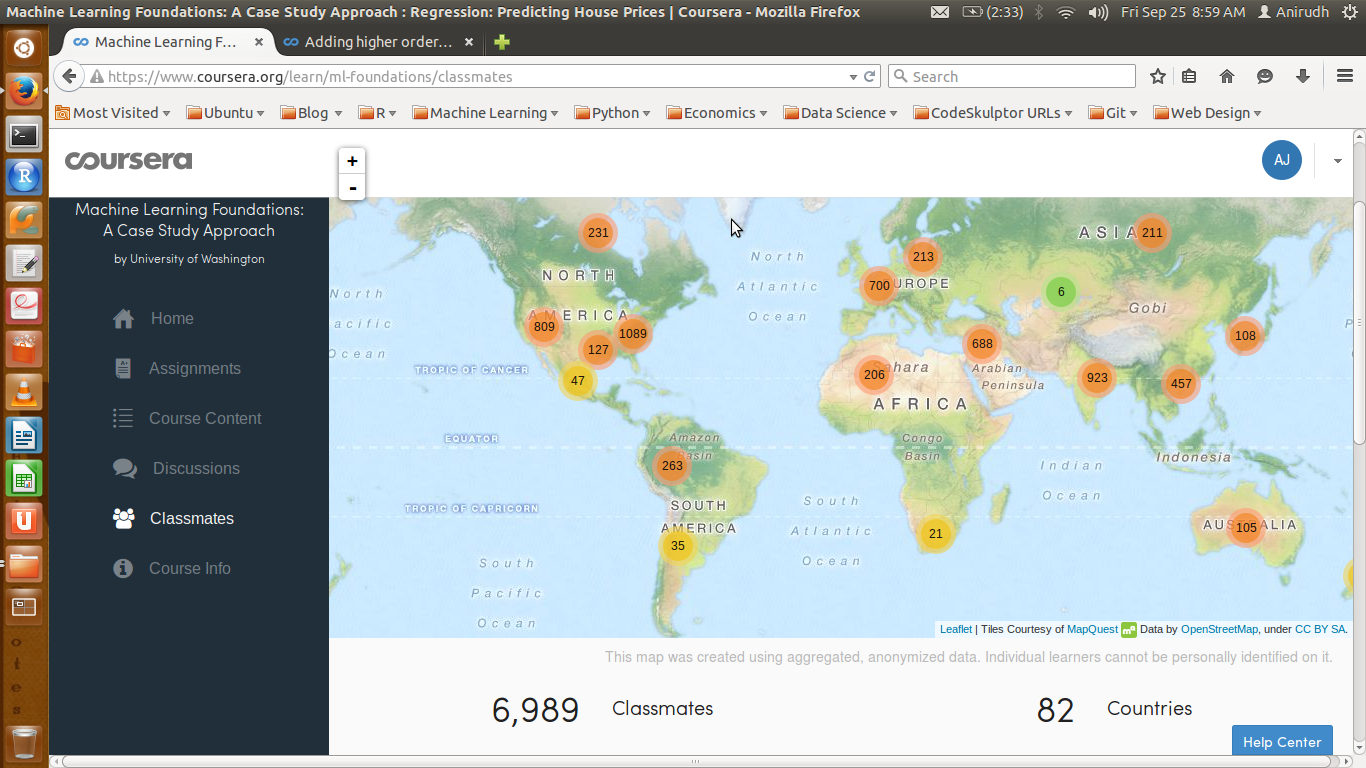
    It’s been 3 days since the course began, and here’s how the classmate demographic looks like:

    Classmates09252015

  • Magic 5-gon Ring — Project Euler (Problem 68)

    Magic 5-gon Ring — Project Euler (Problem 68)

    Yet another exciting math problem that requires an algorithmic approach to arrive at a quick solution! There is a pen-paper approach to it too, but this post assumes we’re more interested in discussing the programming angle.

    First, the problem:

    Working clockwise, and starting from the group of three with the numerically lowest external node (4,3,2 in this example), each solution can be described uniquely. For example, the above solution can be described by the set: 4,3,2; 6,2,1; 5,1,3.

    It is possible to complete the ring with four different totals: 9, 10, 11, and 12. There are eight solutions in total.

    Total Solution Set:
    9 4,2,3; 5,3,1; 6,1,2
    9 4,3,2; 6,2,1; 5,1,3
    10 2,3,5; 4,5,1; 6,1,3
    10 2,5,3; 6,3,1; 4,1,5
    11 1,4,6; 3,6,2; 5,2,4
    11 1,6,4; 5,4,2; 3,2,6
    12 1,5,6; 2,6,4; 3,4,5
    12 1,6,5; 3,5,4; 2,4,6
    By concatenating each group it is possible to form 9-digit strings; the maximum string for a 3-gon ring is 432621513.

    Problem

    Using the numbers 1 to 10, and depending on arrangements, it is possible to form 16- and 17-digit strings. What is the maximum 16-digit string for a “magic” 5-gon ring?

    Algorithm

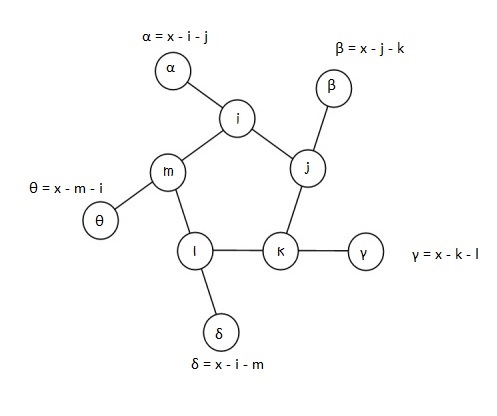
    In attempting this problem, I choose to label the 5 inner nodes as i, j, k, l, and m.
    α, β, γ, δ, and θ being the corresponding outer nodes.

    Let x be the sum total of each triplet line, i.e.,

    x = α + i + j = β + j + k = γ + k + l = δ + l + m = θ + m + i

    magic5gon

    First Observation:
    For the string to be 16-digits, 10 has to be in the outer ring, as each number in the inner ring is included in the string twice. Next, we fill the inner ring in an iterative manner.

    Second Observation:
    There 9 numbers to choose from for the inner ring — 1, 2, 3, 4, 5, 6, 7, 8 and 9.
    5 have to be chosen. This can be done in 9C5 = 126 ways.
    According to circular permutation, if there are n distinct numbers to be arranged in a circle, this can be done in (n-1)! ways, where (n-1)! = (n-1).(n-2).(n-3)…3.2.1. So 5 distinct numbers can be arranged in 4! permutations, i.e., in 24 ways around a circle, or pentagonal ring, to be more precise.
    So in all, this problem can be solved in 126×24 = 3024 iterations.

    Third Observation:
    For every possible permutation of an inner-ring arrangement, there can be one or more values of x (triplet line-sum) that serve as a possible contenders for a “magic” string whose triplets add up to the same number, x. To ensure this, we only need that the values of α through θ of the outer ring are distinct, different from the inner ring, with the greatest of these equal to 10.
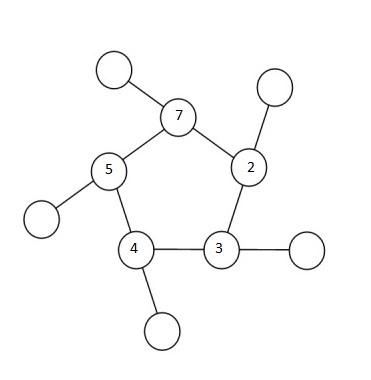
    Depending on the relative positioning of the numbers in the inner ring, one can narrow the range of x-values one might have to check for each permutation. To zero-down on such a range, let’s look at an example. Shown in the figure below is a randomly chosen permutation of number in the inner ring – 7, 2, 3, 4 and 5, in that order.

    magic5gonInstance

    So 10, 9, 8, 6 and 1 must fill the outer circle. It’s easy to notice that the 5, 7 pair is the greatest adjacent pair. So whatever x is, it has to be at least 5 + 7 + 1 = 13 (1 being the smallest number of the outer ring). Likewise,  2, 3 is the smallest adjacent pair, so whatever x is, it can’t be any more than 2 + 3+ 10 = 15 (10 being the largest number of the outer ring). This leaves us with a narrow range of x-values to check – 13, 14 and 15.

    Next, we arrange the 5 triplets in clock-wise direction starting with the triplet with the smallest number in the outer ring to form a candidate string. This exercise when done for each of the 3024 permutations will shortlist a range of candidates, of which, the maximum is chosen.

    That’s all there is to the problem!

    Here’s the Python Code. It executes in about a tenth of a second!

    from itertools import permutations
    from itertools import combinations
    # array of candidate solutions empty at the beginning
    record = []
    # choose 5 numbers for inner cells between 1 and 9; there are 9C5 combinations
    # the problem ask for a 16-digit number, so 10 is not to be included in inner cells
    cells = range(1,10)
    inner_cells = [map(int,comb) for comb in combinations(cells,5)]
    # code to calculate min and max couple in an array
    def minCouple(array):
    answer = array[0]+array[-1]
    for i in xrange(len(array)-1):
    coupleSum = array[i] + array[i+1]
    if coupleSum < answer:
    answer = coupleSum
    return answer
    def maxCouple(array):
    answer = 0
    for i in xrange(len(array)-1):
    if i==0:
    coupleSum = array[0]+ array[-1]
    if coupleSum > answer:
    answer = coupleSum
    else:
    coupleSum = array[i]+ array[i+1]
    if coupleSum > answer:
    answer = coupleSum
    return answer
    # Algorithm
    for array in inner_cells:
    pivot = array[0]
    perm_array = array[1:]
    perms = [map(int,perm) for perm in permutations(perm_array,4)]
    for perm in perms:
    checkArray = perm
    checkArray.insert(0,pivot)
    outerRing = [el for el in range(1,11) if el not in checkArray]
    xMax = minCouple(checkArray) + max(outerRing)
    xMin = maxCouple(checkArray) + min(outerRing)
    if xMax >= xMin:
    for x in xrange(xMin, xMax+1):
    i = checkArray[0]
    j = checkArray[1]
    k = checkArray[2]
    l = checkArray[3]
    m = checkArray[4]
    alpha = x-i-j
    beta = x-j-k
    gamma = x-k-l
    delta = x-l-m
    theta = x-m-i
    outerCalculated = [alpha, beta, gamma, delta, theta]
    if sorted(outerCalculated) == sorted(outerRing):
    a = [alpha, i, j]
    b = [beta, j, k]
    c = [gamma, k, l]
    d = [delta, l, m]
    e = [theta, m, i]
    min_val = min(alpha, beta, gamma, delta, theta)
    if alpha == min_val:
    append = a+b+c+d+e
    elif beta == min_val:
    append = b+c+d+e+a
    elif gamma == min_val:
    append = c+d+e+a+b
    elif delta == min_val:
    append = d+e+a+b+c
    elif theta == min_val:
    append = e+a+b+c+d
    l = [str(i) for i in append]
    s = ''.join(l)
    integer_list = int(s)
    record.append(integer_list)
    print max(record)
    view raw euler68.py hosted with ❤ by GitHub

    Ans: 6531031914842725

  • Maximum Path Sum — Dynamic Programming Algorithm

    Maximum Path Sum — Dynamic Programming Algorithm

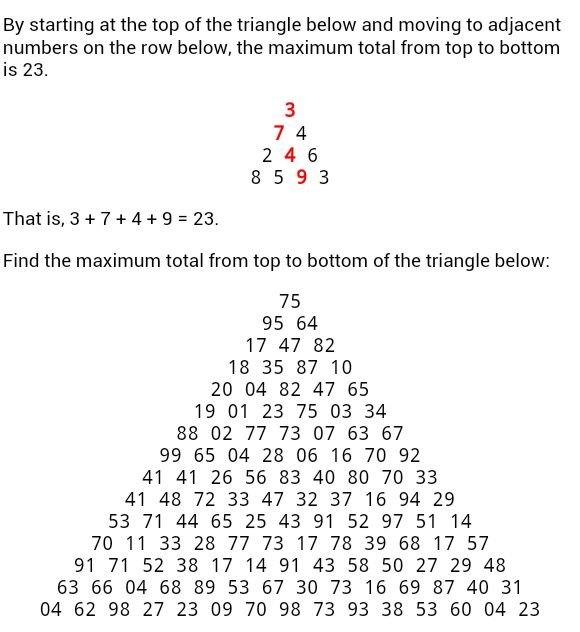
    I came across this problem recently that required solving for the maximum-sum path in a triangle array.

    Problem18
    To copy the above triangle array:

    75
    95 64
    17 47 82
    18 35 87 10
    20 04 82 47 65
    19 01 23 75 03 34
    88 02 77 73 07 63 67
    99 65 04 28 06 16 70 92
    41 41 26 56 83 40 80 70 33
    41 48 72 33 47 32 37 16 94 29
    53 71 44 65 25 43 91 52 97 51 14
    70 11 33 28 77 73 17 78 39 68 17 57
    91 71 52 38 17 14 91 43 58 50 27 29 48
    63 66 04 68 89 53 67 30 73 16 69 87 40 31
    04 62 98 27 23 09 70 98 73 93 38 53 60 04 23
    view raw euler18.txt hosted with ❤ by GitHub

    As can be seen, there are 15 levels to this tree (including the top most node). Therefore, there are 214 possible routes to scan in order to check for the maximum sum using brute force. As there are only 214 (16384) routes, it is possible to solve this problem by trying every route. However, doing the same using brute force on a triangle array of 100 levels would take several billion years to solve using a computer that checks through say, 1012 routes per second. A greedy algorithm might per-chance work for the particular 4-level example problem stated above, but will not always work, and in most cases won’t. For instance, for the 100-level problem:

    59
    73 41
    52 40 09
    26 53 06 34
    10 51 87 86 81
    61 95 66 57 25 68
    90 81 80 38 92 67 73
    30 28 51 76 81 18 75 44
    84 14 95 87 62 81 17 78 58
    21 46 71 58 02 79 62 39 31 09
    56 34 35 53 78 31 81 18 90 93 15
    78 53 04 21 84 93 32 13 97 11 37 51
    45 03 81 79 05 18 78 86 13 30 63 99 95
    39 87 96 28 03 38 42 17 82 87 58 07 22 57
    06 17 51 17 07 93 09 07 75 97 95 78 87 08 53
    67 66 59 60 88 99 94 65 55 77 55 34 27 53 78 28
    76 40 41 04 87 16 09 42 75 69 23 97 30 60 10 79 87
    12 10 44 26 21 36 32 84 98 60 13 12 36 16 63 31 91 35
    70 39 06 05 55 27 38 48 28 22 34 35 62 62 15 14 94 89 86
    66 56 68 84 96 21 34 34 34 81 62 40 65 54 62 05 98 03 02 60
    38 89 46 37 99 54 34 53 36 14 70 26 02 90 45 13 31 61 83 73 47
    36 10 63 96 60 49 41 05 37 42 14 58 84 93 96 17 09 43 05 43 06 59
    66 57 87 57 61 28 37 51 84 73 79 15 39 95 88 87 43 39 11 86 77 74 18
    54 42 05 79 30 49 99 73 46 37 50 02 45 09 54 52 27 95 27 65 19 45 26 45
    71 39 17 78 76 29 52 90 18 99 78 19 35 62 71 19 23 65 93 85 49 33 75 09 02
    33 24 47 61 60 55 32 88 57 55 91 54 46 57 07 77 98 52 80 99 24 25 46 78 79 05
    92 09 13 55 10 67 26 78 76 82 63 49 51 31 24 68 05 57 07 54 69 21 67 43 17 63 12
    24 59 06 08 98 74 66 26 61 60 13 03 09 09 24 30 71 08 88 70 72 70 29 90 11 82 41 34
    66 82 67 04 36 60 92 77 91 85 62 49 59 61 30 90 29 94 26 41 89 04 53 22 83 41 09 74 90
    48 28 26 37 28 52 77 26 51 32 18 98 79 36 62 13 17 08 19 54 89 29 73 68 42 14 08 16 70 37
    37 60 69 70 72 71 09 59 13 60 38 13 57 36 09 30 43 89 30 39 15 02 44 73 05 73 26 63 56 86 12
    55 55 85 50 62 99 84 77 28 85 03 21 27 22 19 26 82 69 54 04 13 07 85 14 01 15 70 59 89 95 10 19
    04 09 31 92 91 38 92 86 98 75 21 05 64 42 62 84 36 20 73 42 21 23 22 51 51 79 25 45 85 53 03 43 22
    75 63 02 49 14 12 89 14 60 78 92 16 44 82 38 30 72 11 46 52 90 27 08 65 78 03 85 41 57 79 39 52 33 48
    78 27 56 56 39 13 19 43 86 72 58 95 39 07 04 34 21 98 39 15 39 84 89 69 84 46 37 57 59 35 59 50 26 15 93
    42 89 36 27 78 91 24 11 17 41 05 94 07 69 51 96 03 96 47 90 90 45 91 20 50 56 10 32 36 49 04 53 85 92 25 65
    52 09 61 30 61 97 66 21 96 92 98 90 06 34 96 60 32 69 68 33 75 84 18 31 71 50 84 63 03 03 19 11 28 42 75 45 45
    61 31 61 68 96 34 49 39 05 71 76 59 62 67 06 47 96 99 34 21 32 47 52 07 71 60 42 72 94 56 82 83 84 40 94 87 82 46
    01 20 60 14 17 38 26 78 66 81 45 95 18 51 98 81 48 16 53 88 37 52 69 95 72 93 22 34 98 20 54 27 73 61 56 63 60 34 63
    93 42 94 83 47 61 27 51 79 79 45 01 44 73 31 70 83 42 88 25 53 51 30 15 65 94 80 44 61 84 12 77 02 62 02 65 94 42 14 94
    32 73 09 67 68 29 74 98 10 19 85 48 38 31 85 67 53 93 93 77 47 67 39 72 94 53 18 43 77 40 78 32 29 59 24 06 02 83 50 60 66
    32 01 44 30 16 51 15 81 98 15 10 62 86 79 50 62 45 60 70 38 31 85 65 61 64 06 69 84 14 22 56 43 09 48 66 69 83 91 60 40 36 61
    92 48 22 99 15 95 64 43 01 16 94 02 99 19 17 69 11 58 97 56 89 31 77 45 67 96 12 73 08 20 36 47 81 44 50 64 68 85 40 81 85 52 09
    91 35 92 45 32 84 62 15 19 64 21 66 06 01 52 80 62 59 12 25 88 28 91 50 40 16 22 99 92 79 87 51 21 77 74 77 07 42 38 42 74 83 02 05
    46 19 77 66 24 18 05 32 02 84 31 99 92 58 96 72 91 36 62 99 55 29 53 42 12 37 26 58 89 50 66 19 82 75 12 48 24 87 91 85 02 07 03 76 86
    99 98 84 93 07 17 33 61 92 20 66 60 24 66 40 30 67 05 37 29 24 96 03 27 70 62 13 04 45 47 59 88 43 20 66 15 46 92 30 04 71 66 78 70 53 99
    67 60 38 06 88 04 17 72 10 99 71 07 42 25 54 05 26 64 91 50 45 71 06 30 67 48 69 82 08 56 80 67 18 46 66 63 01 20 08 80 47 07 91 16 03 79 87
    18 54 78 49 80 48 77 40 68 23 60 88 58 80 33 57 11 69 55 53 64 02 94 49 60 92 16 35 81 21 82 96 25 24 96 18 02 05 49 03 50 77 06 32 84 27 18 38
    68 01 50 04 03 21 42 94 53 24 89 05 92 26 52 36 68 11 85 01 04 42 02 45 15 06 50 04 53 73 25 74 81 88 98 21 67 84 79 97 99 20 95 04 40 46 02 58 87
    94 10 02 78 88 52 21 03 88 60 06 53 49 71 20 91 12 65 07 49 21 22 11 41 58 99 36 16 09 48 17 24 52 36 23 15 72 16 84 56 02 99 43 76 81 71 29 39 49 17
    64 39 59 84 86 16 17 66 03 09 43 06 64 18 63 29 68 06 23 07 87 14 26 35 17 12 98 41 53 64 78 18 98 27 28 84 80 67 75 62 10 11 76 90 54 10 05 54 41 39 66
    43 83 18 37 32 31 52 29 95 47 08 76 35 11 04 53 35 43 34 10 52 57 12 36 20 39 40 55 78 44 07 31 38 26 08 15 56 88 86 01 52 62 10 24 32 05 60 65 53 28 57 99
    03 50 03 52 07 73 49 92 66 80 01 46 08 67 25 36 73 93 07 42 25 53 13 96 76 83 87 90 54 89 78 22 78 91 73 51 69 09 79 94 83 53 09 40 69 62 10 79 49 47 03 81 30
    71 54 73 33 51 76 59 54 79 37 56 45 84 17 62 21 98 69 41 95 65 24 39 37 62 03 24 48 54 64 46 82 71 78 33 67 09 16 96 68 52 74 79 68 32 21 13 78 96 60 09 69 20 36
    73 26 21 44 46 38 17 83 65 98 07 23 52 46 61 97 33 13 60 31 70 15 36 77 31 58 56 93 75 68 21 36 69 53 90 75 25 82 39 50 65 94 29 30 11 33 11 13 96 02 56 47 07 49 02
    76 46 73 30 10 20 60 70 14 56 34 26 37 39 48 24 55 76 84 91 39 86 95 61 50 14 53 93 64 67 37 31 10 84 42 70 48 20 10 72 60 61 84 79 69 65 99 73 89 25 85 48 92 56 97 16
    03 14 80 27 22 30 44 27 67 75 79 32 51 54 81 29 65 14 19 04 13 82 04 91 43 40 12 52 29 99 07 76 60 25 01 07 61 71 37 92 40 47 99 66 57 01 43 44 22 40 53 53 09 69 26 81 07
    49 80 56 90 93 87 47 13 75 28 87 23 72 79 32 18 27 20 28 10 37 59 21 18 70 04 79 96 03 31 45 71 81 06 14 18 17 05 31 50 92 79 23 47 09 39 47 91 43 54 69 47 42 95 62 46 32 85
    37 18 62 85 87 28 64 05 77 51 47 26 30 65 05 70 65 75 59 80 42 52 25 20 44 10 92 17 71 95 52 14 77 13 24 55 11 65 26 91 01 30 63 15 49 48 41 17 67 47 03 68 20 90 98 32 04 40 68
    90 51 58 60 06 55 23 68 05 19 76 94 82 36 96 43 38 90 87 28 33 83 05 17 70 83 96 93 06 04 78 47 80 06 23 84 75 23 87 72 99 14 50 98 92 38 90 64 61 58 76 94 36 66 87 80 51 35 61 38
    57 95 64 06 53 36 82 51 40 33 47 14 07 98 78 65 39 58 53 06 50 53 04 69 40 68 36 69 75 78 75 60 03 32 39 24 74 47 26 90 13 40 44 71 90 76 51 24 36 50 25 45 70 80 61 80 61 43 90 64 11
    18 29 86 56 68 42 79 10 42 44 30 12 96 18 23 18 52 59 02 99 67 46 60 86 43 38 55 17 44 93 42 21 55 14 47 34 55 16 49 24 23 29 96 51 55 10 46 53 27 92 27 46 63 57 30 65 43 27 21 20 24 83
    81 72 93 19 69 52 48 01 13 83 92 69 20 48 69 59 20 62 05 42 28 89 90 99 32 72 84 17 08 87 36 03 60 31 36 36 81 26 97 36 48 54 56 56 27 16 91 08 23 11 87 99 33 47 02 14 44 73 70 99 43 35 33
    90 56 61 86 56 12 70 59 63 32 01 15 81 47 71 76 95 32 65 80 54 70 34 51 40 45 33 04 64 55 78 68 88 47 31 47 68 87 03 84 23 44 89 72 35 08 31 76 63 26 90 85 96 67 65 91 19 14 17 86 04 71 32 95
    37 13 04 22 64 37 37 28 56 62 86 33 07 37 10 44 52 82 52 06 19 52 57 75 90 26 91 24 06 21 14 67 76 30 46 14 35 89 89 41 03 64 56 97 87 63 22 34 03 79 17 45 11 53 25 56 96 61 23 18 63 31 37 37 47
    77 23 26 70 72 76 77 04 28 64 71 69 14 85 96 54 95 48 06 62 99 83 86 77 97 75 71 66 30 19 57 90 33 01 60 61 14 12 90 99 32 77 56 41 18 14 87 49 10 14 90 64 18 50 21 74 14 16 88 05 45 73 82 47 74 44
    22 97 41 13 34 31 54 61 56 94 03 24 59 27 98 77 04 09 37 40 12 26 87 09 71 70 07 18 64 57 80 21 12 71 83 94 60 39 73 79 73 19 97 32 64 29 41 07 48 84 85 67 12 74 95 20 24 52 41 67 56 61 29 93 35 72 69
    72 23 63 66 01 11 07 30 52 56 95 16 65 26 83 90 50 74 60 18 16 48 43 77 37 11 99 98 30 94 91 26 62 73 45 12 87 73 47 27 01 88 66 99 21 41 95 80 02 53 23 32 61 48 32 43 43 83 14 66 95 91 19 81 80 67 25 88
    08 62 32 18 92 14 83 71 37 96 11 83 39 99 05 16 23 27 10 67 02 25 44 11 55 31 46 64 41 56 44 74 26 81 51 31 45 85 87 09 81 95 22 28 76 69 46 48 64 87 67 76 27 89 31 11 74 16 62 03 60 94 42 47 09 34 94 93 72
    56 18 90 18 42 17 42 32 14 86 06 53 33 95 99 35 29 15 44 20 49 59 25 54 34 59 84 21 23 54 35 90 78 16 93 13 37 88 54 19 86 67 68 55 66 84 65 42 98 37 87 56 33 28 58 38 28 38 66 27 52 21 81 15 08 22 97 32 85 27
    91 53 40 28 13 34 91 25 01 63 50 37 22 49 71 58 32 28 30 18 68 94 23 83 63 62 94 76 80 41 90 22 82 52 29 12 18 56 10 08 35 14 37 57 23 65 67 40 72 39 93 39 70 89 40 34 07 46 94 22 20 05 53 64 56 30 05 56 61 88 27
    23 95 11 12 37 69 68 24 66 10 87 70 43 50 75 07 62 41 83 58 95 93 89 79 45 39 02 22 05 22 95 43 62 11 68 29 17 40 26 44 25 71 87 16 70 85 19 25 59 94 90 41 41 80 61 70 55 60 84 33 95 76 42 63 15 09 03 40 38 12 03 32
    09 84 56 80 61 55 85 97 16 94 82 94 98 57 84 30 84 48 93 90 71 05 95 90 73 17 30 98 40 64 65 89 07 79 09 19 56 36 42 30 23 69 73 72 07 05 27 61 24 31 43 48 71 84 21 28 26 65 65 59 65 74 77 20 10 81 61 84 95 08 52 23 70
    47 81 28 09 98 51 67 64 35 51 59 36 92 82 77 65 80 24 72 53 22 07 27 10 21 28 30 22 48 82 80 48 56 20 14 43 18 25 50 95 90 31 77 08 09 48 44 80 90 22 93 45 82 17 13 96 25 26 08 73 34 99 06 49 24 06 83 51 40 14 15 10 25 01
    54 25 10 81 30 64 24 74 75 80 36 75 82 60 22 69 72 91 45 67 03 62 79 54 89 74 44 83 64 96 66 73 44 30 74 50 37 05 09 97 70 01 60 46 37 91 39 75 75 18 58 52 72 78 51 81 86 52 08 97 01 46 43 66 98 62 81 18 70 93 73 08 32 46 34
    96 80 82 07 59 71 92 53 19 20 88 66 03 26 26 10 24 27 50 82 94 73 63 08 51 33 22 45 19 13 58 33 90 15 22 50 36 13 55 06 35 47 82 52 33 61 36 27 28 46 98 14 73 20 73 32 16 26 80 53 47 66 76 38 94 45 02 01 22 52 47 96 64 58 52 39
    88 46 23 39 74 63 81 64 20 90 33 33 76 55 58 26 10 46 42 26 74 74 12 83 32 43 09 02 73 55 86 54 85 34 28 23 29 79 91 62 47 41 82 87 99 22 48 90 20 05 96 75 95 04 43 28 81 39 81 01 28 42 78 25 39 77 90 57 58 98 17 36 73 22 63 74 51
    29 39 74 94 95 78 64 24 38 86 63 87 93 06 70 92 22 16 80 64 29 52 20 27 23 50 14 13 87 15 72 96 81 22 08 49 72 30 70 24 79 31 16 64 59 21 89 34 96 91 48 76 43 53 88 01 57 80 23 81 90 79 58 01 80 87 17 99 86 90 72 63 32 69 14 28 88 69
    37 17 71 95 56 93 71 35 43 45 04 98 92 94 84 96 11 30 31 27 31 60 92 03 48 05 98 91 86 94 35 90 90 08 48 19 33 28 68 37 59 26 65 96 50 68 22 07 09 49 34 31 77 49 43 06 75 17 81 87 61 79 52 26 27 72 29 50 07 98 86 01 17 10 46 64 24 18 56
    51 30 25 94 88 85 79 91 40 33 63 84 49 67 98 92 15 26 75 19 82 05 18 78 65 93 61 48 91 43 59 41 70 51 22 15 92 81 67 91 46 98 11 11 65 31 66 10 98 65 83 21 05 56 05 98 73 67 46 74 69 34 08 30 05 52 07 98 32 95 30 94 65 50 24 63 28 81 99 57
    19 23 61 36 09 89 71 98 65 17 30 29 89 26 79 74 94 11 44 48 97 54 81 55 39 66 69 45 28 47 13 86 15 76 74 70 84 32 36 33 79 20 78 14 41 47 89 28 81 05 99 66 81 86 38 26 06 25 13 60 54 55 23 53 27 05 89 25 23 11 13 54 59 54 56 34 16 24 53 44 06
    13 40 57 72 21 15 60 08 04 19 11 98 34 45 09 97 86 71 03 15 56 19 15 44 97 31 90 04 87 87 76 08 12 30 24 62 84 28 12 85 82 53 99 52 13 94 06 65 97 86 09 50 94 68 69 74 30 67 87 94 63 07 78 27 80 36 69 41 06 92 32 78 37 82 30 05 18 87 99 72 19 99
    44 20 55 77 69 91 27 31 28 81 80 27 02 07 97 23 95 98 12 25 75 29 47 71 07 47 78 39 41 59 27 76 13 15 66 61 68 35 69 86 16 53 67 63 99 85 41 56 08 28 33 40 94 76 90 85 31 70 24 65 84 65 99 82 19 25 54 37 21 46 33 02 52 99 51 33 26 04 87 02 08 18 96
    54 42 61 45 91 06 64 79 80 82 32 16 83 63 42 49 19 78 65 97 40 42 14 61 49 34 04 18 25 98 59 30 82 72 26 88 54 36 21 75 03 88 99 53 46 51 55 78 22 94 34 40 68 87 84 25 30 76 25 08 92 84 42 61 40 38 09 99 40 23 29 39 46 55 10 90 35 84 56 70 63 23 91 39
    52 92 03 71 89 07 09 37 68 66 58 20 44 92 51 56 13 71 79 99 26 37 02 06 16 67 36 52 58 16 79 73 56 60 59 27 44 77 94 82 20 50 98 33 09 87 94 37 40 83 64 83 58 85 17 76 53 02 83 52 22 27 39 20 48 92 45 21 09 42 24 23 12 37 52 28 50 78 79 20 86 62 73 20 59
    54 96 80 15 91 90 99 70 10 09 58 90 93 50 81 99 54 38 36 10 30 11 35 84 16 45 82 18 11 97 36 43 96 79 97 65 40 48 23 19 17 31 64 52 65 65 37 32 65 76 99 79 34 65 79 27 55 33 03 01 33 27 61 28 66 08 04 70 49 46 48 83 01 45 19 96 13 81 14 21 31 79 93 85 50 05
    92 92 48 84 59 98 31 53 23 27 15 22 79 95 24 76 05 79 16 93 97 89 38 89 42 83 02 88 94 95 82 21 01 97 48 39 31 78 09 65 50 56 97 61 01 07 65 27 21 23 14 15 80 97 44 78 49 35 33 45 81 74 34 05 31 57 09 38 94 07 69 54 69 32 65 68 46 68 78 90 24 28 49 51 45 86 35
    41 63 89 76 87 31 86 09 46 14 87 82 22 29 47 16 13 10 70 72 82 95 48 64 58 43 13 75 42 69 21 12 67 13 64 85 58 23 98 09 37 76 05 22 31 12 66 50 29 99 86 72 45 25 10 28 19 06 90 43 29 31 67 79 46 25 74 14 97 35 76 37 65 46 23 82 06 22 30 76 93 66 94 17 96 13 20 72
    63 40 78 08 52 09 90 41 70 28 36 14 46 44 85 96 24 52 58 15 87 37 05 98 99 39 13 61 76 38 44 99 83 74 90 22 53 80 56 98 30 51 63 39 44 30 91 91 04 22 27 73 17 35 53 18 35 45 54 56 27 78 48 13 69 36 44 38 71 25 30 56 15 22 73 43 32 69 59 25 93 83 45 11 34 94 44 39 92
    12 36 56 88 13 96 16 12 55 54 11 47 19 78 17 17 68 81 77 51 42 55 99 85 66 27 81 79 93 42 65 61 69 74 14 01 18 56 12 01 58 37 91 22 42 66 83 25 19 04 96 41 25 45 18 69 96 88 36 93 10 12 98 32 44 83 83 04 72 91 04 27 73 07 34 37 71 60 59 31 01 54 54 44 96 93 83 36 04 45
    30 18 22 20 42 96 65 79 17 41 55 69 94 81 29 80 91 31 85 25 47 26 43 49 02 99 34 67 99 76 16 14 15 93 08 32 99 44 61 77 67 50 43 55 87 55 53 72 17 46 62 25 50 99 73 05 93 48 17 31 70 80 59 09 44 59 45 13 74 66 58 94 87 73 16 14 85 38 74 99 64 23 79 28 71 42 20 37 82 31 23
    51 96 39 65 46 71 56 13 29 68 53 86 45 33 51 49 12 91 21 21 76 85 02 17 98 15 46 12 60 21 88 30 92 83 44 59 42 50 27 88 46 86 94 73 45 54 23 24 14 10 94 21 20 34 23 51 04 83 99 75 90 63 60 16 22 33 83 70 11 32 10 50 29 30 83 46 11 05 31 17 86 42 49 01 44 63 28 60 07 78 95 40
    44 61 89 59 04 49 51 27 69 71 46 76 44 04 09 34 56 39 15 06 94 91 75 90 65 27 56 23 74 06 23 33 36 69 14 39 05 34 35 57 33 22 76 46 56 10 61 65 98 09 16 69 04 62 65 18 99 76 49 18 72 66 73 83 82 40 76 31 89 91 27 88 17 35 41 35 32 51 32 67 52 68 74 85 80 57 07 11 62 66 47 22 67
    65 37 19 97 26 17 16 24 24 17 50 37 64 82 24 36 32 11 68 34 69 31 32 89 79 93 96 68 49 90 14 23 04 04 67 99 81 74 70 74 36 96 68 09 64 39 88 35 54 89 96 58 66 27 88 97 32 14 06 35 78 20 71 06 85 66 57 02 58 91 72 05 29 56 73 48 86 52 09 93 22 57 79 42 12 01 31 68 17 59 63 76 07 77
    73 81 14 13 17 20 11 09 01 83 08 85 91 70 84 63 62 77 37 07 47 01 59 95 39 69 39 21 99 09 87 02 97 16 92 36 74 71 90 66 33 73 73 75 52 91 11 12 26 53 05 26 26 48 61 50 90 65 01 87 42 47 74 35 22 73 24 26 56 70 52 05 48 41 31 18 83 27 21 39 80 85 26 08 44 02 71 07 63 22 05 52 19 08 20
    17 25 21 11 72 93 33 49 64 23 53 82 03 13 91 65 85 02 40 05 42 31 77 42 05 36 06 54 04 58 07 76 87 83 25 57 66 12 74 33 85 37 74 32 20 69 03 97 91 68 82 44 19 14 89 28 85 85 80 53 34 87 58 98 88 78 48 65 98 40 11 57 10 67 70 81 60 79 74 72 97 59 79 47 30 20 54 80 89 91 14 05 33 36 79 39
    60 85 59 39 60 07 57 76 77 92 06 35 15 72 23 41 45 52 95 18 64 79 86 53 56 31 69 11 91 31 84 50 44 82 22 81 41 40 30 42 30 91 48 94 74 76 64 58 74 25 96 57 14 19 03 99 28 83 15 75 99 01 89 85 79 50 03 95 32 67 44 08 07 41 62 64 29 20 14 76 26 55 48 71 69 66 19 72 44 25 14 01 48 74 12 98 07
    64 66 84 24 18 16 27 48 20 14 47 69 30 86 48 40 23 16 61 21 51 50 26 47 35 33 91 28 78 64 43 68 04 79 51 08 19 60 52 95 06 68 46 86 35 97 27 58 04 65 30 58 99 12 12 75 91 39 50 31 42 64 70 04 46 07 98 73 98 93 37 89 77 91 64 71 64 65 66 21 78 62 81 74 42 20 83 70 73 95 78 45 92 27 34 53 71 15
    30 11 85 31 34 71 13 48 05 14 44 03 19 67 23 73 19 57 06 90 94 72 57 69 81 62 59 68 88 57 55 69 49 13 07 87 97 80 89 05 71 05 05 26 38 40 16 62 45 99 18 38 98 24 21 26 62 74 69 04 85 57 77 35 58 67 91 79 79 57 86 28 66 34 72 51 76 78 36 95 63 90 08 78 47 63 45 31 22 70 52 48 79 94 15 77 61 67 68
    23 33 44 81 80 92 93 75 94 88 23 61 39 76 22 03 28 94 32 06 49 65 41 34 18 23 08 47 62 60 03 63 33 13 80 52 31 54 73 43 70 26 16 69 57 87 83 31 03 93 70 81 47 95 77 44 29 68 39 51 56 59 63 07 25 70 07 77 43 53 64 03 94 42 95 39 18 01 66 21 16 97 20 50 90 16 70 10 95 69 29 06 25 61 41 26 15 59 63 35
    view raw euler67.txt hosted with ❤ by GitHub

    The Algorithm

    Solving such a problem would require a powerful approach – and surely enough, there is an algorithm that solves the 100-level problem in a fraction of a second. Here’s a brief sketch of the algorithm:

    You have such triangle:

       3
      7 4
     2 4 6  
    8 5 9 3
    

    Let’s say you’re on the penultimate level 2 4 6 and you have to iterate over it.

    From 2, you can go to either 8 or 5, so 8 is better (maximize you result by 3) so you calculate the first sum 8 + 2 = 10

    From 4, you can go to either 5 or 9, so 9 is better (maximize you result by 4) so you calculate the second sum 9 + 4 = 13

    From 6, you can go to either 9 or 3, so 9 is better again (maximize you result by 6) so you calculate the third sum 9 + 6 = 15

    This is the end of first iteration and you got the line of sums 10 13 15.

    Now you’ve got triangle of lower dimension:

          3
       7    4
    10   13    15  
    

    Keep going this way…

             3
         20    19
    

    …and you finally arrive at 23 as the answer.

    The Code

    Now for the Python code. I first store the 100-level triangle array in a text file, euler67.txt
    I read the triangle array into Python and successively update the penultimate row and delete the last row according to the algorithm discussed above.

    # Read the problem matrix into a triangle array in python
    filename = 'euler67.txt'
    with open(filename, "r") as ins:
    array = []
    for line in ins:
    array.append(line)
    # Convert the triangle arry entries into integers
    newArray = []
    for i in array:
    j = i.split(' ')
    k = [int(n) for n in j]
    newArray.append(k)
    l = len(newArray)
    # Algorithm to calculate Maximum Path Sum
    for i in range(l-1):
    array1 = newArray[-1]
    array2 = newArray[-2]
    for j in range(len(array2)):
    array2[j] += max(array1[j], array1[j+1])
    newArray.pop(-1)
    newArray[-1] = array2
    print newArray[0][0]
    view raw euler67.py hosted with ❤ by GitHub

    This code is the key to solving problems 18 and 67 of Project Euler.
    Problem 18
    Ans: 1074
    Problem 67
    Ans: 7273

  • Collatz Conjecture — What You Need to Know

    Collatz Conjecture — What You Need to Know

    Like many of my previous posts, this post too has something to do with a Project Euler problem. Here’s a sketch of the Colatz Conjecture.

    The following iterative sequence is defined for the set of positive integers:

    n → n/2 (n is even)
    n → 3n + 1 (n is odd)

    Using the rule above and starting with 13, we generate the following sequence:

    13 → 40 → 20 → 10 → 5 → 16 → 8 → 4 → 2 → 1

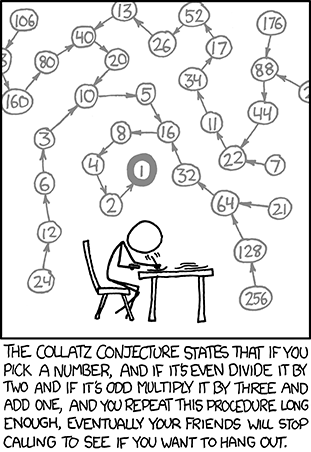
    So basically, it’s just this. Take any natural number n. If n is even, divide it by 2 to get n / 2. If n is odd, multiply it by 3 and add 1 to obtain 3n + 1. Repeat the process indefinitely. The conjecture is that no matter what number you start with, you will always eventually reach 1. The property has aptly been called oneness! But perhaps oneness has its pitfalls too…

    If the conjecture is false, it can only be because there is some starting number which gives rise to a sequence that does not contain 1. Such a sequence might enter a repeating cycle that excludes 1, or increase without bound. No such sequence has been found.

    Question
    It can be seen that the sequence:
    13 → 40 → 20 → 10 → 5 → 16 → 8 → 4 → 2 → 1
    contains 10 terms. Although it has not been proved yet (Collatz Problem), it is thought that all starting numbers finish at 1. Which starting number, under one million, produces the longest chain?

    NOTE: Once the chain starts the terms are allowed to go above one million.

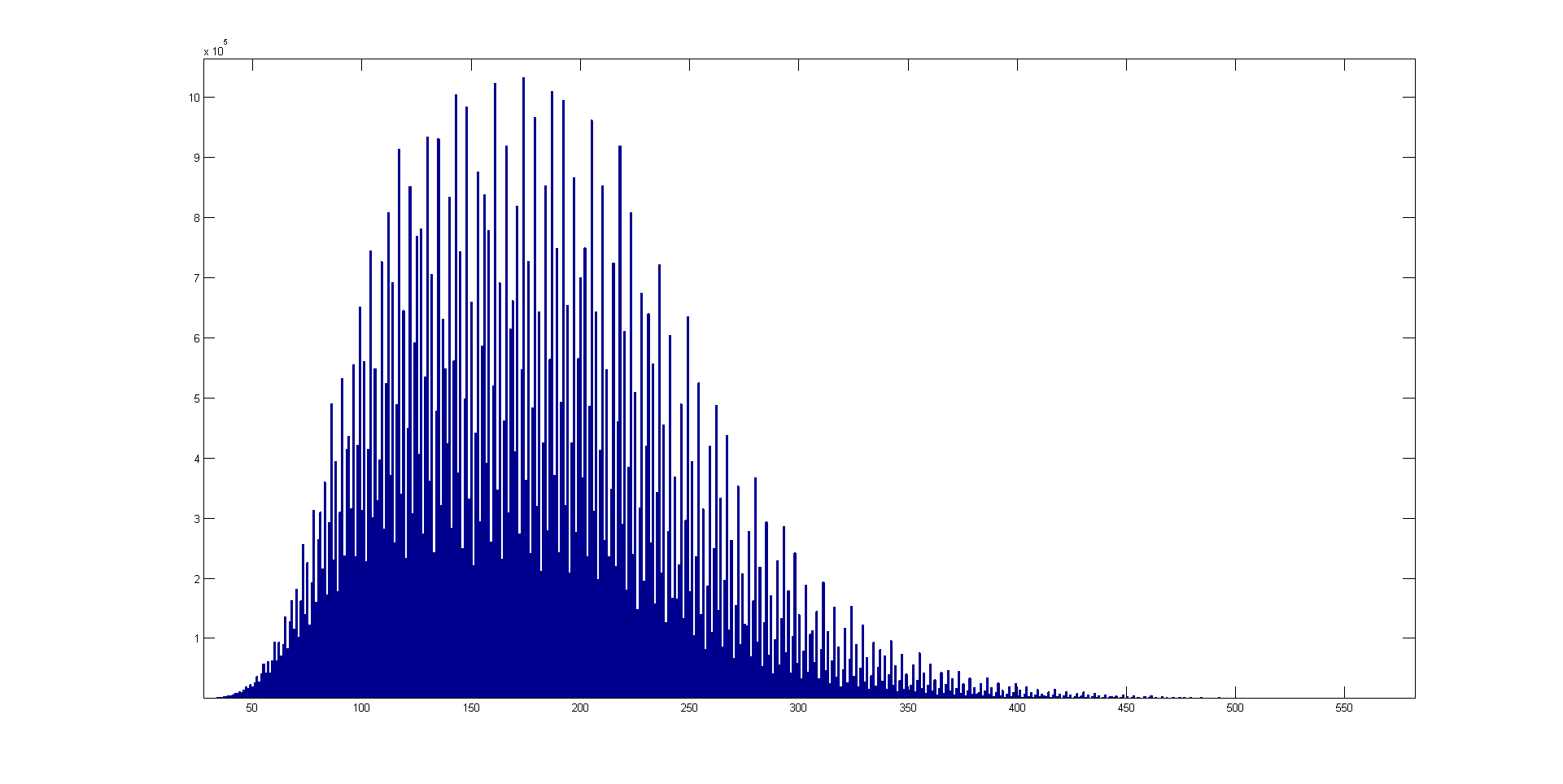
    HUGE HINT:

    Histogram of stopping times for the numbers 1 to 100 million. Stopping time is on the x axis, frequency on the y axis.

    Approach 1 (A naïve, but straigh forward method)

    # Longest Collatz Sequence under a million
    # Function listing collatz sequence for a number
    def collatz(n):
    "function listing collatz sequence for a positive integer"
    coll = []
    coll.append(n)
    while n != 1:
    if n % 2 == 0:
    n = n/2
    coll.append(n)
    else:
    n = 3*n + 1
    coll.append(n)
    return coll
    longest = 0
    j = 0
    for i in xrange(1, 1000000):
    lencoll = len(collatz(i))
    if lencoll > longest:
    longest = lencoll
    j = i
    print j
    view raw euler14.py hosted with ❤ by GitHub

    Approach 2 (Smart, quick method that uses dynamic programming with the help of dictionaries)

    collatz = {1:1}
    def Collatz(n):
    global collatz
    if not collatz.has_key(n):
    if n%2 == 0:
    collatz[n] = Collatz(n/2) + 1
    else:
    collatz[n] = Collatz(3*n + 1) + 1
    return collatz[n]
    for j in range(1000000,0,-1):
    Collatz(j)
    print collatz.keys()[collatz.values().index(max(collatz.values()))]
    view raw euler14.py hosted with ❤ by GitHub

    I couldn’t help appreciate the elegance of the second algorithm. It’ll be well worth perusing if you don’t get it at one go. [Hint: It keeps track of the number of terms of a particular sequence as values assigned to keys of a Python dictionary]

    Ans: 837799