Author: Anirudh

  • Written by Hand or by Model? Testing an AI Detector on Model Documentation

    I built a tool to estimate how much of a model document, from first-line methodology to second-line validation, was written by a language model. Then I did to it what I’m paid to do to every other model.

    First, a disclaimer about the premise

    This is not an anti-AI post. In model validation, AI use is generally encouraged. I use it, my team uses it, and a model that drafts a test plan or summarises 200 pages of development documentation earns its keep.

    The problem is indiscriminate use, and it shows up mostly on the model development side. Development documentation is long, template-driven and written to a deadline. That’s an ideal habitat for paragraphs like this one:

    This methodology outlines the steps and processes involved in developing the Gradient Boosting Machine Learning Credit Card Application Scorecard. The objective is to create a robust and accurate predictor that assesses the risk associated with granting applications to new credit card holders. This approach leverages historical data from past transactions, account management activities, demographic information, and external factors such as socio-economic indicators.

    Qwen2.5-1.5B, asked to write a methodology section

    Nothing in it is wrong, and nothing in it is anything. There’s no sample window, no target definition, no performance number. It describes a scorecard, not this one. Its data sources even include “social media analytics”, which I’d love to see get past a fair-lending review.

    So the tool, mrm-ai-detector, has a modest job description:

    • Model developers in the first line can check methodology and development documentation before it goes to validation.
    • Validators in the second line can see which sections lean heavily on generated text and decide where to read more carefully.

    And a firm limit on its authority: high AI reliance is not, on its own, a finding. It’s a cue for a manual check. Do the numbers tie back to the outputs? Do the claims match the code? Does the text describe this model or models in general? If it holds up, it holds up, however it was drafted.

    It runs locally, because nobody should paste internal model documentation into a website. The rest of this post is about how I tested it, since an unvalidated detector is just one more unvalidated model in the inventory.

    A spoiler, because a validation report should lead with its conclusion. The tool is good at catching generic, template-filling AI text, text from open models, and heavy AI rewrites, including when they’re mixed into otherwise human documents. It is not able to catch a current frontier model writing from the author’s own results, and neither is anything else I tested. I found that out on my own CQF final project, which I’ll come to.

    What it looks at

    Four families of evidence, fed into a fitted logistic model (no hand-tuned weights):

    • Domain evidence. Specifics, meaning metric values, regulatory citations, dates, model IDs and cross-references, against evaluative words (“robust”, “sound”, “appropriate”) with nothing behind them. The Qwen paragraph above scores badly here.
    • LLM markers. The “it is important to note” and “plays a pivotal role” school of prose, plus “, ensuring…” sentence tails and reflexive lists of three. Genuine MRM jargon (“effective challenge”, “ongoing monitoring”) is weighted at or near zero, so practitioners aren’t penalised for talking like practitioners.
    • Stylometry. How much sentence length and vocabulary vary.
    • Entropy. How compressible and repetitive the text is, measured in fixed windows so long documents aren’t penalised for length.

    An optional heavier mode adds two perplexity-based methods (Binoculars and Fast-DetectGPT) and three open-source transformer classifiers. Every score comes with the features behind it, section by section.

    Ground truth, part one: what counts as “human”

    You can’t scrape human-written MRM text from the 2026 internet and trust the label. So I used a blunt rule: every in-domain human document was published before 30 November 2022, the day ChatGPT launched. It’s the closest thing this field has to a pre-contamination sample.

    That gave 41 documents: regulatory guidance, supervisory and Inspector General findings, GAO reviews, stress-test methodology, public comment letters and academic papers. The full list is at the end. Here’s what they sound like.

    Supervisory guidance, which is plain, declarative and slightly stern:

    Validation involves a degree of independence from model development and use. Generally, validation should be done by people who are not responsible for development or use and do not have a stake in whether a model is determined to be valid. Independence is not an end in itself but rather helps ensure that incentives are aligned with the goals of model validation.

    Federal Reserve SR 11-7 (2011)

    An audit report, which is procedural and heavy with acronyms:

    Within FHFA, DER is responsible for supervising and examining the Enterprises. DER prepares annual risk assessments that identify significant risks and supervisory concerns, and supervisory strategies and examination priorities that identify the activities to be conducted.

    FHFA OIG EVL-2020-001 (2020)

    A supervisory finding, which is technical and unapologetically dense:

    Another relatively frequent issue was the treatment of TRCFs, including inconsistencies in the default management process and consequences of the interpolation/extrapolation methods owing to a coarse time grid.

    ECB TRIM project report (2021)

    Notice the problem already. SR 11-7 is formulaic, generic and evaluative (“effective”, “sound”, “appropriate”). By surface statistics it looks a lot like the Qwen paragraph. Keep that in mind; it comes back later.

    Alongside these sat three public research datasets that pair human text with machine text on the same prompts: HC3 (finance Q&A), M4 (peer reviews and arXiv abstracts), and about 150 pre-2002 Enron business e-mails as a check that terse, formulaic business writing isn’t mistaken for AI.

    Ground truth, part two: what counts as “AI”

    Real validation reports and development documents aren’t public, so the AI side had to be synthetic: documents I had language models write as if they were validation reports, model documentation, policies and monitoring packs. None of them is a real report about a real model. They are imitations, built so the detector had something in-domain to learn from.

    There were 156 of these, from four models.

    Claude (28 documents) is a frontier model, and it was prompted hard. Several prompts told it to “sound like a human practitioner, not an AI”. It obliged rather too well:

    When we plotted partial dependence on the validation sample, the score falls as expected from 0% to around 75% utilisation, but then rises again between roughly 85% and 95% before dropping off. […] We also re-ran the model with the monotone constraint on and the Gini dropped from 0.612 to 0.607 on the out-of-time sample, which is within noise.

    Claude, synthetic validation finding

    That paragraph has a SHAP ranking, a Gini to three decimal places and an opinion about noise. If it landed on my desk I’d assume it came from a competent colleague with a mild caffeine dependency.

    I also had Claude write genre-matched imitations of the human corpus, meaning fake Inspector General findings, fake regulatory guidance and fake comment letters. Without them, the detector could simply learn “sounds like a regulator, therefore human”:

    We found that the Division planned 34 targeted examinations of high-risk models during this period but completed only 21. Of the 21 completed examinations, 9 were completed in a later cycle than originally planned.

    Claude, imitating an OIG report. No such report exists.

    Three small open models (128 documents) were Qwen2.5-1.5B, SmolLM2-1.7B and Phi-3.5-mini, run on a laptop across a grid of 14 document types, 14 model types (from IRB PD scorecards to Heston and SABR) and six writing styles. They are less subtle. SmolLM2 opened an AML policy section with:

    I’d be happy to help you draft this important document!

    Phi-3.5’s fraud-model back-test covered “over 50 different payment methods across six continents”, which leaves you wondering what Antarctica did. Qwen, asked for supervisory expectations on an XVA engine, expanded XVA as:

    XVA (Exposure at Default)

    It doesn’t stand for that. It’s a fine reminder of why a validator still reads the document.

    Every generated file is in the repository with its prompt in the header, so you can judge the imitations for yourself.

    Closing the shortcuts

    Detectors are notorious for learning the wrong thing, and this setup offered plenty of wrong things to learn. Human documents were long PDFs with broken line wraps, while AI documents were short, clean markdown. Human documents came from regulators and auditors, while the AI documents were mostly synthetic validation reports and model documentation, a genre the human side barely had. A lazy classifier could score beautifully by learning “PDF”, “long” or “sounds like the Fed”, and it would be useless on a real development document.

    The controls:

    • Split by document. Train and test are split by document, so no document has pieces on both sides. Cross-validation folds are grouped by document too.
    • Cap long documents. No document contributes more than 40 segments, so the ECB’s guide to internal models doesn’t drown everyone else out.
    • Remove duplicates. Public datasets recycle text.
    • Drop format features. Bullet rates, bold rates, paragraph-length variation and question rate were measuring PDF extraction, not authorship. They were cut.
    • Genre-match the AI text. The fake OIG findings above exist for exactly this.
    • Weight in-domain documents. MRM documents count three times as much as the generic datasets.
    • Set a conservative threshold. “Likely AI” was set on training documents to keep human false positives at or below 2%. Every flag costs a reviewer’s time, and a tool that cries wolf soon stops being read.

    Results

    There were 1,148 documents in total. All results below are on the 331 held-out documents the model never saw, with seven open-source detectors run on the same documents. “In-domain” means MRM and regulatory text, the only number I really care about.

    DetectorIn-domain AUCIn-domain TPR @ 5% FPRAll-docs AUCTPR / FPR at own threshold
    mrm-detector + neural0.9650.8910.9860.895 / 0.006
    Fakespot RoBERTa (2025)0.9310.8480.9650.947 / 0.163
    Desklib DeBERTa-v3 (2025)0.9240.8700.9620.930 / 0.138
    mrm-detector (lightweight, no ML libraries)0.9200.7390.9290.515 / 0.000
    HC3 RoBERTa0.7580.3260.9230.620 / 0.013
    RADAR0.6360.1300.8230.655 / 0.175
    Binoculars0.5020.1090.787n/a
    Fast-DetectGPT0.4060.0870.741n/a
    OpenAI RoBERTa (GPT-2 era)0.3980.0430.7980.550 / 0.037

    (Version 1.1 of the tool, after the second round of testing described below.)

    Look at the FPR column first. The two best off-the-shelf classifiers catch marginally more AI text by flagging 14–16% of human documents. They called a third of the pre-ChatGPT regulatory guidance and supervisory findings AI-written, and Desklib flagged a quarter of the Enron e-mails. If every flag means a manual review, that’s one wasted review in every seven human documents. The ensemble flagged one of the 160 held-out human documents, and the one it flagged is SR 11-7 itself, at 52% against a 50% threshold. More on SR 11-7’s AI-shaped prose shortly.

    In fairness to them, the ensemble uses those classifiers as inputs and learns how far to trust each one on MRM text. It beats them by combining them, not by being cleverer on its own.

    The lightweight mode punches above its weight. It’s pure Python, with no GPU and nothing to download, and it reaches 0.92 in-domain AUC. It catches about half the AI documents at its threshold and flagged none of the held-out human ones. It’s a decent first-pass screen.

    Perplexity methods fall over on regulatory prose. Binoculars and Fast-DetectGPT score about 0.9 AUC on general text and coin-toss on MRM text. Remember the SR 11-7 excerpt: regulators write with the low perplexity these methods read as “machine”. To be fair, I ran them with a small 0.5B observer model to keep things laptop-sized. The published setups use much bigger ones, and I come back to that below.

    The humbling bit: frontier models

    Detection rate by source, ensemble model, held-out documents:

    AI sourceDetected
    ChatGPT / gpt-3.5-turbo, Cohere100%
    Qwen2.5, SmolLM2, Phi-3.5100%
    Flan-T573%
    text-davinci-00320%
    Claude, MRM prompts33% (3 of 9)

    Small models are easy: anything that offers to “help you draft this important document” will be caught. Claude, prompted to sound like a practitioner, was caught three times in nine. That’s the best of any detector tested, and it’s still not much. The Gini-to-three-decimals finding quoted earlier scored 1.7%.

    So read the output asymmetrically. A “Likely AI” flag at a low false-positive threshold means something. A “Likely human” result means only that the text didn’t trip the wire. That is also why the tool is a prompt for review, not a verdict: the documents it misses are exactly the well-specified ones, and those are the ones a manual check would pass anyway.

    Round two: documents that are only partly AI

    When I first circulated the results, the fair criticism was that the synthetic AI documents were shallow. Real AI use in model documentation rarely produces a wholly machine-written report. An author drafts, then asks an assistant to polish this paragraph, rewrite that section, turn some notes into prose, or write the conclusions from the results. The AI text that comes out is grounded in real facts and numbers.

    So I built that. I took ~1,500-word windows from the pre-2022 human documents and had an assistant do exactly those jobs to some of the paragraphs, keeping a label on every word: 106 mixed documents from three open models running on my laptop (Qwen2.5-7B, Llama-3.1-8B, Gemma-2-9B) and from Claude. I also tested on two public benchmarks of AI-polished text, APT-Eval and MixSet.

    The open models still embarrassed themselves now and then. In a trial run, Qwen-7B rewrote a sentence from the ECB’s TRIM report and expanded LDP (low-default portfolio) as:

    Large Deposit Portfolios (LDPs)

    When asked to write a paragraph from bullet-point notes, it added detail that the notes didn’t contain:

    Limitations on model use were identified in 20% of the TRIMIXs […] Remedial obligations were found in 15% of cases […] Recommendations […] were issued in 30% of the cases

    Qwen2.5-7B, writing from notes that contained no percentages at all

    Every number in that paragraph is invented, and it reads perfectly plausibly. If you want one argument for why a validator still ties numbers back to outputs, that’s it.

    The results, after recalibrating on mixed documents from training sources and testing on the 51 built from held-out sources:

    True AI share of the documentDocumentsTool’s estimated AI shareDocument flagged
    0%73%0%
    1–35%1325%23%
    35–70%1641%69%
    70–100%1585%93%

    At section level, 82% of AI-written sections were flagged at a 4.7% false-flag rate. Writing from notes, continuing the text and writing summaries were caught most often (84–93%); faithful rewrites less so (60%). Light polishing was mostly left alone, which is the behaviour I wanted: on APT-Eval, 11–17% of “minor” GPT-4o/DeepSeek/Llama polishes were flagged against 83% of “major” rewrites.

    By generator, Gemma’s sections were caught 95% of the time, Qwen’s 88% and Llama’s 76%. Claude’s: 0 of 8. Which brings me to the case study I didn’t plan.

    The case study I didn’t plan: my own CQF report

    I recently finished the CQF, and my final project is a 16,000-word report on pricing a basket credit default swap, with copulas, quasi-Monte Carlo and a lot of sensitivity analysis. I used ChatGPT heavily while writing it. My own estimate is that 80–90% of it started life as AI output, though I redrafted a good deal of it afterwards and can’t say how much.

    That’s about as realistic a test as I’ll get, so I ran it through everything:

    DetectorVerdict on my report
    mrm-detector + neural~3%, “Likely human-written”
    A commercial web detector (JustDone)0% AI, “100% Human”
    Binoculars with a full-size 7B model pair (the strongest published zero-shot method)1 of 64 sections flagged; overall rated more human than genuine pre-2022 quant papers
    The three 2025 neural classifiersConfidently “human”

    My redrafting is the obvious explanation, but it doesn’t hold up. My project folder still had five Word files that ChatGPT’s file tool generated for the conclusions chapter, untouched. Here is a line from one:

    Randomized quasi–Monte Carlo (Halton and Sobol) reduces estimator variability materially versus plain Monte Carlo at the same path count.

    ChatGPT, unedited draft of my conclusions chapter

    Scored on their own, before I’d edited a word, the drafts came back “human” from almost every method. My neural model gave them 0.3%. Binoculars, with its 7B models, rated them as more human than the human reference papers. The one exception was the lightweight model, which flagged 17% of their text and called them “Mixed”, which is a long way short of the truth.

    The lesson isn’t that my redrafting fooled the detectors. They couldn’t see this kind of text in the first place. A frontier model writing technical prose from the author’s own results, code and notes, in a formal register, looks like a competent person writing. I tried, and found no statistical signal in the text itself that would separate the two at a false-alarm rate anyone would accept.

    What did give the drafts away was the files, not the prose:

    • All five Word files say in their metadata that they were created by python-docx, the library ChatGPT’s file tool uses. Their creation date is 23 December 2013, the date baked into python-docx’s default template.
    • They are full of non-breaking hyphens (U+2011), a character assistants emit and keyboards almost never produce. My final report has 99 of them, and every single one sits in the chapter that came from those drafts.
    • One draft still carried a “Generated on 2025-08-21 13:17:10” stamp.

    So version 1.1 of the tool reports provenance hints alongside the score: generated-file metadata, assistant typography, utm_source=chatgpt.com links, oaicite citation markers, “Certainly! Here’s…” openers and [Insert …] placeholders. They never change the probability, and on the 624 human benchmark documents none of them fired. They’re easy to remove, of course. But most people don’t know they’re there, and that makes them useful.

    The free web detectors

    I also ran eight short samples by hand through three free web detectors. Four were human: SR 11-7, a 2015 Fed OIG report, GAO-16-269 and the 2020 FHFA OIG evaluation quoted above. Four were AI: the three Claude excerpts above and the Qwen methodology. Everything was public-domain or synthetic, and nothing internal went near a website.

    SampleTruthGPTZeroZeroGPTSaplingmrm-detector + neural
    Claude, “sound human” findingAI100%13.6%1.2%1.7%
    Claude, VaR back-testingAI100%0%1.8%27.6%
    Claude, fake OIG findingAI100%0%1.6%62.7%
    Qwen2.5-1.5B methodologyAI100%57.5%99.6%99.7%
    SR 11-7 (2011)Human0%0%95.5%65.9%
    Fed OIG (2015)Human0%0%19.5%15.3%
    GAO-16-269 (2016)Human0%18.3%17.3%17.9%
    FHFA OIG (2020)Human100%0%71.9%5.2%

    Eight samples are an anecdote, not a test. Still, Sapling is 95.5% confident that SR 11-7, written in 2011 and the founding text of my profession, came from an AI. GPTZero went 4 for 4 on the AI samples, which is genuinely impressive, and is also 100% sure the FHFA OIG excerpt about DER’s annual risk assessments was machine-made. My own tool gives SR 11-7 a 66%, so I’m in no position to be smug. Regulatory prose is simply hard.

    If a web detector’s percentage is ever offered as a conclusion about anyone’s work, this table is my rebuttal.

    How I’d use it

    1. A flag means “check further”, not “reject”. Tie the figures back to the outputs and the claims back to the code and data. Make sure the description fits this model.
    2. “Likely human” is not a clean bill of health. It means the text didn’t trip the detector, and frontier-model text grounded in the author’s own work won’t. Read the provenance hints, and for anything that matters, check the substance regardless.
    3. Start with development documentation. Methodology, assumptions, limitations and performance testing are where template filler most often stands in for analysis.
    4. Use the section view. The tool scores each section and reports the AI share, which tells a validator where to look. That beats one number for the whole document.
    5. Compare a team’s documents with its own history. Baseline mode measures drift from a set of earlier documents, which is more informative than a generic threshold.
    6. Calibrate locally. My human set is public regulatory text. The train command refits on your own examples.
    7. Read the reasons, not just the score. “Evaluative claims, no supporting numbers” is worth a second look whoever, or whatever, wrote the paragraph.

    Every document it was trained on

    Nothing is redistributed in the repository. benchmarks/fetch_corpus.py downloads everything from the original sources, so every number above can be reproduced.

    Human: regulatory guidance (9)

    Human: model documentation (2)

    Human: supervisory and audit findings (5)

    Human: validation and review reports (4)

    Human: comment letters on the 2021 interagency AI/ML RFI, docket OP-1743 (8)

    Human: academic papers (13)

    Public research datasets (human and AI pairs)

    • HC3 (Guo et al., 2023), finance subset: 150 human and 150 ChatGPT answers to the same questions.
    • M4 (Wang et al., 2024): peer reviews written by humans vs. gpt-3.5-turbo, LLaMA and Cohere, plus finance and statistics arXiv abstracts written by humans vs. gpt-3.5-turbo and text-davinci-003. That’s 242 human and 260 AI texts after deduplication.
    • Enron e-mail corpus (2000–01): 149 substantive business e-mails, newest message only. Human only, used as the false-positive control.

    Synthetic AI-written MRM documents (156, in the repository)

    Total: 1,148 documents (582 human, 566 AI). The source list also names four documents that failed to download and were never used: three FHA actuarial reviews and one arXiv paper. They’re recorded in benchmarks/sources.json.

    Known limitations

    • Frontier-model text is the blind spot. Claude-written and ChatGPT-written text grounded in real material went undetected throughout, by this tool and by every alternative I tried. The repository includes a script to generate mixed documents with OpenAI models using your own API key; whether training on them helps is an open question.
    • Few frontier-model documents: 28 synthetic and 10 mixed Claude documents. That’s the thinnest evidence on the question that matters most.
    • No real internal documents. Human text is public regulatory writing, and AI text is synthetic imitation. Real development documentation sits somewhere between the two.
    • Generator overlap. The perplexity observer is a Qwen model, which flatters detection of Qwen text. Results are reported per generator so this stays visible.
    • The web detector test is anecdotal: eight samples, by hand, on one afternoon.

    Try it

    pip install mrm-ai-detector
    mrm-detect scan model_documentation.docx

    It reads Word, PDF, Markdown, HTML, e-mail and even phone photos of a page (on a Mac, with nothing extra to install), and lists any provenance hints it finds. Add --lm after pip install "mrm-ai-detector[lm]" for the neural ensemble.

    Provenance, as is now tradition

    I built this with Claude Code, Anthropic’s coding agent. I supplied the brief and the constraints: the pre-ChatGPT cutoff, the obsession with false positives, the rule that nothing internal goes near a website, and the habit of asking how it breaks. Claude wrote most of the code, assembled the corpus, ran the benchmarks and helped draft this post.

    So an AI helped build a tool for spotting AI, wrote 38 of the documents used to test it, and mostly slipped past it. Another AI wrote most of my CQF report and slipped past everything. Both are fair demonstrations of this post’s premise: AI involvement is now the norm, the text alone often can’t tell you how much, and what’s left is the careful human check.
  • It Was Chrome. It’s Always Chrome: Model Validation Comes for My Laptop

    My Mac had a couple of bad days, and nothing on it could tell me why. So I built a small model that could, and then reviewed it the way I’d review anyone else’s.

    A risk system with no history

    Here is a sentence I would never accept at work: “We can tell you exactly what the portfolio looks like right now, but we keep no history, so we can’t say what happened on Tuesday.”

    That is, more or less, the monitoring setup on every Mac. Activity Monitor and the rest are excellent at the present tense. When the beach ball appears and you go looking for the culprit, you get a live snapshot of a machine that has, by then, calmed down and is looking innocent. A dog sitting next to a shredded sofa, with no idea what you’re talking about.

    In model risk we’d call this a monitoring framework with no time series. You can’t backtest it, can’t spot trends, and can’t tell a one-off from a pattern. The diagnosis is left entirely to whoever is staring at the graph.

    So I built macverdict, a small open-source tool for Macs. It takes a quiet sample of the machine every 15 minutes, keeps the history, and once it has a few weeks turns it into four verdicts:

    1. What’s slowing me down?
    2. Do I need more RAM?
    3. How long will my battery last?
    4. Is my fanless MacBook Air overheating?

    Those are four small models making four calls. Naturally, the first thing I did was validate them.

    Conceptual soundness: are we measuring the right thing?

    The first question in any validation isn’t “is the code right?” It’s “is this even the right quantity to look at?” Memory on a Mac turns out to be a lovely example of a model built on the wrong metric.

    Open Activity Monitor on almost any Mac and the “memory used” figure looks alarming. Most people read that as running out of RAM. It isn’t. macOS deliberately fills spare memory with cached files, since empty memory is wasted memory, and hands it back the moment anything needs it. “Memory used” is high on a healthy Mac. It’s a bit like judging a bank’s liquidity by how much cash is sitting in the vault on a quiet day, without asking whether it can meet a run.

    What actually tells you whether the machine is short is memory pressure, which macOS calculates itself, and swap, the overflow it writes to disk when it really has run out. Those are the stress indicators. So macverdict ignores “memory used” entirely, and every RAM verdict rests on pressure and swap observed over weeks.

    The same thinking applies to blame. The naive approach lists the apps using the most memory. But the apps that are always open, such as mail, chat and the file browser, sit near the top of that list all day. Count them at every bad moment and you’ve built a model that blames whatever is always present. That’s a correlation problem any validator would flag.

    So the blame model works differently. It first defines a stress event: a sample where memory pressure is raised, swap has grown, the processor is running flat out, or the machine is slowing itself down for heat. Then, at each event, it blames exactly one app: the biggest consumer of whatever was scarce at that moment. Everything else that happened to be running gets at most a mention.

    Outcomes analysis: a real week

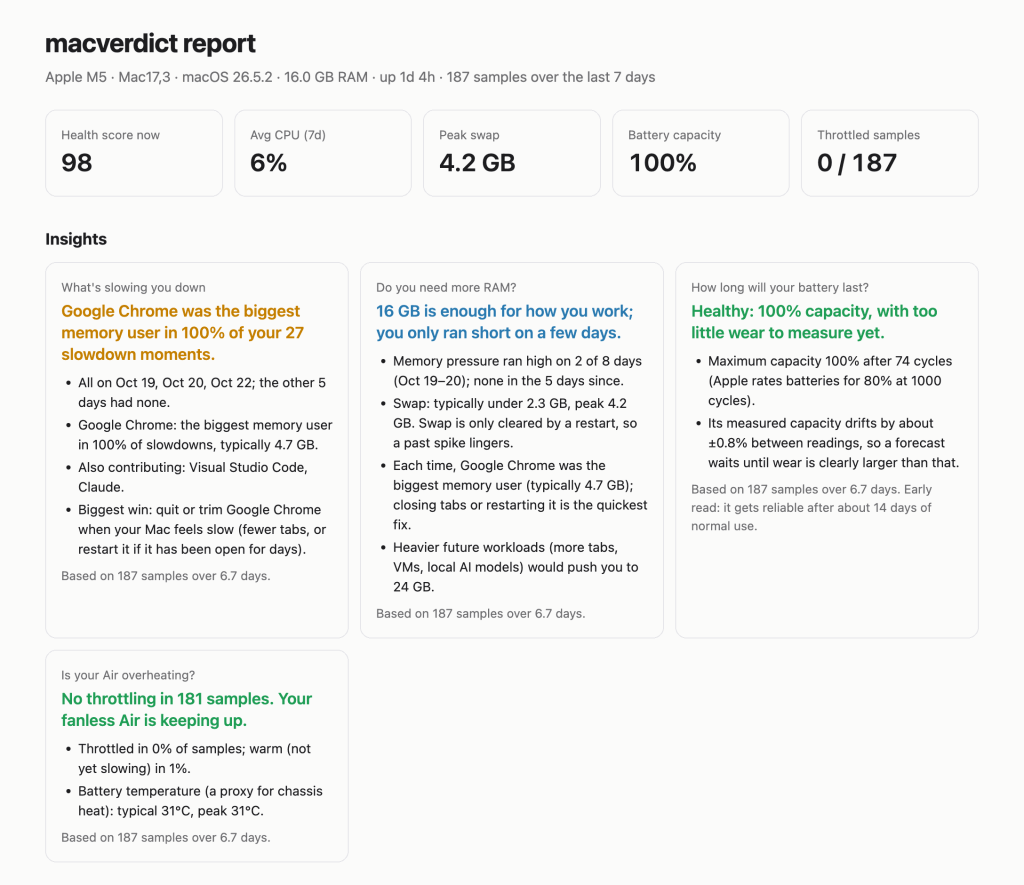
    Theory is cheap. Here’s what it concluded about my own MacBook Air (16 GB of memory) after its first real week:

    ● What's slowing you down
      Google Chrome was the biggest memory user in 100% of your 27 slowdown moments.
        · All on Oct 19, Oct 20, Oct 22; the other 5 days had none.
        · Google Chrome: the biggest memory user in 100% of slowdowns, typically 4.7 GB.
        · Also contributing: Visual Studio Code, Claude.
    
    ● Do you need more RAM?
      16 GB is enough for how you work; you only ran short on a few days.
        · Memory pressure ran high on 2 of 8 days (Oct 19–20); none in the 5 days since.
        · Swap: typically under 2.3 GB, peak 4.2 GB.

    A hundred percent. Not “mostly Chrome”. Twenty-seven stress events, one culprit every time, typically holding 4.7 GB. The code editor and Claude were in the room, but only ever as accomplices.

    The RAM verdict is the more useful one, because it’s a capital allocation question in disguise. Do I spend money on a bigger machine, or change behaviour? Two stressed days out of eight, all driven by one app, is a behavioural problem, not a capacity problem. The fix costs nothing: fewer tabs.

    The other two verdicts were reassuringly dull. The battery is at 100% capacity after 74 charge cycles. In 184 samples the Air never once slowed itself down to cool off.

    macverdict insights on a real week: Chrome behind every slowdown, 16 GB is enough, battery healthy, no throttling

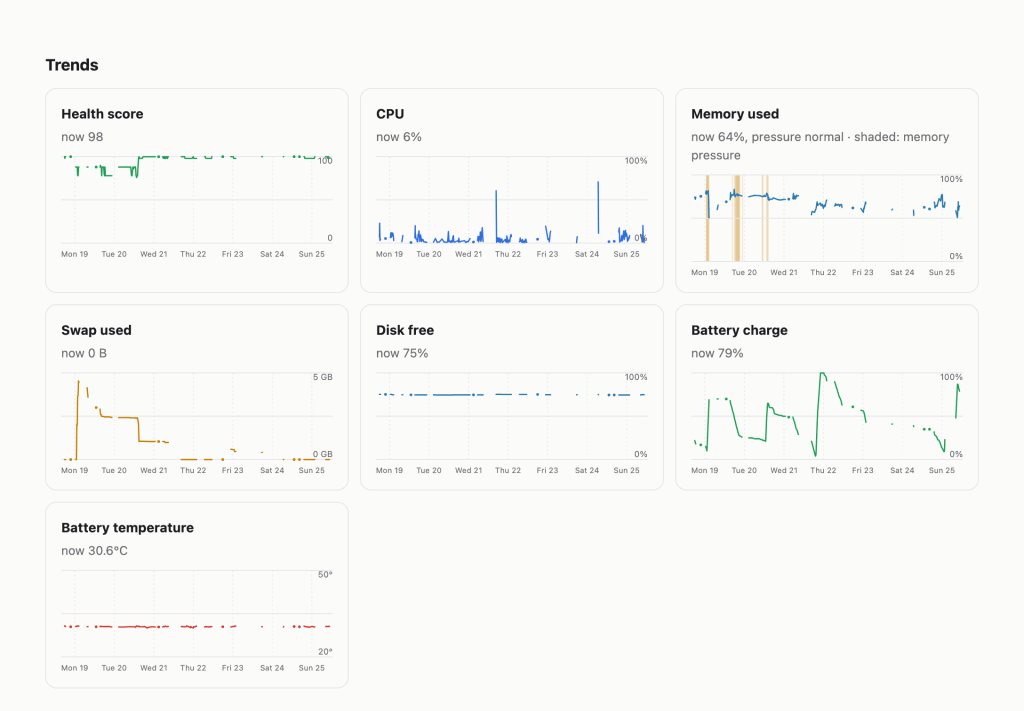
    It also produces a report of the full time series. The stress is visible at a glance: memory pressure shaded on Monday and Tuesday, swap climbing alongside it, then a long, quiet rest of the week.

    A week of trends: health score, CPU, memory with pressure shaded, swap, disk and battery

    The full report from that week is online if you’d like to look at it.

    Findings: my first version failed its own backtest

    The week above is what the model says now. The first version said something different, and it was wrong.

    Finding 1: one bad day was treated as a regime. The first RAM model measured the share of samples under memory pressure. On made-up test data it looked perfectly sensible. On my real week it told me, with total confidence, that 16 GB wasn’t enough and I should buy a bigger Mac.

    All of that pressure came from about a day and a half when Chrome had grown far beyond its usual size. The rest of the week was calm. The model had weighed one stressed stretch as if it were my normal life. Anyone who has reviewed a model calibrated over a crisis window will recognise the shape of the problem: the tail mistaken for the centre.

    The remediation was to change the unit of measurement from samples to days. A day only counts as “ran short” if it shows pressure more than once, because one blip isn’t a trend. Calling memory “not enough” now needs breadth (pressure on at least half the days) and depth (a meaningful share of the time), or genuinely heavy swap. And when a single app was behind nearly every stressed moment, the verdict names it, so the recommendation becomes “trim Chrome”, not “spend money”.

    Finding 2: noise was read as signal. A battery’s measured capacity wobbles by around a percent from one reading to the next, depending on temperature and charge level. The first battery forecast treated that wobble as wear, so its predicted end-of-life date jumped around by months from day to day. A forecast that changes its mind daily isn’t a forecast.

    The remediation was a smoother estimate (the median over three days) and a materiality threshold. No forecast is made until measured wear is clearly larger than the noise. On my battery the noise is about ±0.8%, so the honest answer today is “too little wear to measure yet”. I would much rather a model say “I don’t know” than invent a date with false precision.

    Both fixes shipped in version 0.1.1. My real week is now preserved as a regression test, a day and a half of stress followed by six quiet days, so if a future change brings back the “buy a bigger Mac” verdict, the test fails before anyone sees it.

    Limitations, stated plainly

    Every model has them, and the good ones say so on the front page.

    • Sampling frequency. One sample every 15 minutes will miss a ten-second spike. This tool is for patterns over days and weeks, not for catching a single freeze.
    • Small samples. A week is a week. Each verdict states how many samples and days it rests on, and calls itself an “early read” until there’s enough history.
    • It’s not a live monitor. If you want to watch your Mac in real time, use one of the excellent live tools alongside it. macverdict is what you ask on Friday about Tuesday.
    • No data leaves the machine. Not a limitation, strictly, but worth stating. Everything stays local, and nothing is sent anywhere.

    Try it

    On a Mac with Homebrew:

    brew install anirudhjayaraman/tap/macverdict
    macverdict setup

    Then, whenever you’re curious, macverdict insights gives the four verdicts and macverdict report opens the charts. It’s free, open source, and also installable with pip install macverdict. Give it a week before judging it. Like any model, it needs data before its opinions are worth much.

    Provenance, as is now tradition

    I built macverdict with Claude Code, Anthropic’s coding agent. I brought the questions, the distrust of the “memory used” number and the insistence on testing against real data before believing anything. Claude wrote most of the code and tests, and helped draft this post.

    One last observation for the validation file. Among the apps “also contributing” to my slowdowns was Claude itself, running in the background, helping me build the tool that flagged it. To be fair, it was never the main suspect. That was Chrome. It’s always Chrome.

  • Incident Report: A Risk Quant Reviews DeepLearning.AI’s Agentic AI Course

    Model Risk & Validation · Incident Report

    A five-module review from the one chair in the building that assumes everything is broken until proven otherwise. Fair warning — I have never met a try/except: pass I liked, and I read release notes for fun.

    Case fileDLAI · AGENTIC-AI
    Date2026-07-12
    Scope5 modules · all labs
    Overall rating★★★★★★★★★★ 3.0 / 5
    Benchmarked vs.HF · LangGraph · CrewAI
    ClassificationCOND. APPROVED

    There’s a particular kind of person who, when handed a shiny new AI course, immediately asks: “Yes, but can I reproduce it, and what happens when it fails at 2 a.m.?” That person does not get invited to many parties. That person is me, and this is my review.

    DeepLearning.AI’s Agentic AI course walks you through five modules that build, brick by brick, from a single reflecting agent to a coordinated team of them: reflection → tool use → evaluation → multi-agent collaboration, all hung on one running example — a research-report agent — plus a rotating cast of standalone labs (chart bots, SQL bots, an email assistant, a sunglasses-store customer-service pipeline, a marketing team). Andrew Ng narrates. The slides are clean. The vibe is optimistic.

    My job is to be the opposite of optimistic. So I studied every lecture PDF, ran a magnifying glass over every ungraded and graded lab, cracked open the autograders, and benchmarked the whole thing against what the rest of the field — Hugging Face’s Agents Course, LangGraph, CrewAI, AutoGen, Anthropic’s tool-use docs, LangSmith, DeepEval — teaches for the same money (which, for a lot of them, is zero).

    The headline: as a set of ideas, this course is genuinely well-sequenced and honest. As a set of artifacts you might mistake for production code, it is a target-rich environment. The gap between those two sentences is the entire review.

    The scorecard · for people who skip to the table
    Mod Topic Rating The one-line indictment
    1Reflective Research Agent★★★★★★★★★★ (3.5/5)Boots up, wipes its own audit trail on every restart.
    2Reflection Design Pattern★★★★★★★★★★ (3.5/5)Teaches you to ground self-critique — then never checks V2 beat V1.
    3Tool Use Design Pattern★★★★★★★★★★ (3/5)Hands an agent a hard delete and forbids it from asking permission.
    4Evaluating Agentic Workflows★★★★★★★★★★ (2.5/5)The evaluation module ships an autograder that evaluates nothing.
    5Multi-Agent Collaboration★★★★★★★★★★ (3/5)Best ideas, best lab — routed through a JSON parser held together with hope.
    Overall: ~3/5. A very good conceptual course wearing the costume of an engineering course. Take it for the mental models. Do not git clone your way into an incident.
    01
    Ambition meets drop_all()

    The Reflective Research Agent

    ★★★★★★★★★★3.5 / 5 as teaching · ~1.5 / 5 as code you’d validate

    Most intro modules hand you a notebook and a warm feeling. Module 1 hands you a deployable FastAPI + Postgres app in a Docker container and says good luck. A planner (o4-mini, temperature=1) emits a 5–7 step plan; an executor routes each step to a research/writer/editor agent; the research agents call Tavily, arXiv, and Wikipedia; the result is persisted to Postgres and streamed to a UI. Shipping a real back end on day one is genuinely unusual — Hugging Face opens with one smolagents notebook; Microsoft’s “AI Agents for Beginners” is concept-first lessons. This throws you in the deep end of deployment, state, and orchestration immediately.

    Which is exactly why the validation findings pile up so fast.

    The signature crime is on main.py:49: an unconditional Base.metadata.drop_all() on every startup. Every restart nukes the tasks table — the audit trail, the one thing a validator actually lives for, has the persistence half-life of a container. The README documents this as a “gotcha” rather than fixing it, which is a very honest way of saying “we know.” Around it: dependencies that float free (2 of ~30 packages pinned, so two builds a week apart are two different models of reality); a research_agent that swallows exceptions and returns "[Model Error: ...]" as content the writer will then cheerfully cite; routing by substring match (if "research" in step_lower), so a step titled “Write up the research draft” routes to the research agent because “research” got checked first; allow_origins=["*"]; default Postgres creds on an exposed port; and LLM-authored raw HTML rendered into innerHTML with no sanitization — stored XSS waiting for the wrong search result.

    What’s genuinely instructive is the shape: the clean planner/executor/agents/tools separation, a real multi-source tool loop, and a Docker one-shot that actually runs end to end. What’s dangerous is that it looks production-ready enough for someone to treat it that way.

    Risk register

    data destruction on boot · silent error-as-content · unpinned deps · prompt-injection + XSS surface · open CORS + default creds · print()-only observability, zero tests.

    Verdict — 3.5/5 as a teaching artifact; ~1.5/5 as code you’d validate. For FastAPI-literate learners who’ll read it critically — not copy it.
    02
    The model grades its own homework

    Reflection Design Pattern

    ★★★★★★★★★★3.5 / 5

    My priors on “the model critiques itself” are openly hostile, so I came in swinging. Module 2 mostly earned my grudging respect, because it stages the failure instead of hiding it.

    The pattern is simple: emit V1, critique it, emit V2. The deck escalates through three grounding regimes — ungrounded self-reflection, execution feedback (run the code, feed back the stderr), and multimodal feedback (render the chart, let a vision model judge the actual pixels). Pleasingly, it doesn’t stop at “reflection good”: it cites Self-Refine (Madaan et al., 2023), then spends five slides on evaluation and explicitly warns about position bias in LLM-as-judge. Acknowledging that your evaluator is itself a biased instrument, in a beginner course, is more intellectual honesty than I budgeted for.

    The star is the SQL lab (M2_UGL_2). It runs two reflection passes on a query over an event-sourced schema where qty_delta < 0 means a sale. The text-only refiner inspects the SQL, pronounces it fine, and confidently returns a negative total-sales number. Then the grounded refiner gets fed the actual result DataFrame, sees the nonsense, and fixes it with ABS(). That’s the whole model-validation lesson in one lab: self-reflection without an external oracle is theater.

    Where it thins out is everything a validator asks next. No lab ever checks that V2 beat V1 — improvement is assumed, never measured. There’s no loop, no stopping criterion, no regression guard. The critic in the grounded SQL refiner runs at temperature=1.0 (a nondeterministic validator — a hard sell in any governed pipeline). And the graded assignment is the least trustworthy instance of the whole pattern: ungrounded essay critique, autograded only on “returns a str, no exception, length > 100.” You can pass with three near-identical three-line f-strings and never once observe whether reflection did anything. Defensible — free text can’t be autograded deterministically — but a cop-out all the same.

    Versus the field: DLAI is more practical on the grounding distinction than most, but shallower on iteration — it never mentions Reflexion’s cross-trial memory, and LangGraph frames reflection as a stateful graph with loops and stopping edges. DLAI stops at V2; real systems iterate to convergence.

    Risk register

    V2 > V1 never verified · graded task tests plumbing only · nondeterministic critic · no stopping criterion · unsandboxed exec() of LLM code. ● Redeeming grace: the SQL lab that stages the null result.

    Verdict — 3.5/5. The right instinct — ground your self-critique — taught via one excellent lab. Graduate to Reflexion / LangGraph for the loop.
    03
    We gave the text generator a delete button

    Tool Use Design Pattern

    ★★★★★★★★★★3 / 5

    This is the module I actually lose sleep over, because tool use is the exact moment a text predictor acquires side effects on the world. The mechanics are taught cleanly — a tool is just code the LLM can request; here’s naive string-parsing, here’s the JSON function-calling contract, here’s multi-tool orchestration, here’s MCP as the m×n → m+n integration story. Two calling conventions (raw OpenAI vs. aisuite), which is realistic but plants the provider:model footgun ("gpt-4o" vs "openai:gpt-4o") that the README rightly flags as the #1 cause of silent NoneType has no attribute 'choices' failures.

    And then the email lab (M3_UGL_2) hands the model a delete_email tool. I read the backend: email_service.py:194 is db.delete(email); db.commit() — a hard delete. No soft-delete, no trash, no tombstone; recovery means reseeding the fixture. Worse, the notebook’s own prompt instructs: “Never ask the user for confirmation before performing an action… (no human-in-the-loop).” The lab hard-codes the anti-pattern — full autonomy over a destructive verb — and then the closing cell congratulates you on building agents that act “safely and transparently.” It demonstrates transparency. It does not demonstrate safety, and conflating the two is precisely the trap a risk function exists to catch.

    Elsewhere: web and arXiv content flows straight into the message history — a textbook indirect prompt-injection surface, never mentioned. Argument validation is fully delegated to the model (delete_email(email_id) trusts whatever integer the LLM hallucinates; no existence or ownership check). The autograder, despite the README claiming it “mocks the client,” actually calls your function live and asserts isinstance(out, str) and len(out) > 50 — 51 characters of lorem ipsum passes.

    Credit where it’s due, and it’s real credit: auditability is the module’s genuine strength. The assignment forces you to hand-build the tool-response messages and retain the full history, and pretty_print_chat_completion renders the entire tool-call trace. You can reconstruct which tool fired with what arguments — the closest thing to a model-risk audit log in the whole course.

    Versus the field, this is where DLAI trails hardest. Hugging Face names web-content injection as a memory-poisoning attack; Anthropic’s docs say “require confirmation for destructive operations”; LangGraph makes interrupt-on-destructive-action a first-class primitive. Module 3 teaches the literal opposite default and never shows the alternative exists.

    Risk register

    destructive tool + no human-in-the-loop, taught as default · prompt-injection via tool output unmentioned · autograder asserts nothing · no argument/authorization validation. ● Redeeming graces: excellent trace auditability, error-as-data tool returns.

    Verdict — 3/5. Crisp on how tools work; actively misleading on how to ship them safely. Pair with Anthropic’s tool-use docs before it goes near production.
    04
    The grader that grades air

    Evaluating Agentic Workflows

    ★★★★★★★★★★2.5 / 5

    This is home turf, so naturally it’s the module I graded hardest. And here’s the twist: the framing is the best thing in the entire course. The 2×2 of objective-vs-judge crossed with ground-truth-vs-none is genuinely reusable pedagogy. Error analysis via traces — count which stage produces the bad output (search results 45%, source selection 10%…) and spend your budget there — is just attribution analysis, and it’s the right instinct. The evaluation-vs-reflection distinction the README draws (reflection fixes this run; evaluation is a reusable scorer that catches regressions across many runs) is exactly the offline-eval-as-regression-gate idea a validator wants to hear.

    Then the labs show up and start filing exceptions against themselves.

    LLM-as-judge is introduced and simply trusted — no calibration against human labels, no inter-rater agreement, no acknowledgement that a judge from the same model family as the generator is marking its own homework, no treatment of the scorer’s own non-determinism (same rubric, same input, different score — sampling noise cosplaying as a P&L improvement). “Trustworthy source” is operationalized as “URL host is on an allowlist,” which quietly swaps provenance for correctness — a well-sourced wrong answer scores a clean PASS, and arxiv.org is un-reviewed preprints. And the matching in the notebook students actually run is substring, not suffix (any(td in domain for td in TOP_DOMAINS)), so nature.com would happily trust nature.com.phishing.io. The utils.py next door does it correctly with endswith. The one they run does not.

    The assignment is where it falls over completely. There’s no blank template to complete — only a filled-in submission.ipynb that’s almost entirely mocked, with TOP_DOMAINS = {} (an empty dict, so validation is structurally guaranteed to FAIL). And the connoisseur’s detail, the thing I could not have designed as satire: grader.py’s part_1 builds cases = [] and returns it. The autograder for the evaluation module evaluates nothing. The validator’s validator is a stub.

    What a real validation function would demand and this omits entirely: a versioned held-out eval set, ground truth beyond a domain list, confidence intervals (n≈20 with no error bars is a vibe, not a measurement), human-calibration of the judge, drift monitoring, and trajectory-level metrics (τ-bench’s pass^k reliability, tool-call correctness). The field — LangSmith, DeepEval’s 14 metrics, Ragas, Phoenix — treats agent eval as the hard problem it is. Even DLAI’s own “Evaluating and Debugging Generative AI” goes deeper.

    Risk register

    judge never validated · provenance ≠ correctness · spoofable substring matching · no statistics · reusable eval suite described but never built · assignment is a mocked skeleton · grader tests nothing.

    Verdict — 2.5/5. A very good conceptual frame around labs that under-deliver and an assignment that, fittingly, evaluates almost nothing. The first page of the eval playbook — then go read LangSmith / DeepEval / τ-bench for the rest.
    05
    Compounding risk with extra steps

    Multi-Agent Collaboration

    ★★★★★★★★★★3 / 5 · the capstone

    The capstone hands you an org chart: a team of specialized agents — planner, researcher, writer, editor — passing work down a line, coordinated by an executor that reads each plan step and routes it to whoever should do it. The slides are the most intellectually interesting of the course: linear pipelines, then all-to-all, then deeper hierarchies (manager → sub-teams → fact-checker → citation-checker). It’s a lovely tour. The labs only ever build the linear case. You’re shown the hard topologies and handed the easy one.

    Here’s the number that belongs on slide one and isn’t: if each agent in a four-step chain is 90% reliable, the chain is 0.94 ≈ 66%. The entire selling point of multi-agent — decomposition — is also its central risk, because errors propagate and compound rather than cancel. The course never quantifies this, so a learner leaves thinking “more agents = more capability” when the validation reality is “more agents = more independent failure points in series.”

    And the routing layer, the load-bearing wall of the whole design, is made of drywall. The executor_agent asks gpt-4o for “only a valid JSON object,” runs the reply through clean_json_block() — a regex that scrapes off Markdown code fences — and then calls a bare json.loads() with no try/except. The very existence of that fence-scraper is a confession that the model doesn’t reliably return clean JSON, so we bolt one on and pray. The day it emits a stray sentence or a trailing comma, the entire pipeline throws and dies mid-report. “Our orchestration layer deserializes free-text LLM output with no schema validation and no fallback” is not a design; it’s an incident with a pending date.

    But — and this is real — M5_UGL_1 is the best-engineered lab in the entire course. A sunglasses-store customer-service pipeline with actual inventory/transactions tables in pandas + DuckDB, real tool functions, a planning step (request → JSON tool plan), a reflection step that repairs a flawed plan against a TOOLS-ONLY spec, and an error-explanation step that turns “this return would drive stock negative” into human guidance. It’s the closest the course comes to production shape. (It still explains the failure rather than preventing it with a rollback — but explaining it is more than most demos manage.) The campaign-team lab (M5_UGL_2) is the fun one — researcher → designer → copywriter → packager compiling an HTML report — but it’s a linear happy-path where every agent trusts its upstream blindly, with no evaluation gate between stages.

    Versus the field, the comparison is almost unfair, because DeepLearning.AI has dedicated multi-agent courses — “Multi AI Agent Systems with crewAI,” “AI Agentic Design Patterns with AutoGen.” Against those, plus LangGraph’s stateful graphs with checkpoints and retries and OpenAI’s Agents SDK handoffs, this single capstone frames orchestration as a prompt-engineering problem solved with a hand-rolled JSON router, where the serious tools frame it as a reliability problem with real primitives. As a first exposure to the idea, it’s clear. As preparation to ship one, it’s a trailhead, not a map.

    Risk register

    brittle json.loads router with no fallback · compounding failure never quantified · no transactional safety · blind hand-offs with no eval gate · autograder tests the parts, never the emergent team · observability = print().

    Verdict — 3/5. The strongest ideas and the single best lab, undercut by a toy orchestration layer that fails the first hour of a design review. Then graduate to LangGraph / CrewAI / AutoGen before anything touches a customer.
    Final disposition

    The model validation sign-off

    Let me total the ledger, because that’s the job.

    What this course does well, and I mean genuinely well: the sequencing is excellent — reflection → tool use → evaluation → multi-agent is the right arc, and reusing one research-agent example across all five modules gives a continuity most course collections lack. The conceptual honesty is above market: Ng’s slides cite the real papers (Self-Refine), warn about LLM-judge position bias, draw the evaluation-vs-reflection line crisply, and never pretend “agentic” is a binary. Two labs — the execution-grounded SQL refiner (M2) and the DuckDB customer-service pipeline (M5) — are things I’d happily show a junior. The tool-call auditability in M3 is real. As a way to build the right mental models fast, it’s very good.

    What a validation committee cannot sign: a recurring pattern where safety, reliability, and evaluation are treated as afterthoughts precisely in the modules about acting, and about evaluating. Autograders that certify “returns a string” and, in one delicious case, certify literally nothing. Code that wipes its own audit trail, deletes without confirmation, ingests untrusted content into its own context, routes on unschema’d JSON, and calls all of it “safe.” The course teaches you to start a system; it consistently declines to teach you to trust one.

    Who should take it:

    Take itEngineers and analysts who want the four agentic design patterns in their hands quickly — and who’ll read the code as a whiteboard sketch that boots, not a reference implementation.
    ChaperoneAnyone heading toward production. Take the mental models here; take the guardrails from Anthropic’s tool-use docs, LangGraph’s human-in-the-loop, and LangSmith / DeepEval’s eval discipline.
    Look awayIf you need production hygiene, statistical rigor in evaluation, or serious multi-agent reliability — DLAI’s own deeper courses (and the open HF Agents Course) serve those axes better.

    Final rating: 3/5 — and, in the spirit of a module that never checks whether V2 beat V1, I’ll note that I have not validated this rating against a held-out committee of human reviewers, calibrated my judge, or attached a confidence interval. Take it, appropriately, with external feedback.

    Conditionally Approvedfor education
    Not Approvedfor deployment

    Findings above. Remediation left as an exercise for the learner — which, to be fair, is the whole point of a course.

    Reviewed against: DeepLearning.AI — Agentic AI, Hugging Face Agents Course, Anthropic tool-use docs, LangGraph human-in-the-loop, LangSmith, DeepEval, and the Self-Refine / Reflexion / τ-bench literature. Every code citation (main.py:49, email_service.py:194, TOP_DOMAINS = {}) was read in-repo, not inferred.

  • When the Skeptic Reads the Manual: A Risk Quant Learns to Build AI Agents

    In which I build the perfect AI-course reading list, then do to it what I’m paid to do to everyone else’s models.

    The confession

    There is a particular irony in a model-risk quant deciding to learn how to build AI agents. My job is to sit across the table from someone who has built something clever and ask, as politely as I can manage, “Yes, but how does it break?” I am paid to be the person who doesn’t get swept up in the excitement. Skepticism isn’t a mood for me; it’s a line item.

    So when large language models went from party trick to production dependency in roughly the time it takes to run a Monte Carlo simulation, my first instinct was the usual one: fold my arms and wait for the backtest. But a funny thing happens when you spend enough years reviewing other people’s models. You realize the only thing worse than a technology you distrust is one you distrust and don’t understand. You cannot challenge what you cannot read.

    So I did the thing skeptics rarely admit to doing. I decided to actually learn it, hands on keyboard, from people who build these systems for a living rather than from a thousand breathless LinkedIn posts. This is the story of the syllabus I built to do that — and, more usefully, the story of how I turned around and validated my own reading list before trusting it.

    What’s actually on DeepLearning.AI

    If you haven’t looked lately, DeepLearning.AI has quietly become the place practitioners go to learn this stack. It’s Andrew Ng’s shop, and it shows: the pedagogy is unfussy, the notebooks run, and the instructors are people who ship.

    The catalog splits into two shapes. There are the foundational specializations, multi-week affairs that teach a subject properly, and then there are the short courses, of which there are now around 124. The short courses are the real draw. Most run one to three hours, each is taught by a named practitioner from a company you’ve heard of, and every one hands you a code notebook so you’re typing rather than nodding. Anthropic, Google, Meta, LangChain, crewAI, LlamaIndex, Hugging Face, Nvidia, Databricks: the guest list reads like the org chart of the entire field.

    The topics span the whole territory: prompting, the internals of transformers, retrieval-augmented generation, single and multi-agent systems, evaluation, guardrails and red-teaming, fine-tuning, and coding agents. It’s subscription-based, which for someone who binges in bursts felt fair. The catch is that with 124 courses and no obvious ordering, it’s easy to wander in and drown.

    Why I built a five-tier path

    Drowning is the problem a curriculum solves. Left to its own devices, a catalog this large becomes a buffet where you fill your plate with whatever’s shiny and leave still hungry for the basics. I wanted a spine, an order that built competence deliberately instead of accreting trivia.

    Five tiers, roughly: foundations first, then the practical craft of building agents, then, crucially, evaluation, governance, and reliability, then the supporting technical skills that make the rest robust, and finally some optional productivity tooling.

    Here’s where being a risk person rearranges the furniture. In most self-taught AI curricula, evaluation and guardrails are the vegetables you’re meant to eat after the fun part. For someone in model risk, that ordering is backwards to the point of being funny. Evaluation, governance, red-teaming: that isn’t the compliance tax on the interesting work. That is the interesting work. An agent that takes autonomous, multi-step actions is, from where I sit, a model with a much larger blast radius and far worse documentation. So I gave that material its own tier and refused to treat it as an afterthought.

    Draft one: the list that looked perfect

    Here is what I landed on first. Read it and tell me it doesn’t look like a serious, well-rounded plan:

    • Tier 1 — Foundations. Agentic AI (DeepLearning.AI, Andrew Ng); How Transformer LLMs Work (Jay Alammar & Maarten Grootendorst).
    • Tier 2 — Core agent-building. MCP: Build Rich-Context AI Apps with Anthropic (Anthropic); AI Agents in LangGraph (LangChain/Tavily); Building Agentic RAG with LlamaIndex (LlamaIndex); Multi AI Agent Systems with crewAI (crewAI); A2A: The Agent2Agent Protocol (Google Cloud/IBM Research).
    • Tier 3 — Evaluation, reliability, governance. Evaluating AI Agents (Arize); Governing AI Agents (Databricks); Safe and Reliable AI via Guardrails (GuardrailsAI); Red Teaming LLM Applications (Giskard); NeMo Agent Toolkit: Making Agents Reliable (Nvidia).
    • Tier 4 — Supporting skills. Getting Structured LLM Output (DotTxt); Pydantic for LLM Workflows (DeepLearning.AI); Building and Evaluating Data Agents (Snowflake).
    • Tier 5 — Optional coding agents. Claude Code (Anthropic); Spec-Driven Development with Coding Agents (JetBrains).

    Marquee names, sensible progression, the risk material promoted to its own tier. I very nearly hit “enroll” on all of it. And then the part of my brain that reviews models for a living cleared its throat and asked the question it always asks: how do you know this is any good?

    The validation: interrogating my own reading list

    The uncomfortable thing about a course list is that it markets itself. Every card looks equally current, because the thumbnails are equally glossy. But in applied AI, currency is everything. Frameworks ship breaking changes on a schedule that would make a fixed-income desk weep. A course that teaches you to drive a specific library the way it worked eighteen months ago is not a shortcut; it’s a trap with a completion certificate.

    So I did the boring, load-bearing thing. I checked the vintage of every course before committing a single evening to it.

    Getting the dates was itself a small exercise in not trusting the surface. The course cards don’t advertise a release date — you see a title, a duration, a difficulty, and nothing about age. But the platform is a Next.js app, and Next.js ships a page’s data to the browser as a blob of JSON embedded in the HTML (the __NEXT_DATA__ script tag). Buried in that blob, each course carried a quiet little released_at field that the interface never bothers to render. A few lines in the browser console were enough to pull it out:

    const data = JSON.parse(document.getElementById('__NEXT_DATA__').textContent);
    // walk the embedded query cache and collect { slug, name, released_at }
    // ...then sort by date and stop kidding yourself about what's current

    Five minutes of squinting at JSON told me more about the syllabus’s health than five hours of reading course descriptions would have. This is, more or less, my entire job compressed into a paragraph: the polished front-end is not the model; go find the data the front-end is quietly sitting on.

    Then I split the courses into two buckets, because “old” isn’t one thing:

    • Concept-durable courses teach mental models that don’t expire — what a transformer is, how to think like an attacker, why you evaluate before you deploy. A two-year-old course on those still earns its seat.
    • API-volatile courses teach you to drive a specific, fast-moving library. Those rot. A mid-2024 course on an agent framework will hand you notebooks that no longer run against today’s version of that same framework.

    Here is what validating the dates turned up (ages as of writing, mid-2026):

    CourseReleasedAgeVerdict
    Agentic AISep 2025~9 moFresh
    How Transformer LLMs WorkFeb 2025~17 moConcept-durable
    MCP (Anthropic)May 2025~14 moFine
    AI Agents in LangGraphJun 2024~25 moAPI-volatile — swap
    Building Agentic RAG (LlamaIndex)May 2024~26 moAPI-volatile — swap
    Multi AI Agent Systems (crewAI)May 2024~26 moAPI-volatile — swap
    A2A ProtocolFeb 2026~5 moFresh
    Evaluating AI Agents (Arize)Feb 2025~17 moFine
    Governing AI Agents (Databricks)Oct 2025~9 moFresh
    Safe & Reliable AI via GuardrailsNov 2024~20 moRedundant — drop
    Red Teaming LLM ApplicationsApr 2024~27 moConcept-durable — keep, flagged
    NeMo Agent Toolkit (Nvidia)Dec 2025~7 moFresh
    Getting Structured LLM OutputApr 2025~15 moFine
    Pydantic for LLM WorkflowsJul 2025~11 moFresh
    Building & Evaluating Data AgentsSep 2025~9 moFresh
    Claude Code (Anthropic)Aug 2025~11 moWatch — moves fast
    Spec-Driven Development (JetBrains)Apr 2026~3 moFresh

    The perfect list, it turned out, had five soft spots — all clustered, predictably, in the hands-on agent-building tier where the frameworks churn fastest.

    Draft two: the swaps

    Where a stale, API-volatile course had a fresher replacement teaching the same thing, I swapped it. Where it didn’t, I kept it and made peace with rewriting a few code cells. Where a fresher course elsewhere already covered the ground, I cut the duplicate.

    Out (and why)In (and why)
    Multi AI Agent Systems with crewAI — 26 mo oldDesign, Develop, and Deploy Multi-Agent Systems with CrewAI (Nov 2025) — same framework, production-focused, current API
    Building Agentic RAG with LlamaIndex — 26 mo oldRetrieval Augmented Generation (RAG) (DeepLearning.AI, Sep 2025) — comprehensive, architecture → deployment → evaluation
    AI Agents in LangGraph — 25 mo oldDSPy: Build and Optimize Agentic Apps (Databricks, Jun 2025) — current, and built around MLflow experiment tracking, which is a model-risk person’s native tongue
    Safe and Reliable AI via Guardrails — 20 mo oldDropped — the fresher NeMo (Dec 2025) and Governing AI Agents (Oct 2025) already cover reliability and control
    Red Teaming LLM Applications — 27 mo oldKept, with an asterisk — it’s the oldest course on the list and has no newer equivalent, but adversarial thinking ages well even when the specific exploits don’t

    Two honest caveats. First, DSPy is not a like-for-like replacement for LangGraph — it’s a different paradigm (optimizing agents rather than wiring them as graphs). I chose it for freshness and for the MLflow angle; if you want to stay in the LangGraph world, its newest touchpoint is Long-Term Agentic Memory with LangGraph (Mar 2025). Second, the swaps cost time. The 2024 courses were bite-sized; their current replacements are comprehensive. My honest estimate for Tiers 1–4 roughly doubled, from ~30 hours to closer to 65. A season of evenings, not a long weekend. I decided current-and-longer beats dated-and-quick — which is, when you think about it, exactly the trade a risk function exists to make.

    Where I am so far

    I’ve finished Tier 1’s Agentic AI, and, setting aside the professional obligation to sound measured, I came out of it genuinely energized.

    The reframe that landed hardest was almost embarrassingly simple. I’d been thinking of an LLM as a very articulate oracle: you ask, it answers, you move on. The course reoriented me toward agents as iterative, multi-step workflows that take action: plan, act, observe, revise, repeat. Once that clicked, my skepticism sharpened into something more useful. An oracle you can spot-check. A system that plans and acts across many steps, calling tools and touching real state along the way, needs the full apparatus of model risk: evaluation, monitoring, controls, and someone whose job it is to ask how it breaks.

    Which is exactly why the tiers ahead are the ones I’m most impatient to reach. The evaluation and governance material isn’t the part I’ll dutifully endure to get certified. It’s the part where my existing instincts finally have somewhere to go. I suspect I’ll be an insufferable student in those modules, and I’m oddly looking forward to it.

    A disclaimer, offered without apology

    In the spirit of the model-risk documentation I spend my life reading and writing, one honest note on provenance. This whole exercise — the five-tier structure, the reordering that promotes evaluation and governance, and the recency validation that pulled every release date and swapped out the stale courses — came out of an extended back-and-forth with Claude, Anthropic’s AI, acting as co-author and thinking partner. I brought the constraints, the skepticism, and the risk lens; it drafted the first list, and then, when I muttered that I didn’t trust how old these things were, it was the one that went and dug the released_at dates out of the page and helped me sort the keepers from the fossils.

    There’s a pleasing symmetry to that. I used an AI to design my plan for understanding AI, validated its first draft the way I’d validate any model handed to me, and then told you so plainly rather than pretending the syllabus sprang fully formed from my own head. If I’m going to spend the next several weeks learning to evaluate these systems, I might as well start by being transparent about working with one. Consider it the first entry in the validation report.

  • Scraping the Daily India Covid-19 Tracker for CSV Data

    Scraping the Daily India Covid-19 Tracker for CSV Data

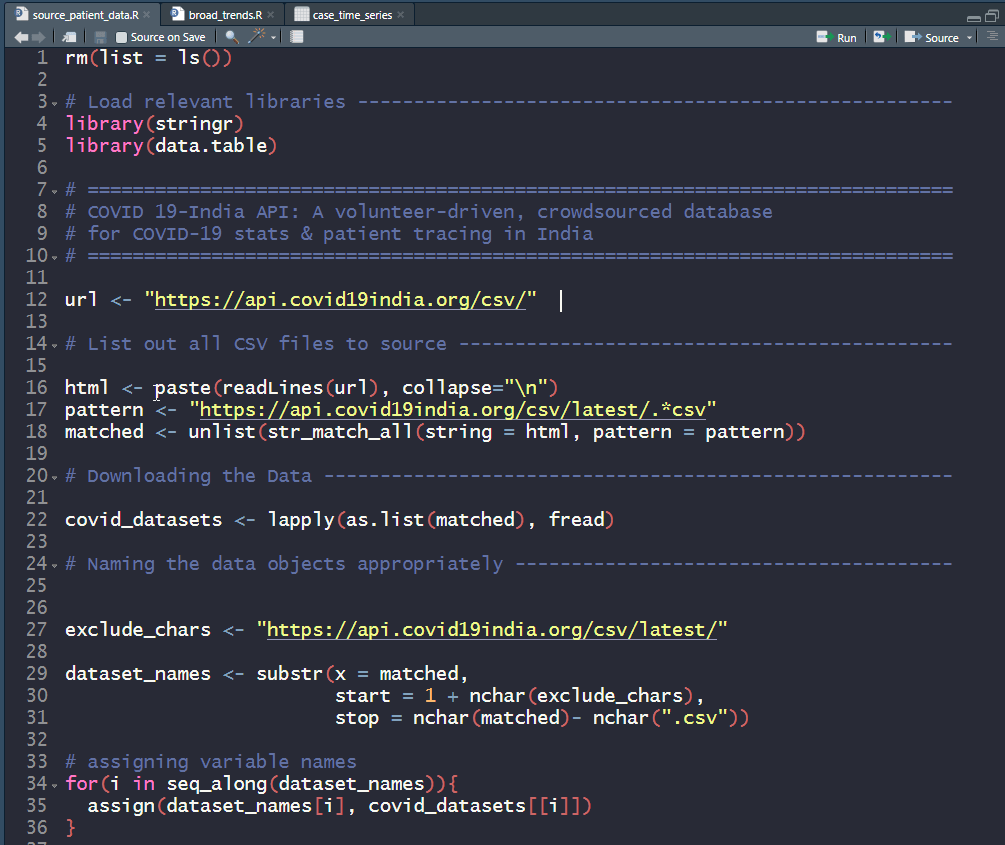
    This is a very short post that will be very useful to help you quickly set up your COVID-19 datasets. I’m sharing code at the end of this post that scrapes through all CSV datasets made available by COVID19-India API.

    Copy paste this standalone script into your R environment and get going!

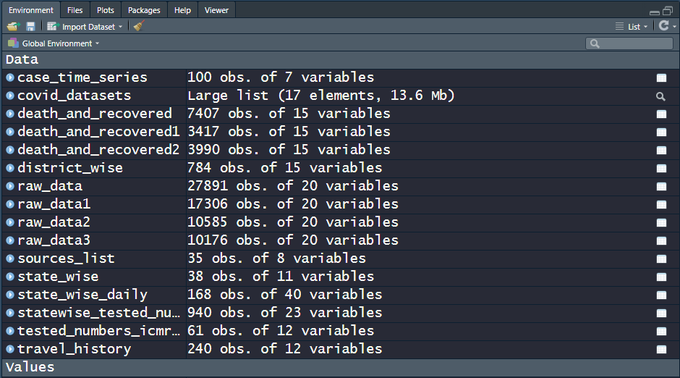
    There are 15+ CSV files on the India COVID-19 API website. raw_data3 is actually a live dataset and more can be expected in the days to come, which is why a script that automates the data sourcing comes in handy.  Snapshot of the file names and the data dimensions as of today, 100 days since the first case was recorded in the state of Kerala —

    Image

    My own analysis of the data and predictions are work-in-progress, going into a Github repo. Execute the code below and get started analyzing the data and fighting COVID-19!

    rm(list = ls())
    # Load relevant libraries —————————————————–
    library(stringr)
    library(data.table)
    # =============================================================================
    # COVID 19-India API: A volunteer-driven, crowdsourced database
    # for COVID-19 stats & patient tracing in India
    # =============================================================================
    url <- "https://api.covid19india.org/csv/&quot;
    # List out all CSV files to source ——————————————–
    html <- paste(readLines(url), collapse="\n")
    pattern <- "https://api.covid19india.org/csv/latest/.*csv&quot;
    matched <- unlist(str_match_all(string = html, pattern = pattern))
    # Downloading the Data ——————————————————–
    covid_datasets <- lapply(as.list(matched), fread)
    # Naming the data objects appropriately —————————————
    exclude_chars <- "https://api.covid19india.org/csv/latest/&quot;
    dataset_names <- substr(x = matched,
    start = 1 + nchar(exclude_chars),
    stop = nchar(matched)- nchar(".csv"))
    # assigning variable names
    for(i in seq_along(dataset_names)){
    assign(dataset_names[i], covid_datasets[[i]])
    }

  • Linear Algebra behind the lm() function in R

    Linear Algebra behind the lm() function in R

    This post comes out of the blue, nearly 2 years since my last one. I realize I’ve been lazy, so here’s hoping I move from an inertia of rest to that of motion, implying, regular and (hopefully) relevant posts. I also chanced upon some wisdom while scrolling through my Twitter feed:

    https://twitter.com/CoralineAda/status/1193216045210906625

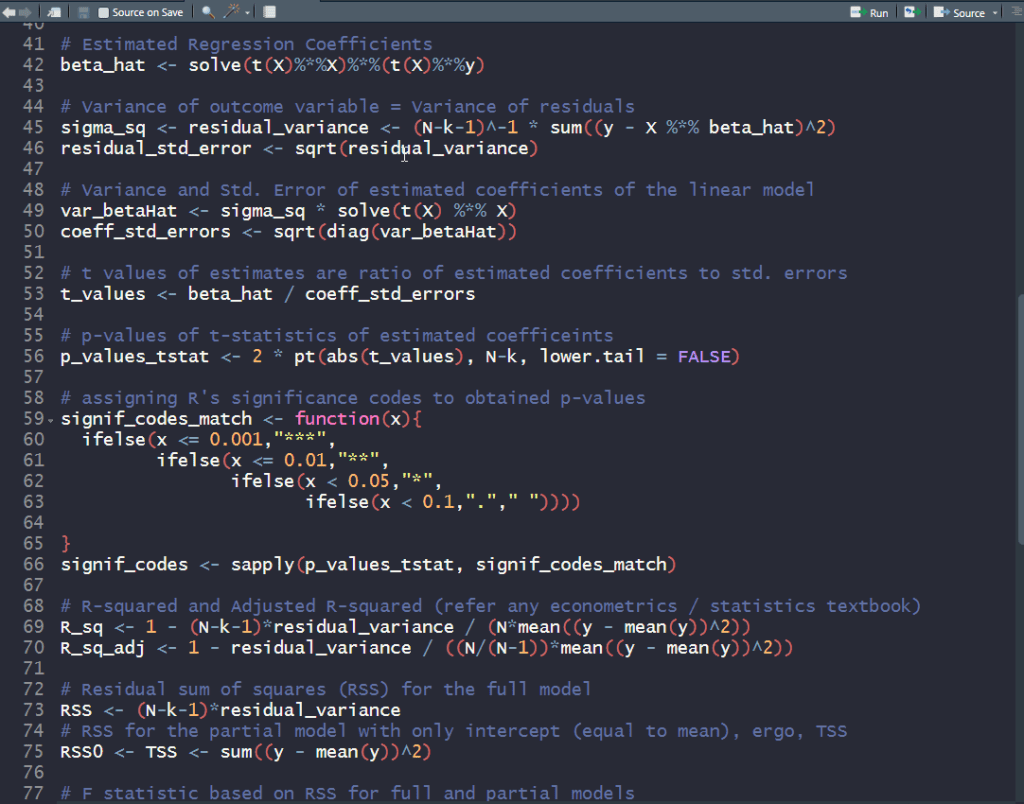
    This blog post in particular was meant to be a reminder to myself and other R users that the much used lm() function in R (for fitting linear models) can be replaced with some handy matrix operations to obtain regression coefficients, their standard errors and other goodness-of-fit stats printed out when summary() is called on an lm object.

    Linear regression can be formulated mathematically as follows:
    \mathbf{y} = \mathbf{X} \mathbf{\beta} + \mathbf{\epsilon} ,
    \mathbf{\epsilon} \sim N(0, \sigma^2 \mathbf{I})

    \mathbf{y} is the \mathbf{n}\times \mathbf{1} outcome variable and \mathbf{X} is the \mathbf{n}\times \mathbf{(\mathbf{k}+1)} data matrix of independent predictor variables (including a vector of ones corresponding to the intercept). The ordinary least squares (OLS) estimate for the vector of coefficients \mathbf{\beta} is:

    \hat{\mathbf{\beta}} = (\mathbf{X}^{\prime} \mathbf{X})^{-1} \mathbf{X}^{\prime} \mathbf{y}

    The covariance matrix can be obtained with some handy matrix operations:
    \textrm{Var}(\hat{\mathbf{\beta}}) = (\mathbf{X}^{\prime} \mathbf{X})^{-1} \mathbf{X}^{\prime} \;\sigma^2 \mathbf{I} \; \mathbf{X} (\mathbf{X}^{\prime} \mathbf{X})^{-1} = \sigma^2 (\mathbf{X}^{\prime} \mathbf{X})^{-1}
    given that \textrm{Var}(AX) = A \times \textrm{Var}X \times A^{\prime}; \textrm{Var}(\mathbf{y}) = \mathbf{\sigma^2}

    The standard errors of the coefficients are basically \textrm{Diag}(\sqrt{\textrm{Var}(\hat{\mathbf{\beta}})}) = \textrm{Diag}(\sqrt{\sigma^2 (\mathbf{X}^{\prime} \mathbf{X})^{-1}}) and with these, one can compute the t-statistics and their corresponding p-values.

    Lastly, the F-statistic and its corresponding p-value can be calculated after computing the two residual sum of squares (RSS) statistics:

    • \mathbf{RSS} – for the full model with all predictors
    • \mathbf{RSS_0} – for the partial model (\mathbf{y} = \mathbf{\mu} + \mathbf{\nu}; \mathbf{\mu} = \mathop{\mathbb{E}}[\mathbf{y}]; \mathbf{\nu} \sim N(0, \sigma_0^2 \mathbf{I}) ) with the outcome observed mean as estimated outcome

    \mathbf{F} = \frac{(\mathbf{RSS_0}-\mathbf{RSS})/\mathbf{k}}{\mathbf{RSS}/(\mathbf{n}-\mathbf{k}-1)}

    I wrote some R code to construct the output from summarizing lm objects, using all the math spewed thus far. The data used for this exercise is available in R, and comprises of standardized fertility measures and socio-economic indicators for each of 47 French-speaking provinces of Switzerland from 1888. Try it out and see for yourself the linear algebra behind linear regression.

    ### Linear Regression Using lm() —————————————-
    data("swiss")
    dat <- swiss
    linear_model <- lm(Fertility ~ ., data = dat)
    summary(linear_model)
    # Call:
    # lm(formula = Fertility ~ ., data = dat)
    #
    # Residuals:
    # Min 1Q Median 3Q Max
    # -15.2743 -5.2617 0.5032 4.1198 15.3213
    #
    # Coefficients:
    # Estimate Std. Error t value Pr(>|t|)
    # (Intercept) 66.91518 10.70604 6.250 1.91e-07 ***
    # Agriculture -0.17211 0.07030 -2.448 0.01873 *
    # Examination -0.25801 0.25388 -1.016 0.31546
    # Education -0.87094 0.18303 -4.758 2.43e-05 ***
    # Catholic 0.10412 0.03526 2.953 0.00519 **
    # Infant.Mortality 1.07705 0.38172 2.822 0.00734 **
    # —
    # Signif. codes: 0 ‘***’ 0.001 ‘**’ 0.01 ‘*’ 0.05 ‘.’ 0.1 ‘ ’ 1
    #
    # Residual standard error: 7.165 on 41 degrees of freedom
    # Multiple R-squared: 0.7067, Adjusted R-squared: 0.671
    # F-statistic: 19.76 on 5 and 41 DF, p-value: 5.594e-10
    ### Using Linear Algebra ————————————————
    y <- matrix(dat$Fertility, nrow = nrow(dat))
    X <- cbind(1, as.matrix(x = dat[,-1]))
    colnames(X)[1] <- "(Intercept)"
    # N x k matrix
    N <- nrow(X)
    k <- ncol(X) – 1 # number of predictor variables (ergo, excluding Intercept column)
    # Estimated Regression Coefficients
    beta_hat <- solve(t(X)%*%X)%*%(t(X)%*%y)
    # Variance of outcome variable = Variance of residuals
    sigma_sq <- residual_variance <- (N-k-1)^-1 * sum((y – X %*% beta_hat)^2)
    residual_std_error <- sqrt(residual_variance)
    # Variance and Std. Error of estimated coefficients of the linear model
    var_betaHat <- sigma_sq * solve(t(X) %*% X)
    coeff_std_errors <- sqrt(diag(var_betaHat))
    # t values of estimates are ratio of estimated coefficients to std. errors
    t_values <- beta_hat / coeff_std_errors
    # p-values of t-statistics of estimated coefficeints
    p_values_tstat <- 2 * pt(abs(t_values), N-k, lower.tail = FALSE)
    # assigning R's significance codes to obtained p-values
    signif_codes_match <- function(x){
    ifelse(x <= 0.001,"***",
    ifelse(x <= 0.01,"**",
    ifelse(x < 0.05,"*",
    ifelse(x < 0.1,"."," "))))
    }
    signif_codes <- sapply(p_values_tstat, signif_codes_match)
    # R-squared and Adjusted R-squared (refer any econometrics / statistics textbook)
    R_sq <- 1 – (N-k-1)*residual_variance / (N*mean((y – mean(y))^2))
    R_sq_adj <- 1 – residual_variance / ((N/(N-1))*mean((y – mean(y))^2))
    # Residual sum of squares (RSS) for the full model
    RSS <- (N-k-1)*residual_variance
    # RSS for the partial model with only intercept (equal to mean), ergo, TSS
    RSS0 <- TSS <- sum((y – mean(y))^2)
    # F statistic based on RSS for full and partial models
    # k = degress of freedom of partial model
    # N – k – 1 = degress of freedom of full model
    F_stat <- ((RSS0 – RSS)/k) / (RSS/(N-k-1))
    # p-values of the F statistic
    p_value_F_stat <- pf(F_stat, df1 = k, df2 = N-k-1, lower.tail = FALSE)
    # stitch the main results toghether
    lm_results <- as.data.frame(cbind(beta_hat, coeff_std_errors,
    t_values, p_values_tstat, signif_codes))
    colnames(lm_results) <- c("Estimate","Std. Error","t value","Pr(>|t|)","")
    ### Print out results of all relevant calcualtions ———————–
    print(lm_results)
    cat("Residual standard error: ",
    round(residual_std_error, digits = 3),
    " on ",N-k-1," degrees of freedom",
    "\nMultiple R-squared: ",R_sq," Adjusted R-squared: ",R_sq_adj,
    "\nF-statistic: ",F_stat, " on ",k-1," and ",N-k-1,
    " DF, p-value: ", p_value_F_stat,"\n")
    # Estimate Std. Error t value Pr(>|t|)
    # (Intercept) 66.9151816789654 10.7060375853301 6.25022854119771 1.73336561301153e-07 ***
    # Agriculture -0.172113970941457 0.0703039231786469 -2.44814177018405 0.0186186100433133 *
    # Examination -0.258008239834722 0.253878200892098 -1.01626779663678 0.315320687313066
    # Education -0.870940062939429 0.183028601571259 -4.75849159892283 2.3228265226988e-05 ***
    # Catholic 0.104115330743766 0.035257852536169 2.95296858017545 0.00513556154915653 **
    # Infant.Mortality 1.07704814069103 0.381719650858061 2.82156849475775 0.00726899472564356 **
    # Residual standard error: 7.165 on 41 degrees of freedom
    # Multiple R-squared: 0.706735 Adjusted R-squared: 0.670971
    # F-statistic: 19.76106 on 4 and 41 DF, p-value: 5.593799e-10

    Hope this was useful and worth your time!

  • Installing Tensorflow on Windows is Easy!

    Installing Tensorflow on Windows is Easy!

    I recently got myself to start using Python on Windows, whereas till very recently I had been working on Python only from Ubuntu.

    I am sure I am late in realizing this, but installing Tensorflow was just so easy!

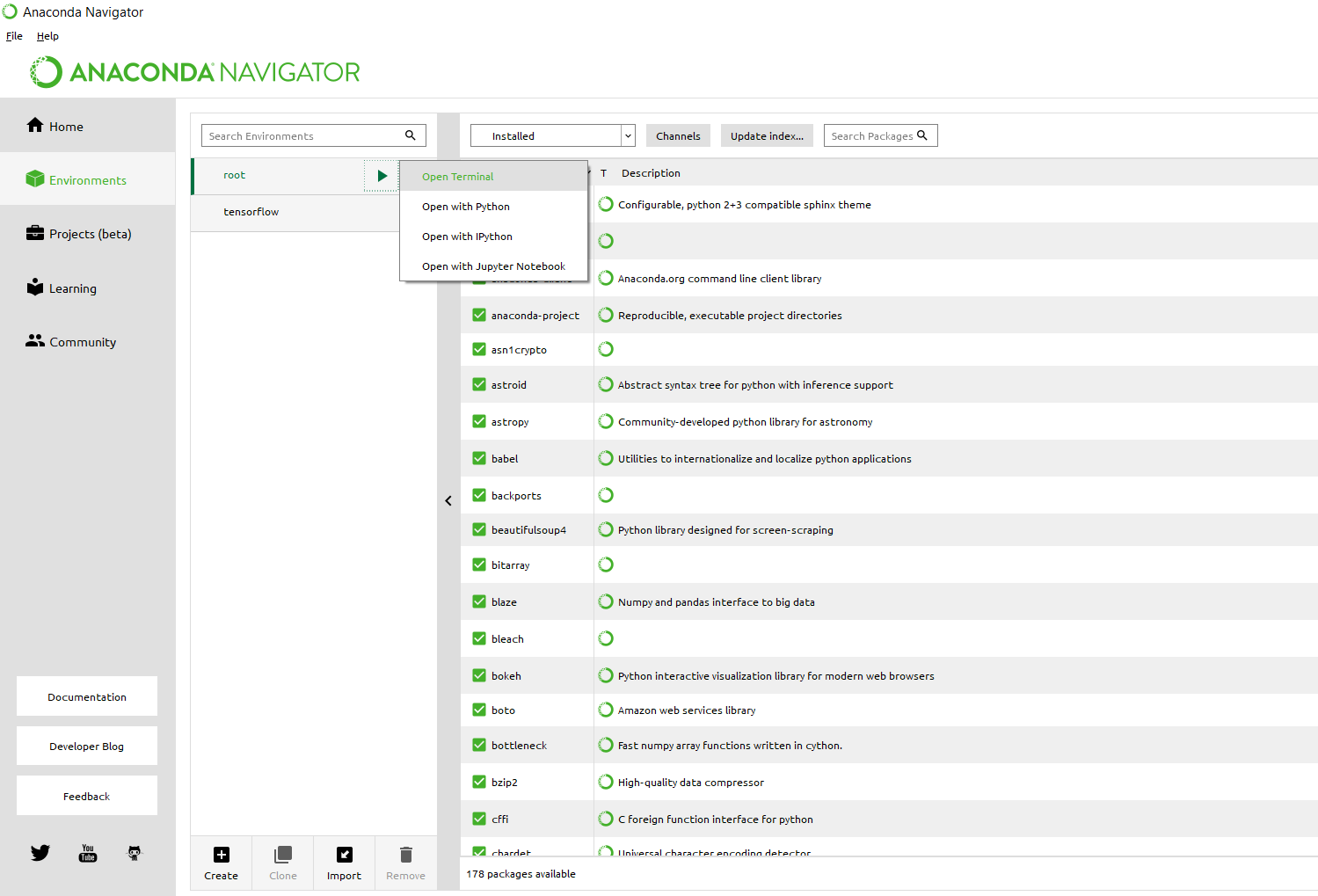
    If you’ve tried installing Tensorflow for Windows when it was first introduced, and gave up back then – try again. The method I’d recommend would be using Anaconda Navigator from where you first open a terminal (figure below). You may notice that I already have a tensorflow environment set up, since I am writing this post after installation.

    anaconda navigator

    Once you have terminal open, create a conda environment named tensorflow by invoking the following command, with your python version:

    C:> conda create -n tensorflow python=3.6

    That’s all! You should now have tensorflow ready to use.

    For more details, you could always go here. Otherwise, the screenshot below gives a sense of what it takes.

    tensorflow installed


  • Linear / Logistic Regression in R: Dealing With Unknown Factor Levels in Test Data

    Linear / Logistic Regression in R: Dealing With Unknown Factor Levels in Test Data

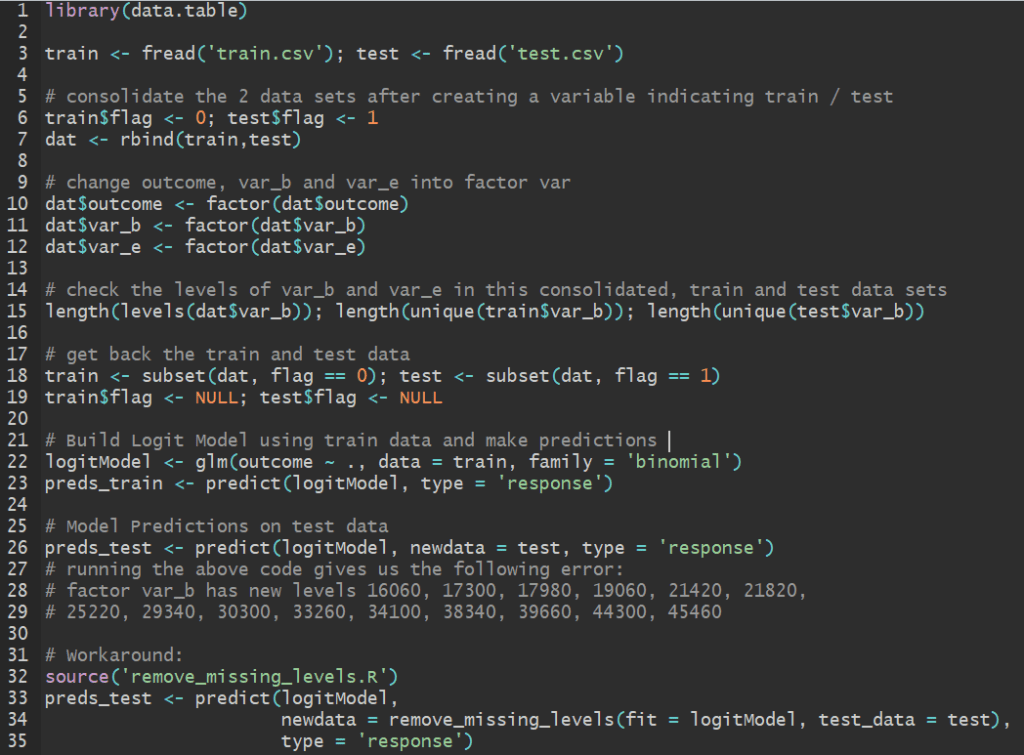
    Let’s say you have data containing a categorical variable with 50 levels. When you divide the data into train and test sets, chances are you don’t have all 50 levels featuring in your training set.

    This often happens when you divide the data set into train and test sets according to the distribution of the outcome variable. In doing so, chances are that our explanatory categorical variable might not be distributed exactly the same way in train and test sets – so much so that certain levels of this categorical variable are missing from the training set. The more levels there are to a categorical variable, it gets difficult for that variable to be similarly represented upon splitting the data.

    Take for instance this example data set (train.csv + test.csv) which contains a categorical variable var_b that takes 349 unique levels. Our train data has 334 of these levels – on which the model is built – and hence 15 levels are excluded from our trained model. If you try making predictions on the test set with this model in R, it throws an error:
    factor var_b has new levels 16060, 17300, 17980, 19060, 21420, 21820,
    25220, 29340, 30300, 33260, 34100, 38340, 39660, 44300, 45460

    If you’ve used R to model generalized linear class of models such as linear, logit or probit models, then chances are you’ve come across this problem – especially when you’re validating your trained model on test data.

    The workaround to this problem is in the form of a function, remove_missing_levels  that I found here written by pat-s. You need magrittr library installed and it can only work on lm, glm and glmmPQL objects.

    remove_missing_levels <- function(fit, test_data) {
    library(magrittr)
    # https://stackoverflow.com/a/39495480/4185785
    # drop empty factor levels in test data
    test_data %>%
    droplevels() %>%
    as.data.frame() -> test_data
    # 'fit' object structure of 'lm' and 'glmmPQL' is different so we need to
    # account for it
    if (any(class(fit) == "glmmPQL")) {
    # Obtain factor predictors in the model and their levels
    factors <- (gsub("[-^0-9]|as.factor|\\(|\\)", "",
    names(unlist(fit$contrasts))))
    # do nothing if no factors are present
    if (length(factors) == 0) {
    return(test_data)
    }
    map(fit$contrasts, function(x) names(unmatrix(x))) %>%
    unlist() -> factor_levels
    factor_levels %>% str_split(":", simplify = TRUE) %>%
    extract(, 1) -> factor_levels
    model_factors <- as.data.frame(cbind(factors, factor_levels))
    } else {
    # Obtain factor predictors in the model and their levels
    factors <- (gsub("[-^0-9]|as.factor|\\(|\\)", "",
    names(unlist(fit$xlevels))))
    # do nothing if no factors are present
    if (length(factors) == 0) {
    return(test_data)
    }
    factor_levels <- unname(unlist(fit$xlevels))
    model_factors <- as.data.frame(cbind(factors, factor_levels))
    }
    # Select column names in test data that are factor predictors in
    # trained model
    predictors <- names(test_data[names(test_data) %in% factors])
    # For each factor predictor in your data, if the level is not in the model,
    # set the value to NA
    for (i in 1:length(predictors)) {
    found <- test_data[, predictors[i]] %in% model_factors[
    model_factors$factors == predictors[i], ]$factor_levels
    if (any(!found)) {
    # track which variable
    var <- predictors[i]
    # set to NA
    test_data[!found, predictors[i]] <- NA
    # drop empty factor levels in test data
    test_data %>%
    droplevels() -> test_data
    # issue warning to console
    message(sprintf(paste0("Setting missing levels in '%s', only present",
    " in test data but missing in train data,",
    " to 'NA'."),
    var))
    }
    }
    return(test_data)
    }

    Once you’ve sourced the above function in R, you can seamlessly proceed with using your trained model to make predictions on the test set. The code below demonstrates this for the data set shared above. You can find these codes in one of my github repos and try it out yourself.

    library(data.table)
    train <- fread('train.csv'); test <- fread('test.csv')
    # consolidate the 2 data sets after creating a variable indicating train / test
    train$flag <- 0; test$flag <- 1
    dat <- rbind(train,test)
    # change outcome, var_b and var_e into factor var
    dat$outcome <- factor(dat$outcome)
    dat$var_b <- factor(dat$var_b)
    dat$var_e <- factor(dat$var_e)
    # check the levels of var_b and var_e in this consolidated, train and test data sets
    length(levels(dat$var_b)); length(unique(train$var_b)); length(unique(test$var_b))
    # get back the train and test data
    train <- subset(dat, flag == 0); test <- subset(dat, flag == 1)
    train$flag <- NULL; test$flag <- NULL
    # Build Logit Model using train data and make predictions
    logitModel <- glm(outcome ~ ., data = train, family = 'binomial')
    preds_train <- predict(logitModel, type = 'response')
    # Model Predictions on test data
    preds_test <- predict(logitModel, newdata = test, type = 'response')
    # running the above code gives us the following error:
    # factor var_b has new levels 16060, 17300, 17980, 19060, 21420, 21820,
    # 25220, 29340, 30300, 33260, 34100, 38340, 39660, 44300, 45460
    # Workaround:
    source('remove_missing_levels.R')
    preds_test <- predict(logitModel,
    newdata = remove_missing_levels(fit = logitModel, test_data = test),
    type = 'response')

  • Quick Way of Installing all your old R libraries on a New Device

    Quick Way of Installing all your old R libraries on a New Device

    I recently bought a new laptop and began installing essential software all over again, including R of course! And I wanted all the libraries that I had installed in my previous laptop. Instead of installing libraries one by one all over again, I did the following:

    Step 1: Save a list of packages installed in your old computing device (from your old device).


    installed <- as.data.frame(installed.packages())
    write.csv(installed, 'installed_previously.csv')

    This saves information on installed packages in a csv file named installed_previously.csv. Now copy or e-mail this file to your new device and access it from your working directory in R.

    Step 2: Create a list of libraries from your old list that were not already installed when you freshly download R (from your new device).


    installedPreviously <- read.csv('installed_previously.csv')
    baseR <- as.data.frame(installed.packages())
    toInstall <- setdiff(installedPreviously, baseR)

    We now have a list of libraries that were installed in your previous computer in addition to the R packages already installed when you download R. So you now go ahead and install these libraries.

    Step 3: Download this list of libraries.


    install.packages(toInstall)

    That’s it. Save yourself the trouble installing packages one-by-one all over again.

    installing_libraries_R

  • Key Insights on Sberbank Home Price Predicting Kaggle Competition Coming Soon…

    Key Insights on Sberbank Home Price Predicting Kaggle Competition Coming Soon…

    This post is more about data science and Kaggle than about R or Python. I am currently taking part in my 2nd Kaggle competition, Sberbank Russian Housing Market — Can you predict realty price fluctuations in Russia’s volatile economy?

    I’ve been stuck for about a week at the 52nd percentile among 3400+ Kagglers taking part in the competition. I’ve been told that Kaggle Kernels and discussion boards are helpful when you’re stuck or if you need to learn some practical data science that can’t be gleaned from books or tutorials.

    One such discussion thread looks like this:


    screenshot-www.kaggle.com-2017-06-29-12-34-08

    This person going by the pseudonym Schoolpal is currently killing it on the leaderboard and I’m eagerly looking forward to this person’s code once the competition ends in less than 24 hours. If you’re interested too, follow this discussion here.

    Cheers!

    Update:

    This Schoolpal, as mentioned earlier, finally came in second and shared their approach here.

    screenshot-www.kaggle.com-2017-06-30-09-52-21