|
## if fxregime is absent from installed packages, download it and load it |
|
if(!require('fxregime')){ |
|
install.packages("fxregime") |
|
} |
|
## load package |
|
library("fxregime") |
|
# load the necessary data related to exchange rates - 'FXRatesCHF' |
|
# this dataset treats CHF as unit currency |
|
|
|
# install / load Quandl |
|
if(!require('Quandl')){ |
|
install.packages("Quandl") |
|
} |
|
library(Quandl) |
|
|
|
# Extract and load currency data series with respect to CHF from Quandl |
|
|
|
# Extract data series from Quandl. Each Quandl user will have unique api_key |
|
# upon signing up. The freemium version allows access up to 10 fx rate data sets |
|
# USDCHF <- Quandl("CUR/CHF", api_key="p2GsFxccPGFSw7n1-NF9") |
|
# write.csv(USDCHF, file = "USDCHF.csv") |
|
|
|
# USDCNY <- Quandl("CUR/CNY", api_key="p2GsFxccPGFSw7n1-NF9") |
|
# write.csv(USDCNY, file = "USDCNY.csv") |
|
|
|
# USDJPY <- Quandl("CUR/JPY", api_key="p2GsFxccPGFSw7n1-NF9") |
|
# write.csv(USDJPY, file = "USDJPY.csv") |
|
|
|
# USDEUR <- Quandl("CUR/EUR", api_key="p2GsFxccPGFSw7n1-NF9") |
|
# write.csv(USDEUR, file = "USDEUR.csv") |
|
|
|
# USDGBP <- Quandl("CUR/GBP", api_key="p2GsFxccPGFSw7n1-NF9") |
|
# write.csv(USDGBP, file = "USDGBP.csv") |
|
|
|
# load the data sets into R |
|
|
|
USDCHF <- read.csv("G:/China's Economic Woes/USDCHF.csv") |
|
USDCHF <- USDCHF[,2:3] |
|
USDCNY <- read.csv("G:/China's Economic Woes/USDCNY.csv") |
|
USDCNY <- USDCNY[,2:3] |
|
USDEUR <- read.csv("G:/China's Economic Woes/USDEUR.csv") |
|
USDEUR <- USDEUR[,2:3] |
|
USDGBP <- read.csv("G:/China's Economic Woes/USDGBP.csv") |
|
USDGBP <- USDGBP[,2:3] |
|
USDJPY <- read.csv("G:/China's Economic Woes/USDJPY.csv") |
|
USDJPY <- USDJPY[,2:3] |
|
|
|
start = 1 # corresponds to 2016-05-12 |
|
end = 2272 # corresponds to 2010-02-12 |
|
|
|
dates <- as.Date(USDCHF[start:end,1]) |
|
USD <- 1/USDCHF[start:end,2] |
|
CNY <- USDCNY[start:end,2]/USD |
|
JPY <- USDJPY[start:end,2]/USD |
|
EUR <- USDEUR[start:end,2]/USD |
|
GBP <- USDGBP[start:end,2]/USD |
|
|
|
# reverse the order of the vectors to reflect dates from 2005 - 2010 instead of |
|
# the other way around |
|
|
|
USD <- USD[length(USD):1] |
|
CNY <- CNY[length(CNY):1] |
|
JPY <- JPY[length(JPY):1] |
|
EUR <- EUR[length(EUR):1] |
|
GBP <- GBP[length(GBP):1] |
|
dates <- dates[length(dates):1] |
|
|
|
df <- data.frame(CNY, USD, JPY, EUR, GBP) |
|
df$weekday <- weekdays(dates) |
|
row.names(df) <- dates |
|
df <- subset(df, weekday != 'Sunday') |
|
df <- subset(df, weekday != 'Saturday') |
|
df <- df[,1:5] |
|
zoo_df <- as.zoo(df) |
|
|
|
|
|
# Code to replicate analysis |
|
cny_rep <- fxreturns("CNY", data = zoo_df, frequency = "daily", |
|
other = c("USD", "JPY", "EUR", "GBP")) |
|
time(cny_rep) <- as.Date(row.names(df)[2:1627]) |
|
regx_rep <- fxregimes(CNY ~ USD + JPY + EUR + GBP, |
|
data = cny_rep, h = 100, breaks = 10, ic = "BIC") |
|
|
|
|
|
summary(regx_rep) |
|
|
|
## minimum BIC is attained for 2-segment (5-break) model |
|
plot(regx_rep) |
|
round(coef(regx_rep), digits = 3) |
|
sqrt(coef(regx_rep)[, "(Variance)"]) |
|
|
|
## inspect associated confidence intervals |
|
cit_rep <- confint(regx_rep, level = 0.9) |
|
breakdates(cit_rep) |
|
|
|
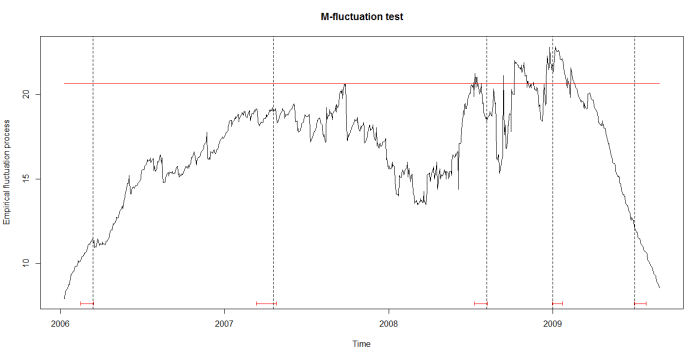
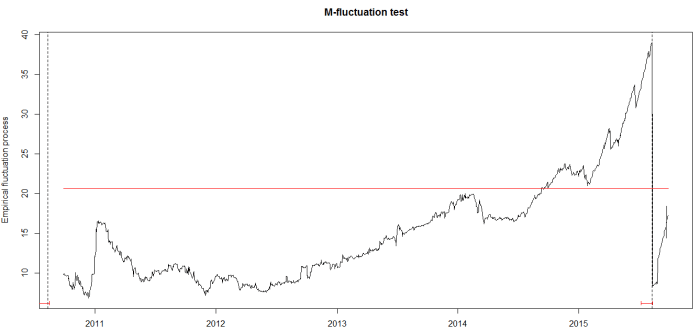
## plot LM statistics along with confidence interval |
|
flm_rep <- fxlm(CNY ~ USD + JPY + EUR + GBP, data = cny_rep) |
|
scus_rep <- gefp(flm_rep, fit = NULL) |
|
plot(scus_rep, functional = supLM(0.1)) |
|
## add lines related to breaks to your plot |
|
lines(cit_rep) |
|
|
|
apply(cny_rep,1,function(x) sum(is.na(x))) |
 Discovering Python & R