MOOC Review: Introduction to Computer Science and Programming Using Python (6.00.1x)

I enrolled in Introduction to Computer Science and Programming Using Python with the primary objective of learning to code using Python. This course, as the name suggests, is more than just about Python. It uses Python as a tool to teach computational thinking and serves as an introduction to computer science. The fact that it is a course offered by MIT, makes it special.

As a matter of fact, this course is aimed at students with little or no prior programming experience who feel the need to understand computational approaches to problem solving. Eric Grimson is an excellent teacher (also Chancellor of MIT) and he delves into the subject matter to a surprising amount of detail.

The video lectures are based on select chapters from an excellent book by John Guttag. While the book isn’t mandatory for the course (the video lectures do a great job of explaining the material on their own), I benefited greatly from reading the textbook. There are a couple of instances where the code isn’t presented properly in the slides (typos or indentation gone wrong when pasting code to the slides), but the correct code / study material can be found in the textbook. Also, for explanations that are more in-depth, the book comes in handy.

Introduction to Computation and Programming Using Python

MIT offers this course in 2 parts via edX. While 6.00.1x is is an introduction to computer science as a tool to solve real-world analytical problems, 6.00.2x is an introduction to computation in data science. For a general look and feel of the course, this OCW link may be a good starting point. It contains material including video lectures and problem sets that are closely related to 6.00.1x and 6.00.2x.

Each week’s material of 6.00.1x consists of 2 topics, followed by a Problem Set. Problem Sets account for 40% of your grade. Video lectures are followed by finger exercises that can be attempted any number of times. Finger exercises account for 10% of your grade. The Quiz (kind of like a mid-term exam) and the Final Exam account for 25% each. The course is of 8 weeks duration and covers the following topics (along with corresponding readings from John Guttag’s textbook).

course_structure_till_quiz

course_structure_till_final

From the questions posted on forums, it was apparent that the section of this course that most people found challenging, was efficiency and orders of growth – and in particular, the Big-O asymptotic notation and problems on algorithmic complexity.

Lectures on Classes, Inheritance and Object Oriented Programming (OOP) were covered really well in over 100 minutes of video time. I enjoyed the problem set that followed, requiring the student to build an Internet news filter alerting the user when it noticed a news story that matched that user’s interests.

The final week had lectures on the concept of Trees, which were done hurriedly when compared to the depth of detail the instructor had earlier gone to, while explaining concepts from previous weeks. However, this material was covered quite well in Guttag’s textbook and the code for tree search algorithms was provided for perusal as part of the courseware.

At the end of the course, there were some interesting add-on videos to tickle the curiosity of the learner on the applications of computation in diverse fields such as medicine, robotics, databases and 3D graphics.

The Wiki tab for this course (in the edX platform) is laden with useful links to complement each week of lectures. I never got around to reading those, but I’m going through them now, and they’re quite interesting. It’s a section that nerds would love to skim through.

I learnt a great deal from this course (scored well too) putting in close to 6-hours-a-week of study. It is being offered again on August 26, 2015. In the mean time, I’m keeping my eyes open for MIT’s data science course (6.00.2x) which is likely to be offered in October, in continuation to 6.00.1x.
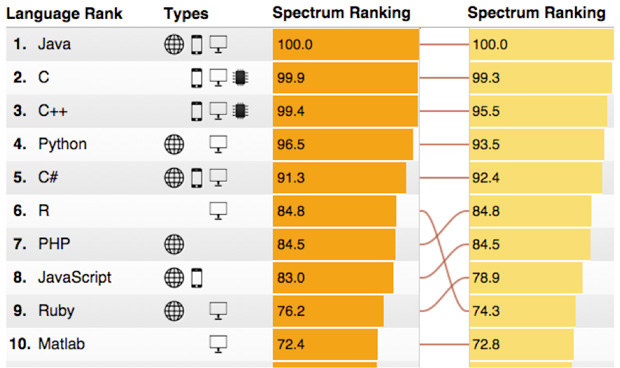
R — The Big Mover in IEEE Spectrum’s 2015 Rankings for Top 10 Programming Languages

The column on the left is the 2015 ranking; the column on the right is the 2014 ranking for comparison:

top-tech-rankings

source: The 2015 Top Ten Programming Languages

The thing to note is that the top 5 languages haven’t budged from their positions. R has pushed past PHP, JavaScirpt and Ruby, which have maintained their relative positions.  So this year’s rankings have been about R moving forward.

Object Oriented Programing with Python – Particle Diffusion Simulation

I’m a newbie to the programming world. I first started programming in Python in May this year, a month after I started this blog, so I still haven’t learnt enough to contribute to economics as is the stated goal of this blog. But I know I’ll get there in a year or less.

This blog was also meant to document my learning. In May, I would have called myself Newb v0.0. Today, 3 months later, I’d like to call myself Newb v0.3 and the goal is to be at least Expert v1.0 by January 2016.

With the help of Rice University’s awesome classes on Python programming I created a cool simulation of particles diffusing into space, using the concept of Classes, which I learnt just yesterday!

Click to check out the code !

Screenshot from 2015-07-23 11:49:00

Screenshot from 2015-07-23 11:49:10

Screenshot from 2015-07-23 11:49:39

Skillset Necessary for Data Science

I came across this truly amazing visualization of what it takes to foray into data science by @kzawadz via twitter MarketingDistillery.com

data science

Which Programming Language Should I Learn First? [Infographic]

Here’s a pretty interesting flow chart to determine which programming language would suit you:

Which Programming Language Should I Learn First? [Infographic].

or

Click here for the PDF

Number of Inversions in an Unsorted Array: Python Code

This is my solution to the first programming assignment of Tim Roughgarden’s course on Algorithms  that was due 12:30 PM IST today. Here’s the question quoted as it is:

Programming Question-1
Download the text file here. (Right click and save link as) This file contains all of the 100,000 integers between 1 and 100,000 (inclusive) in some order, with no integer repeated.

Your task is to compute the number of inversions in the file given, where the ith row of the file indicates the ith entry of an array.
Because of the large size of this array, you should implement the fast divide-and-conquer algorithm covered in the video lectures. The numeric answer for the given input file should be typed in the space below.
So if your answer is 1198233847, then just type 1198233847 in the space provided without any space / commas / any other punctuation marks. You can make up to 5 attempts, and we’ll use the best one for grading.
(We do not require you to submit your code, so feel free to use any programming language you want — just type the final numeric answer in the following space.)

My Solution

I modified an earlier code I wrote for merge sort to arrive at the solution. It needed just a couple of modifications, and if you look carefully, it turns out that the number of inversions are unearthed each and every time we merge two sorted sub-arrays. So, intuitively, if the merge sort algorithm was O(nlog2 n), it would take almost as many operations for counting inversions. In python, the code to sort and count inversions in an array of 10,000 integers took less than 3 seconds.

# load contents of text file into a list
# numList
NUMLIST_FILENAME = "IntegerArray.txt"
inFile = open(NUMLIST_FILENAME, 'r')
with inFile as f:
numList = [int(integers.strip()) for integers in f.readlines()]
count = 0
def inversionsCount(x):
global count
midsection = len(x) / 2
leftArray = x[:midsection]
rightArray = x[midsection:]
if len(x) > 1:
# Divid and conquer with recursive calls
# to left and right arrays similar to
# merge sort algorithm
inversionsCount(leftArray)
inversionsCount(rightArray)
# Merge sorted sub-arrays and keep
# count of split inversions
i, j = 0, 0
a = leftArray; b = rightArray
for k in range(len(a) + len(b) + 1):
if a[i] <= b[j]:
x[k] = a[i]
i += 1
if i == len(a) and j != len(b):
while j != len(b):
k +=1
x[k] = b[j]
j += 1
break
elif a[i] > b[j]:
x[k] = b[j]
count += (len(a) - i)
j += 1
if j == len(b) and i != len(a):
while i != len(a):
k+= 1
x[k] = a[i]
i += 1
break
return x
# call function and output number of inversions
inversionsCount(numList)
print count

Test my solution here with your own test cases.

The Merge Sort — Python Code

I have just begun working on a MOOC on algorithms offered by Stanford. Since this course gives us the liberty to choose a programming language, there isn’t any code discussed in those lectures. I plan to convert any algorithm discussed in those lectures into Python code. Since Merge Sort was the first algorithm discussed, I’m starting with that.

Merge Sort is supposedly a good introduction to divide and conquer algorithms, greatly improving upon selection, insertion and bubble sort techniques, especially when input size increases.

Pseudocode:

— Recursively sort the first half of the input array.
— Recursively sort the second half of the input array.
— Merge two sorted sub-lists into one list.

C = output [length = n]
A = 1st sorted array [n/2]
B = 2nd sorted array [n/2]
i = 0 or 1 (depending on the programming language)
j = 0 or 1 (depending on the programming language)

for k = 1 to n

if A(i) < B(j)
C(k) = A(i)
i = i + 1

else if A(i) > B(j)
C(k) = B(j)
j = j + 1

Note: the pseudocode for the merge operation ignores the end cases.

Visualizing the algorithm can be done in 2 stages — first, the recursive splitting of the arrays, 2 each 2 at a time, and second, the merge operation.

Merge-sort-example-300px MergeSort

Here’s the Python code to merge sort an array.

# Code for the merge subroutine
def merge(a,b):
""" Function to merge two arrays """
c = []
while len(a) != 0 and len(b) != 0:
if a[0] < b[0]:
c.append(a[0])
a.remove(a[0])
else:
c.append(b[0])
b.remove(b[0])
if len(a) == 0:
c += b
else:
c += a
return c
# Code for merge sort
def mergesort(x):
""" Function to sort an array using merge sort algorithm """
if len(x) == 0 or len(x) == 1:
return x
else:
middle = len(x)/2
a = mergesort(x[:middle])
b = mergesort(x[middle:])
return merge(a,b)
view raw mergesort.py hosted with ❤ by GitHub

We can divide a list in half log2 n times where n is the length of the list. The second process is the merge. Each item in the list will eventually be processed and placed on the sorted list. So the merge operation which results in a list of size n requires n operations. The result of this analysis is that log2 n splits, each of which costs n for a total of nlog2 n operations.

Other Algorithms:
Karatsuba Integer Multiplication Algorithm
Quick Sort Python Code

Review: An Introduction to Interactive Programming in Python (Part 1)

This class (Part 1 of a 2-part course on interactive programming using Python – and the first course of the Fundamentals of Computing Specialization offered by RICE Unviersity) was an excellent introduction to programming because of its focus on building interactive (and fun) applications with the lessons learned each week. Most introductory coding classes start with text based (boring?) programs, while all through this course you’re required to build a series of projects that get progressively complicated with every passing week. I’m not to be mistaken to be trashing conventional pedagogy, but then again, how many gifted coders do you know who learned to code after completing all the exercises, cover-to-cover of some programming textbook? The best way to learn to enjoy coding would be to build interactive stuff, and this course scores full points on that.

A short introduction to the class in a charmingly nerdy way

The mini-projects / assignments during the course are implemented on a cloud-based environment called CodeSkulptor (built by Scott Rixner, one of the instructors for this course). I found CodeSkulptor unique, in that it allows you to share your code (because it’s browser based) with just about anyone with an Internet connection and makes you work with a graphic user interface (GUI) module similar to Pygame, called Simplegui. It also had a debugging tool, called Viz Mode that helped visualize the process. It eases the task of debugging your code and you’ll realize how cool it is as you start using it more.

Since the course mini-projects were peer-reviewed, evaluating other people’s code also became a more straight-jacket affair, as everyone has their code on the same version of Python. This ensures that the focus is on learning to code, without wasting time on the logistics of programming environment (tuning differences in versions or IDEs). I especially enjoyed peer grading – for each mini project we completed, we had to evaluate and grade the work of 5 others. This was very rewarding – because I got the opportunity to fix bugs in others’ code (which makes you a better coder, I guess) and also got to see better implementations than the ones I had coded, further enriching the learning experience. Indeed, the benefits of peer grading and assessment have been well studied and documented.

Of all the assignments, the one I loved the most was implementing the classic arcade game Pong. You could try playing a version of the game I implemented here. It is a 2-player implementation, but you can play it as a single-player game, only if you imagine yourself to be answering this somewhat cheeky question! Which Pong character are you? Left or Right?

which pong

Which_Pong_Charater_Are_you

Pong v1.1

The principal reason behind my joining this course was the way it is structured and taught. We had to watch two sets of videos (part a and part b) and then complete one quiz for each set. The main task for each week was to complete a mini-project that was due along with the quizzes early Sunday morning, followed by assessment of peers’ mini-projects on the following Sunday-Wednesday. The instructors clearly put in A LOT OF WORK to make the lecture videos interesting, laced with humor, with just enough to get you going on your own with the week’s mini-project. That way you’d spend less time viewing the lecture videos, spending more time on actually getting the code for your mini-project to work. So in a way, one might say this course doesn’t follow standard pedagogy for an introductory programming course, but then, as Scott Rixner assures, “You’d know enough to be dangerous!

The projects that were completed in Part 1 of this course were indeed exciting:

Rock Paper Scissors Lizard Spock: A simple implementation played with the computer. This project covers basics on statements, expressions and variables, functions, logic and conditionals [I’m a huge fan of The Big Bang Theory, so I was obviously eager to complete this game. Instead of a series of if-elif-else clauses, this implementation used modular logic, all of which is taught in a really fun way. A great way to start off the course].
Guess the Number: Computer chooses a random number between 1 and 100 and you guess that number. It covered event-driven programming, local and global variables, buttons and input fields [This game although fun, might have been more interesting to code if the computer had to guess the number that the player chose, using bisection search].
Stopwatch: This was the first project that used a graphic user interface, using some modular arithmetic to get the digits of the ticking seconds in place. A game was also built on it where the player had to stop the watch right at the start of a second to score points. This game tested your reaction-time. It covered static drawing, timers and interactive drawing.
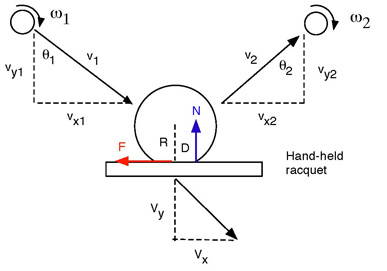
Pong: The last project of Part 1 and the most fun. Creating the game required only a minor step-up from learnings from previous weeks. It covered knowledge of lists, keyboard input, motion, positional/velocity control. Coding the ball physics where you put to use high-school physics knowledge of elasticity and collisions was very enjoyable. In my game, I set elasticity = 1 (for perfectly elastic collisions)

BallBounce

In an interview with the founders of this MOOC, who spent they say that they spent over 1000 hours building it (Part 1 and Part 2 combined, I guess). That’s an awful lot of effort and it all shows in how brilliantly the class is executed. The support system in the class is excellent. You’ll always find help available within minutes of posting your doubts and queries on the forums. I’ve seen Joe Warren (one of the main instructors of the course) replying to forum posts quite regularly. In addition, there was enough supplementary material in the form of pages on concepts and examples, practice exercises, and video content created by students from previous iterations of the class to better explain concepts and aspects of game-building, improving upon the lecture material.

Concepts and Examples

Concepts_and_examples

Practice Exercises

Practice_exercises

Student-created Videos Explaining Concepts

Student_created_videos

Overall, I had a great learning experience. I completed Part 1 with a 100 per cent score even though I had a minor hiccup while building the game Pong, which was the most satisfying of all the projects in Part 1. I would review Part 2 when I’m done with that in August this year. I’d easily recommend this course to anyone wishing to start off with Python. It is a great place to be introduced to Python, but it shouldn’t be your ONLY resource. I have been taking MIT’s 6.01x introductory Python course side-by-side. I shall review that course as soon as I’m through with it. That course is pedagogically more text-bookish, and indeed they do profess the use of their textbook to complement the course. I’m 4 weeks into that course and finding that enjoyable too – albeit in a different way. I still haven’t lost a point on any of the assignments or finger exercises there, and hope the trend continues:

CourseProgressTillQuiz

PS: In one of the forum threads, Joe posted a list of resources that could be referred to in addition to the class.

Additional_Resources

Python Books:

Another List of Books:

  • http://pythonbooks.revolunet.com/  – about 50 books –  Another good list of free python books that is kept up to date, and I believe are all free or open-source: (I won’t repeat all the books on the list here, just go check it out! Some are also on the list above, but not all)


Further Online Learning:

How to become a programmer, or the art of Googling well

This should serve as encouragement to all and sundry. Stop wasting time getting intimidated and learn to code like a pro.

Featured Image: http://xkcd.com/979/

okepi's avatarokepi

*Note: Please read all italicized technical words as if they were in a foreign language.

The fall semester of my senior year, I was having some serious self-confidence issues. I had slowly come to realize that I did not, in fact, want to become a researcher. Statistics pained me, and the seemingly endless and fruitless nature of research bored me. I was someone who was driven by results – tangible products with deadlines that, upon completion, had a binary state: success, or failure. Going into my senior year, this revelation was followed by another. All of my skills thus far had been cultivated for research. If I wasn’t going into research, I had… nothing.

At a liberal arts college, being a computer science major does not mean you are a “hacker”. It can mean something as simple as, you were shopping around different departments, saw a command line for the…

View original post 1,398 more words

Code for my First Text-Based Game

I started learning Python from Learn Python the Hard Way, 10 days ago. The last scripting language I learnt was C++, but it was ages ago – and never took to it with as much interest as I am taking on Python. I learnt C++ to pass an undergraduate course in 2008, and that’s all I really wanted from it back then.

There are 52 exercises in the book, and I have finished the 36th exercise today. It required me to write code for a simple text-based game, the likes of which were people played by computer nerds in the 80’s when the GUIs weren’t as advanced as they are today. Sometimes nerds from our generation might also want to get a kick out of these text-based games, as evidenced by the following:

Here’s the python code for this text-based game you might want to try out. You can simply copy the code below into a text file, naming it something like game.py and save it to your home directory or wherever you wish to and run game.py from. Then from Terminal (CMD for Windows), type in python game.py. Of course, you need to have Python installed. If you want to learn how to create a text based game of your own, the best way would be to play such a game, simultaneously glancing at its code, understanding how the game was programmed to function. I haven’t over-complicated this one so that newbs like me could work out the map easily – and maybe add their own branches and make the game lot more interesting.

from sys import exit

def lion():
    print "You had to choose some direction and you chose West. You have been walking for miles.... and you're thirsty, and dehydrated."
    print "... you have just begun to feel you're walking into eternity when you see a T-junction. But just then you hear a ROAR!!!"
    print "You turn back to see a giant lion, miles away, running after you at great speed. You just have time to react. What now?"
    
    do_what = raw_input("> ")
    
    if "left" in do_what or "south" in do_what:
        print "Unfortunately for you, the lion catches up and rips you to shreds. You feel intense pain, yet you can't die. This is hell." 
        dead()
    elif "right" in do_what or "north" in do_what:
        print "You find a portal to another dimension. Could this be a trap? Or should you take that chance? What do you do?"
        do_what = raw_input("> ")
        if "portal" in do_what:
            cthulhu()
        else:
            dead()
    else:
        dead()

def princess():
    print "You have been walking for miles... and this is geting frustrating. Will this road ever end?"
    print "A dagger falls from the skies abvoe. What do you do?"
    do_what = raw_input("> ")
    if "dagger" in do_what or "pick" in do_what:
        print "lo and behold! A beautiful princess stands before you."
        print "A diamond on the hilt of your dagger turns the color of her eyes. This is a clue."
        what_color = raw_input("Do you see the color or blood?\n> ")
        print "... are you sexually attracted to her?"
        sexually_attracted = raw_input("> ")
        print "You'll have to make a choice. You can either go kiss in a warm embrace or kill her with your dagger. Which will it be?"
        your_choice = raw_input("> ")
        if "yes" in what_color or "blood" in what_color:
            if "kill" in your_choice:
                win()
            else:
                dead()
        elif "yes" in sexually_attracted:
            if "kiss" in your_choice:
                print "You have been betrayed by your lecherous lust. This goddess of desire turns into a dragon and burns you to dust."
                dead()
            else:
                win()
                
        elif "no" in sexually_attracted:
                if "kill" in your_choice:
                    print "What a muderous and sinful thing you did."
                    dead()
                else:
                    win()
        else:
            dead()
    else:
        print "You should have picked up the dagger. You never know what might be coming..."
        print "...but what do we have here!? A beautiful maiden! She looks like royalty. In fact she is a princess!"
        print "... are you sexually attracted to her?"   
        sexually_attracted = raw_input("> ")
        if "yes" in sexually_attracted:
            print "You have been betrayed by your lecherous lust. This goddess of desire turns into a dragon and burns you to dust."
            dead()
        else:
            print "The princess gives you a magic potion that can grant you any boon."
            print "You ask for all the happiness and riches of the world"
            win()                        


def prince():
    print "You have been walking for miles... and this is geting frustrating. Will this road ever end?"
    print "A dagger falls from the skies abvoe. What do you do?"
    do_what = raw_input("> ")
    if "dagger" in do_what or "pick" in do_what:
        print "lo and behold! A handsome prince stands before you."
        print "A diamond on the hilt of your dagger turns the color of his hair. This is a clue."
        what_color = raw_input("Do you see the color or blood?\n> ")
        print "... are you sexually attracted to him?"
        sexually_attracted = raw_input("> ")
        print "You'll have to make a choice. You can either go kiss in a warm embrace or kill him with your dagger. Which will it be?"
        your_choice = raw_input("> ")
        if "yes" in what_color or "blood" in what_color:
            if "kill" in your_choice:
                win()
            else:
                dead()
        elif "yes" in sexually_attracted:
            if "kiss" in your_choice:
                print "You have been betrayed by your lecherous lust. This god of desire turns into a dragon and burns you to dust."
                dead()
            else:
                win()
                
        elif "no" in sexually_attracted:
                if "kill" in your_choice:
                    print "What a muderous and sinful thing you did."
                    dead()
                else:
                    win()
        else:
            dead()
    else:
        print "You should have picked up the dagger. You never know what might be coming..."
        print "...but what do we have here!? A handsome prince!"
        print "... are you sexually attracted to him?"   
        sexually_attracted = raw_input("> ")
        if "yes" in sexually_attracted:
            print "You have been betrayed by your lecherous lust. This god of desire turns into a dragon and burns you to dust."
            dead()
        else:
            print "The prince gives you a magic potion that can grant you any boon."
            print "You ask for all the happiness and riches of the world"
            win()                        


def cthulhu():
    print "You walk for miles into what seems like an endless abyss. And then he presents himself. The evil Cthulhu."
    print "He, it, or whatever - stares at you and you go insane."
    print "Do you flee for your life or eat your head?"
    
    next = raw_input("> ")
    
    if "flee" in next:
        start()
    elif "head" in next:
        cthulhu()
        
def win():
    print "You made an excellent choice. You win. You are magically transported to your time, your world."
    print "Exit? (y / n)"
    exit = raw_input("> ")
    if "y" in exit or "Y" in exit:
        exit(0)
    else:
        start()        


def dead():
    print "Wrong move friend. You shall be lost forever into the infinite abyss of the tree of the undead."
    exit(0)

def start():
    print "You are walking through an enchanted forest with gigantic trees as tall as mountains and as thick as large lakes."
    print "You got here magically teleported into a distant planet in a distant galaxy in the future."
    print "You see one such tree with a cave-like structure at its base. What do you do?"
    
    do_what = raw_input("> ")
    
    while True:
        if "cave" in do_what or "cave-like" in do_what or "enter" in do_what:
            print "You enter  the dark hollow of an ancient tree that has had earthlings like you in the past."
            print "This tree is called the tree of the undying, where death won't touch you."
            print "On the other hand, pain can - if you don't make the right moves. And then you have to live with the pain for eternity."
            print "You are suddenly sucked into a vortex, finding yourself at crossroads of sorts." 
            print "From here, you can go north, south, east or west."
        
            while True: 
                now_what = raw_input("> ")
                if "north" in now_what:
                    cthulhu()
                elif "south" in now_what:
                    prince()
                elif "east" in now_what:
                    princess()
                elif "west" in now_what:
                    lion()
                else:
                    print "I got no idea what you're saying. Is it that hard picking a cardinal direction?" 
        else:
            print "I got no idea what you're saying. You have no choice but to enter the cave. Now let's start over"
            start()
            

start()        

featured image source: http://xkcd.com/91/