Category: Non Technical

  • Properly Uninstalling Canopy Python Installation from Linux

    Properly Uninstalling Canopy Python Installation from Linux

    Motivation for this blog post:

    I had downloaded Canopy at the insistence of the instructors of MIT’s introductory course on computer science using Python. That said, I rarely ever used it. I’ve all along been working on Python using a text editor and command line only. I also downloaded Anaconda and started working on IPython since I began working on a new machine learning MOOC offered by the University of Washington via Coursera. Anaconda is awesome! It has all the best scientific libraries and I love IPython compared to PyCharm or Canopy, which pale in comparison to IPython, especially if you’re using Python for Machine Learning.

    Anyway, I was working on IPython, trying to import matplotlib, when I got the following ImportError:

    ImportError in importing matplotlib in IPython notebook

    I noticed that the matplotlib library was trying to be accessed in Canopy’s Enthought directory. Since I never used or liked Canopy anyway, I decided to uninstall, bitch!

    Step by step process of uninstalling Canopy from Linux:

    1) From the Canopy preferences option in the Edit menu, mark off Canopy as your default Python (this step is not available on very early versions of Canopy).

    2) Restart your computer.

    3) Remove the “~/Canopy” directory (or the directory where you installed Canopy).
    rm -rf Canopy

    4) For each Canopy user, delete one or more of the directories below, which contain that user’s “System” and “User” virtual environments, and any user macros.

    • Deleting “System” removes the environment where the Canopy GUI application runs; it will be re-created the next time that you start Canopy.
    • Deleting “User” removes all your installed Python packages; it will be re-created with only the packages bundled into the Canopy installer, the next time that you start Canopy.
    • Deleting the third directory will remove any Canopy macros which you may have written. It is usually empty. I did this from the desktop home directory itself.

    (for 32-bit Canopy, replace “64bit” with “32bit”):

    ~/Enthought/Canopy_64bit/System
    ~/Enthought/Canopy_64bit/User
    ~/canopy

    For a 64 bit system:
    cd Enthought/Canopy_64bit

    for a 32 bit system:
    cd Enthought/Canopy_32bit

    rm -rf System
    rm -rf User

    5) Delete the file “locations.cfg” from each user’s Canopy configuration / preferences directory. For complete Canopy removal, delete this directory entirely; if you do so, the user will lose individual preferences such as fonts, bookmarks, and recent file list.

    cd ~/.canopy
    cd ..
    rm -rf .canopy

    6) If you are uninstalling completely, edit the following files to delete any lines which reference Canopy (usually, the Canopy-related lines will have been commented out by step 1 but on some system configurations the lines might remain):

    For this step, refer to my blog post on opening files in a text editor from the CMD / Terminal (Using Python).

    ~/.bashrc
    ~/.bash_profile
    ~/.profile

    7) Restart your computer.

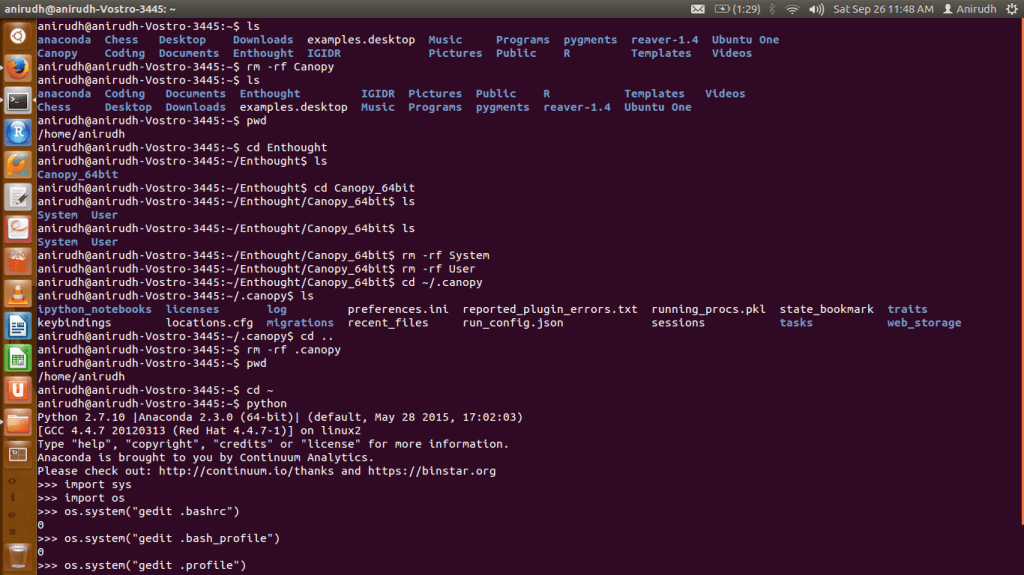
    All these steps in one:

    Screenshot from 2015-09-26 11:48:43

    Once I was done with these steps, I no longer encountered any issues importing matplotlib on IPython anymore.


    Screenshot from 2015-09-26 12:06:47

  • Opening Files in a Text Editor from the CMD / Terminal (Using Python)

    Opening Files in a Text Editor from the CMD / Terminal (Using Python)

    Motivation for this blog post:

    I recently had to edit the .bashrc file in Ubuntu and comment / delete a subset of its contents. The file .bashrc had to be located (home directory) and opened in a text editor. The file isn’t visible in the desktop environment, so it can’t be opened from there, so I had to use bash. I’m no command line expert, so I used Python to open and edit the file. I intended to open the file in gedit text editor, so I had to run Python from the directory containing .bashrc. [Click image below to enlarge]

    openGeditFromPythonInCommandPrompt

    Which opened up .bashrc

    Screenshot from 2015-09-26 13:46:01

    Put simply:

    Opening a file in text editor is a matter of two simple lines of code. First, navigate to the directory containing the file you wish to open in a text editor (such as gedit) in bash or terminal or CMD. Then type the following:


    $ python
    >>> import sys, os
    >>> os.system("<text editor> <file name with extension>")

    That’s all there is to it!

  • Machine Learning — New Coursera Specialization from the University of Washington

    Machine Learning — New Coursera Specialization from the University of Washington

    I have finally embarked on my first machine learning MOOC / Specialization. I love Python, and this course uses Python as the language of choice. Also, the instructors assert that Python is widely used in industry, and is becoming the de facto language for data science in industry. They use IPython Notebook in their assignments and videos.

    The specialization offered by the University of Washington consists of 5 courses and a capstone project spread across about 8 months (September through April). The specialization’s first iteration kicked off yesterday.

    washingtonMachineLearningThe first course, Machine Learning Foundations: A Case Study Approach is 6 weeks long, running from September 22 through November 9.

    The Instructors:

    Emily Fox and Carlos Guestrin
    EmilyFoxguestrin-dato

    Key Learning Outcomes
    – Identify potential applications of machine learning in practice.
    – Describe the core differences in analyses enabled by regression, classification, and clustering.
    – Select the appropriate machine learning task for a potential application.
    – Apply regression, classification, clustering, retrieval, recommender systems, and deep learning.
    – Represent your data as features to serve as input to machine learning models.
    – Assess the model quality in terms of relevant error metrics for each task.
    – Utilize a dataset to fit a model to analyze new data.
    – Build an end-to-end application that uses machine learning at its core.
    – Implement these techniques in Python.

    Week-by-Week
    Week 1: Introductory welcome videos and the instructors’ views on the future of intelligent applications
    Week 2: Predicting House Prices (Regression)
    Week 3: Classification (Sentiment Analysis)
    Week 4: Clustering and Similarity: Retrieving Documents
    Week 5: Recommending Products
    Week 6: Deep Learning: Searching for Images

    EDIT

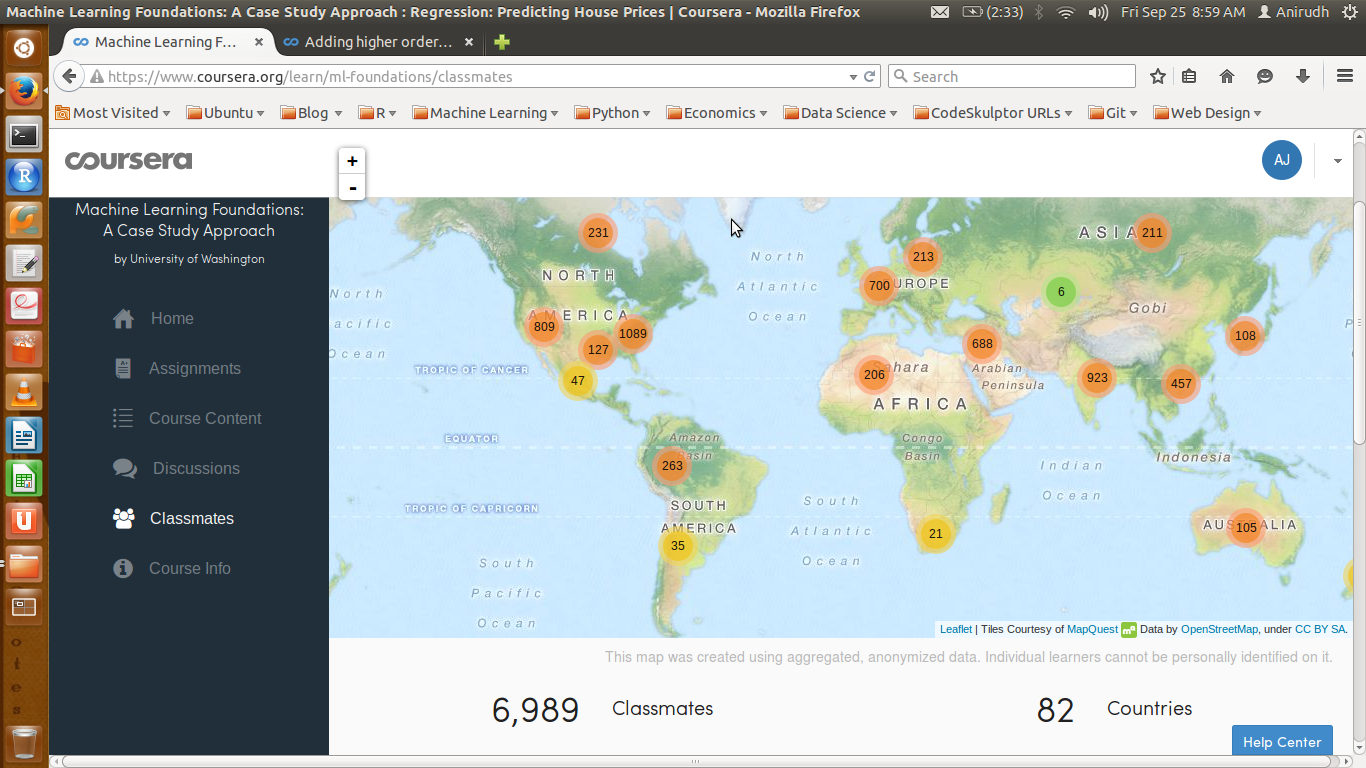
    It’s been 3 days since the course began, and here’s how the classmate demographic looks like:

    Classmates09252015

  • Magic 5-gon Ring — Project Euler (Problem 68)

    Magic 5-gon Ring — Project Euler (Problem 68)

    Yet another exciting math problem that requires an algorithmic approach to arrive at a quick solution! There is a pen-paper approach to it too, but this post assumes we’re more interested in discussing the programming angle.

    First, the problem:

    Working clockwise, and starting from the group of three with the numerically lowest external node (4,3,2 in this example), each solution can be described uniquely. For example, the above solution can be described by the set: 4,3,2; 6,2,1; 5,1,3.

    It is possible to complete the ring with four different totals: 9, 10, 11, and 12. There are eight solutions in total.

    Total Solution Set:
    9 4,2,3; 5,3,1; 6,1,2
    9 4,3,2; 6,2,1; 5,1,3
    10 2,3,5; 4,5,1; 6,1,3
    10 2,5,3; 6,3,1; 4,1,5
    11 1,4,6; 3,6,2; 5,2,4
    11 1,6,4; 5,4,2; 3,2,6
    12 1,5,6; 2,6,4; 3,4,5
    12 1,6,5; 3,5,4; 2,4,6
    By concatenating each group it is possible to form 9-digit strings; the maximum string for a 3-gon ring is 432621513.

    Problem

    Using the numbers 1 to 10, and depending on arrangements, it is possible to form 16- and 17-digit strings. What is the maximum 16-digit string for a “magic5-gon ring?

    Algorithm

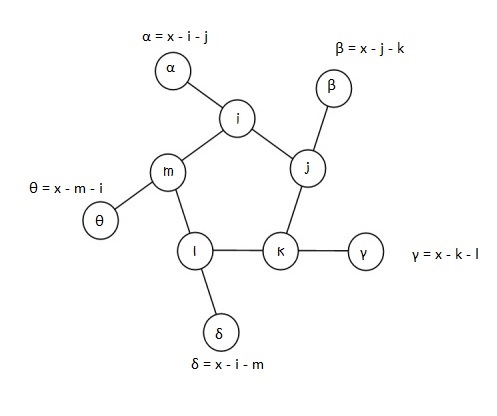
    In attempting this problem, I choose to label the 5 inner nodes as i, j, k, l, and m.
    α, β, γ, δ, and θ being the corresponding outer nodes.

    Let x be the sum total of each triplet line, i.e.,

    x = α + i + j = β + j + k = γ + k + l = δ + l + m = θ + m + i

    magic5gon

    First Observation:
    For the string to be 16-digits, 10 has to be in the outer ring, as each number in the inner ring is included in the string twice. Next, we fill the inner ring in an iterative manner.

    Second Observation:
    There 9 numbers to choose from for the inner ring — 1, 2, 3, 4, 5, 6, 7, 8 and 9.
    5 have to be chosen. This can be done in 9C5 = 126 ways.
    According to circular permutation, if there are n distinct numbers to be arranged in a circle, this can be done in (n-1)! ways, where (n-1)! = (n-1).(n-2).(n-3)…3.2.1. So 5 distinct numbers can be arranged in 4! permutations, i.e., in 24 ways around a circle, or pentagonal ring, to be more precise.
    So in all, this problem can be solved in 126×24 = 3024 iterations.

    Third Observation:
    For every possible permutation of an inner-ring arrangement, there can be one or more values of x (triplet line-sum) that serve as a possible contenders for a “magic” string whose triplets add up to the same number, x. To ensure this, we only need that the values of α through θ of the outer ring are distinct, different from the inner ring, with the greatest of these equal to 10.
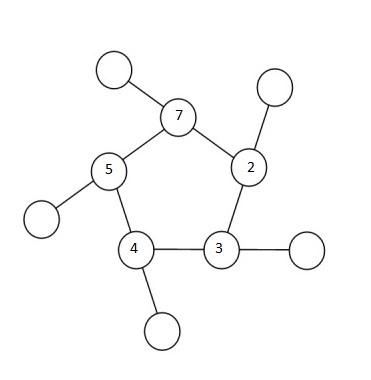
    Depending on the relative positioning of the numbers in the inner ring, one can narrow the range of x-values one might have to check for each permutation. To zero-down on such a range, let’s look at an example. Shown in the figure below is a randomly chosen permutation of number in the inner ring – 7, 2, 3, 4 and 5, in that order.

    magic5gonInstance

    So 10, 9, 8, 6 and 1 must fill the outer circle. It’s easy to notice that the 5, 7 pair is the greatest adjacent pair. So whatever x is, it has to be at least 5 + 7 + 1 = 13 (1 being the smallest number of the outer ring). Likewise,  2, 3 is the smallest adjacent pair, so whatever x is, it can’t be any more than 2 + 3+ 10 = 15 (10 being the largest number of the outer ring). This leaves us with a narrow range of x-values to check – 13, 14 and 15.

    Next, we arrange the 5 triplets in clock-wise direction starting with the triplet with the smallest number in the outer ring to form a candidate string. This exercise when done for each of the 3024 permutations will shortlist a range of candidates, of which, the maximum is chosen.

    That’s all there is to the problem!

    Here’s the Python Code. It executes in about a tenth of a second!

    from itertools import permutations
    from itertools import combinations
    # array of candidate solutions empty at the beginning
    record = []
    # choose 5 numbers for inner cells between 1 and 9; there are 9C5 combinations
    # the problem ask for a 16-digit number, so 10 is not to be included in inner cells
    cells = range(1,10)
    inner_cells = [map(int,comb) for comb in combinations(cells,5)]
    # code to calculate min and max couple in an array
    def minCouple(array):
    answer = array[0]+array[-1]
    for i in xrange(len(array)-1):
    coupleSum = array[i] + array[i+1]
    if coupleSum < answer:
    answer = coupleSum
    return answer
    def maxCouple(array):
    answer = 0
    for i in xrange(len(array)-1):
    if i==0:
    coupleSum = array[0]+ array[-1]
    if coupleSum > answer:
    answer = coupleSum
    else:
    coupleSum = array[i]+ array[i+1]
    if coupleSum > answer:
    answer = coupleSum
    return answer
    # Algorithm
    for array in inner_cells:
    pivot = array[0]
    perm_array = array[1:]
    perms = [map(int,perm) for perm in permutations(perm_array,4)]
    for perm in perms:
    checkArray = perm
    checkArray.insert(0,pivot)
    outerRing = [el for el in range(1,11) if el not in checkArray]
    xMax = minCouple(checkArray) + max(outerRing)
    xMin = maxCouple(checkArray) + min(outerRing)
    if xMax >= xMin:
    for x in xrange(xMin, xMax+1):
    i = checkArray[0]
    j = checkArray[1]
    k = checkArray[2]
    l = checkArray[3]
    m = checkArray[4]
    alpha = x-i-j
    beta = x-j-k
    gamma = x-k-l
    delta = x-l-m
    theta = x-m-i
    outerCalculated = [alpha, beta, gamma, delta, theta]
    if sorted(outerCalculated) == sorted(outerRing):
    a = [alpha, i, j]
    b = [beta, j, k]
    c = [gamma, k, l]
    d = [delta, l, m]
    e = [theta, m, i]
    min_val = min(alpha, beta, gamma, delta, theta)
    if alpha == min_val:
    append = a+b+c+d+e
    elif beta == min_val:
    append = b+c+d+e+a
    elif gamma == min_val:
    append = c+d+e+a+b
    elif delta == min_val:
    append = d+e+a+b+c
    elif theta == min_val:
    append = e+a+b+c+d
    l = [str(i) for i in append]
    s = ''.join(l)
    integer_list = int(s)
    record.append(integer_list)
    print max(record)
    view raw euler68.py hosted with ❤ by GitHub

    Ans: 6531031914842725

  • Large sum — Project Euler (Problem 13)

    This isn’t much of a problem really, but since I’m posting solutions to all the Project Euler problems I solve, I’ve been OCD’d into posting this one too. Besides, it illustrates the simplifying power of Python as a language?

    Anyway… here’s the problem:

    Work out the first ten digits of the sum of the following one-hundred 50-digit numbers:

     37107287533902102798797998220837590246510135740250
    46376937677490009712648124896970078050417018260538
    74324986199524741059474233309513058123726617309629
    91942213363574161572522430563301811072406154908250
    23067588207539346171171980310421047513778063246676
    89261670696623633820136378418383684178734361726757
    28112879812849979408065481931592621691275889832738
    44274228917432520321923589422876796487670272189318
    47451445736001306439091167216856844588711603153276
    70386486105843025439939619828917593665686757934951
    62176457141856560629502157223196586755079324193331
    64906352462741904929101432445813822663347944758178
    92575867718337217661963751590579239728245598838407
    58203565325359399008402633568948830189458628227828
    80181199384826282014278194139940567587151170094390
    35398664372827112653829987240784473053190104293586
    86515506006295864861532075273371959191420517255829
    71693888707715466499115593487603532921714970056938
    54370070576826684624621495650076471787294438377604
    53282654108756828443191190634694037855217779295145
    36123272525000296071075082563815656710885258350721
    45876576172410976447339110607218265236877223636045
    17423706905851860660448207621209813287860733969412
    81142660418086830619328460811191061556940512689692
    51934325451728388641918047049293215058642563049483
    62467221648435076201727918039944693004732956340691
    15732444386908125794514089057706229429197107928209
    55037687525678773091862540744969844508330393682126
    18336384825330154686196124348767681297534375946515
    80386287592878490201521685554828717201219257766954
    78182833757993103614740356856449095527097864797581
    16726320100436897842553539920931837441497806860984
    48403098129077791799088218795327364475675590848030
    87086987551392711854517078544161852424320693150332
    59959406895756536782107074926966537676326235447210
    69793950679652694742597709739166693763042633987085
    41052684708299085211399427365734116182760315001271
    65378607361501080857009149939512557028198746004375
    35829035317434717326932123578154982629742552737307
    94953759765105305946966067683156574377167401875275
    88902802571733229619176668713819931811048770190271
    25267680276078003013678680992525463401061632866526
    36270218540497705585629946580636237993140746255962
    24074486908231174977792365466257246923322810917141
    91430288197103288597806669760892938638285025333403
    34413065578016127815921815005561868836468420090470
    23053081172816430487623791969842487255036638784583
    11487696932154902810424020138335124462181441773470
    63783299490636259666498587618221225225512486764533
    67720186971698544312419572409913959008952310058822
    95548255300263520781532296796249481641953868218774
    76085327132285723110424803456124867697064507995236
    37774242535411291684276865538926205024910326572967
    23701913275725675285653248258265463092207058596522
    29798860272258331913126375147341994889534765745501
    18495701454879288984856827726077713721403798879715
    38298203783031473527721580348144513491373226651381
    34829543829199918180278916522431027392251122869539
    40957953066405232632538044100059654939159879593635
    29746152185502371307642255121183693803580388584903
    41698116222072977186158236678424689157993532961922
    62467957194401269043877107275048102390895523597457
    23189706772547915061505504953922979530901129967519
    86188088225875314529584099251203829009407770775672
    11306739708304724483816533873502340845647058077308
    82959174767140363198008187129011875491310547126581
    97623331044818386269515456334926366572897563400500
    42846280183517070527831839425882145521227251250327
    55121603546981200581762165212827652751691296897789
    32238195734329339946437501907836945765883352399886
    75506164965184775180738168837861091527357929701337
    62177842752192623401942399639168044983993173312731
    32924185707147349566916674687634660915035914677504
    99518671430235219628894890102423325116913619626622
    73267460800591547471830798392868535206946944540724
    76841822524674417161514036427982273348055556214818
    97142617910342598647204516893989422179826088076852
    87783646182799346313767754307809363333018982642090
    10848802521674670883215120185883543223812876952786
    71329612474782464538636993009049310363619763878039
    62184073572399794223406235393808339651327408011116
    66627891981488087797941876876144230030984490851411
    60661826293682836764744779239180335110989069790714
    85786944089552990653640447425576083659976645795096
    66024396409905389607120198219976047599490197230297
    64913982680032973156037120041377903785566085089252
    16730939319872750275468906903707539413042652315011
    94809377245048795150954100921645863754710598436791
    78639167021187492431995700641917969777599028300699
    15368713711936614952811305876380278410754449733078
    40789923115535562561142322423255033685442488917353
    44889911501440648020369068063960672322193204149535
    41503128880339536053299340368006977710650566631954
    81234880673210146739058568557934581403627822703280
    82616570773948327592232845941706525094512325230608
    22918802058777319719839450180888072429661980811197
    77158542502016545090413245809786882778948721859617
    72107838435069186155435662884062257473692284509516
    20849603980134001723930671666823555245252804609722
    53503534226472524250874054075591789781264330331690
    The solution:
    I first copy the problem matrix to a .txt file, in this case, euler13.txt
    The solution is cake really, and I don’t care whether this was worth posting on my blog or not coz I wasted my time solving this problem anyway, and it shouldn’t have been for nothing!
    # Read the problem matrix into an array in python
    filename = 'euler13.txt'
    with open(filename, "r") as ins:
    array = []
    for line in ins:
    array.append(line)
    # Convert the array into an array of integers
    newArray = []
    for i in array:
    newArray.append(int(i))
    # Sum up the array and print the first 10 numbers of the sum as a string
    arraySum = sum(newArray)
    print str(arraySum)[:10]
    view raw euler13.py hosted with ❤ by GitHub
    Ans: 5537376230
  • MOOC Review: Introduction to Computer Science and Programming Using Python (6.00.1x)

    MOOC Review: Introduction to Computer Science and Programming Using Python (6.00.1x)

    I enrolled in Introduction to Computer Science and Programming Using Python with the primary objective of learning to code using Python. This course, as the name suggests, is more than just about Python. It uses Python as a tool to teach computational thinking and serves as an introduction to computer science. The fact that it is a course offered by MIT, makes it special.

    As a matter of fact, this course is aimed at students with little or no prior programming experience who feel the need to understand computational approaches to problem solving. Eric Grimson is an excellent teacher (also Chancellor of MIT) and he delves into the subject matter to a surprising amount of detail.

    The video lectures are based on select chapters from an excellent book by John Guttag. While the book isn’t mandatory for the course (the video lectures do a great job of explaining the material on their own), I benefited greatly from reading the textbook. There are a couple of instances where the code isn’t presented properly in the slides (typos or indentation gone wrong when pasting code to the slides), but the correct code / study material can be found in the textbook. Also, for explanations that are more in-depth, the book comes in handy.

    Introduction to Computation and Programming Using Python

    MIT offers this course in 2 parts via edX. While 6.00.1x is is an introduction to computer science as a tool to solve real-world analytical problems, 6.00.2x is an introduction to computation in data science. For a general look and feel of the course, this OCW link may be a good starting point. It contains material including video lectures and problem sets that are closely related to 6.00.1x and 6.00.2x.

    Each week’s material of 6.00.1x consists of 2 topics, followed by a Problem Set. Problem Sets account for 40% of your grade. Video lectures are followed by finger exercises that can be attempted any number of times. Finger exercises account for 10% of your grade. The Quiz (kind of like a mid-term exam) and the Final Exam account for 25% each. The course is of 8 weeks duration and covers the following topics (along with corresponding readings from John Guttag’s textbook).

    course_structure_till_quiz

    course_structure_till_final

    From the questions posted on forums, it was apparent that the section of this course that most people found challenging, was efficiency and orders of growth – and in particular, the Big-O asymptotic notation and problems on algorithmic complexity.

    Lectures on Classes, Inheritance and Object Oriented Programming (OOP) were covered really well in over 100 minutes of video time. I enjoyed the problem set that followed, requiring the student to build an Internet news filter alerting the user when it noticed a news story that matched that user’s interests.

    The final week had lectures on the concept of Trees, which were done hurriedly when compared to the depth of detail the instructor had earlier gone to, while explaining concepts from previous weeks. However, this material was covered quite well in Guttag’s textbook and the code for tree search algorithms was provided for perusal as part of the courseware.

    At the end of the course, there were some interesting add-on videos to tickle the curiosity of the learner on the applications of computation in diverse fields such as medicine, robotics, databases and 3D graphics.

    The Wiki tab for this course (in the edX platform) is laden with useful links to complement each week of lectures. I never got around to reading those, but I’m going through them now, and they’re quite interesting. It’s a section that nerds would love to skim through.

    I learnt a great deal from this course (scored well too) putting in close to 6-hours-a-week of study. It is being offered again on August 26, 2015. In the mean time, I’m keeping my eyes open for MIT’s data science course (6.00.2x) which is likely to be offered in October, in continuation to 6.00.1x.

  • Which Programming Languages Get Used Most At Hackathons?

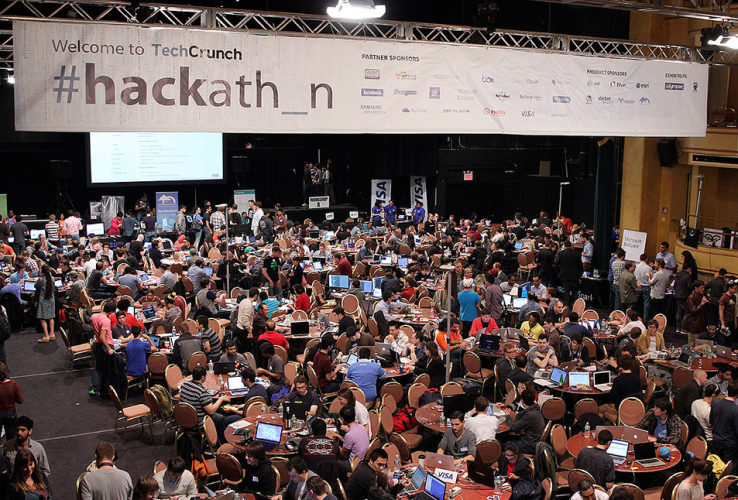
    Which Programming Languages Get Used Most At Hackathons?

    For a quick peek into the list:

    The Top 10 Languages At Devpost’s Hackathons:

    1. HTML/CSS (see note below)
    2. JavaScript
    3. Python
    4. Java
    5. C/C++
    6. PHP
    7. Objective-C
    8. C#
    9. Swift
    10. JSON (which isn’t … really a programming language, but is on their list for some reason, so I’m including #11 too)
    11. Ruby

    Read the full Techcrunch article to know why.

    In stark contrast:

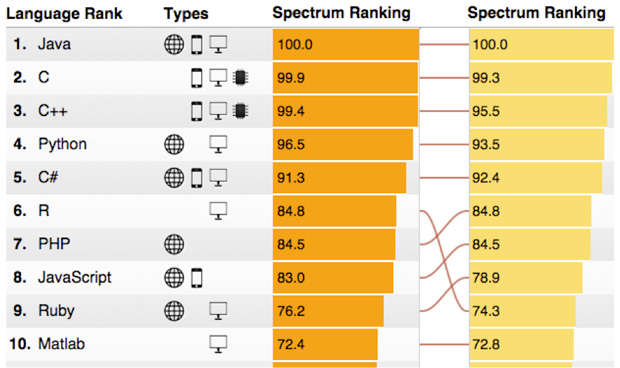
    The Top 10 Languages according to IEEE Spectrum’s 2015 Rankings:

    1. Java
    2. C
    3. C++
    4. Python
    5. C#
    6. R
    7. PHP
    8. JavaScript
    9. Ruby
    10. Matlab

    Note: HTML isn’t quite a “programming” language — it’s a markup language, meaning it’s a means of laying out the elements of a document. But it’s a “language” none the less, and one that pretty much every web developer taps endlessly, so we’ll let the semantic stuff slide

  • R — The Big Mover in IEEE Spectrum’s 2015 Rankings for Top 10 Programming Languages

    R — The Big Mover in IEEE Spectrum’s 2015 Rankings for Top 10 Programming Languages

    The column on the left is the 2015 ranking; the column on the right is the 2014 ranking for comparison:

    top-tech-rankings

    source: The 2015 Top Ten Programming Languages

    The thing to note is that the top 5 languages haven’t budged from their positions. R has pushed past PHP, JavaScirpt and Ruby, which have maintained their relative positions.  So this year’s rankings have been about R moving forward.