My Mac had a couple of bad days, and nothing on it could tell me why. So I built a small model that could, and then reviewed it the way I’d review anyone else’s.
A risk system with no history
Here is a sentence I would never accept at work: “We can tell you exactly what the portfolio looks like right now, but we keep no history, so we can’t say what happened on Tuesday.”
That is, more or less, the monitoring setup on every Mac. Activity Monitor and the rest are excellent at the present tense. When the beach ball appears and you go looking for the culprit, you get a live snapshot of a machine that has, by then, calmed down and is looking innocent. A dog sitting next to a shredded sofa, with no idea what you’re talking about.
In model risk we’d call this a monitoring framework with no time series. You can’t backtest it, can’t spot trends, and can’t tell a one-off from a pattern. The diagnosis is left entirely to whoever is staring at the graph.
So I built macverdict, a small open-source tool for Macs. It takes a quiet sample of the machine every 15 minutes, keeps the history, and once it has a few weeks turns it into four verdicts:
- What’s slowing me down?
- Do I need more RAM?
- How long will my battery last?
- Is my fanless MacBook Air overheating?
Those are four small models making four calls. Naturally, the first thing I did was validate them.
Conceptual soundness: are we measuring the right thing?
The first question in any validation isn’t “is the code right?” It’s “is this even the right quantity to look at?” Memory on a Mac turns out to be a lovely example of a model built on the wrong metric.
Open Activity Monitor on almost any Mac and the “memory used” figure looks alarming. Most people read that as running out of RAM. It isn’t. macOS deliberately fills spare memory with cached files, since empty memory is wasted memory, and hands it back the moment anything needs it. “Memory used” is high on a healthy Mac. It’s a bit like judging a bank’s liquidity by how much cash is sitting in the vault on a quiet day, without asking whether it can meet a run.
What actually tells you whether the machine is short is memory pressure, which macOS calculates itself, and swap, the overflow it writes to disk when it really has run out. Those are the stress indicators. So macverdict ignores “memory used” entirely, and every RAM verdict rests on pressure and swap observed over weeks.
The same thinking applies to blame. The naive approach lists the apps using the most memory. But the apps that are always open, such as mail, chat and the file browser, sit near the top of that list all day. Count them at every bad moment and you’ve built a model that blames whatever is always present. That’s a correlation problem any validator would flag.
So the blame model works differently. It first defines a stress event: a sample where memory pressure is raised, swap has grown, the processor is running flat out, or the machine is slowing itself down for heat. Then, at each event, it blames exactly one app: the biggest consumer of whatever was scarce at that moment. Everything else that happened to be running gets at most a mention.
Outcomes analysis: a real week
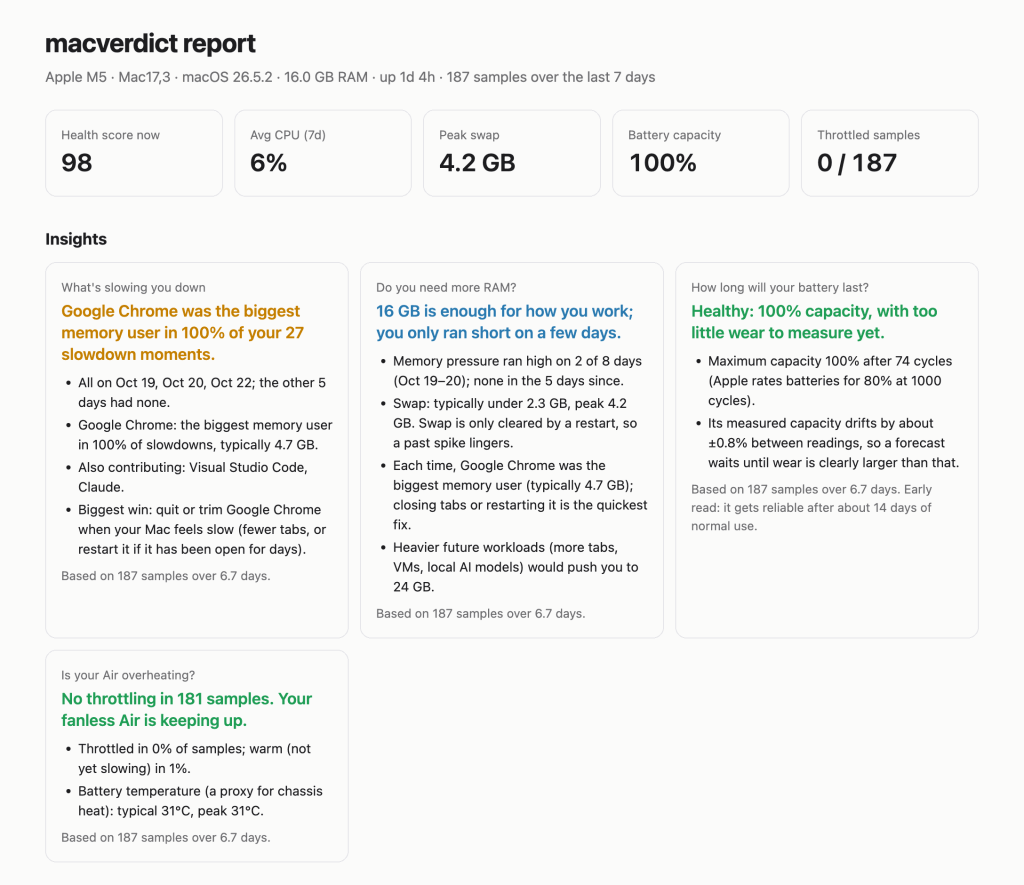
Theory is cheap. Here’s what it concluded about my own MacBook Air (16 GB of memory) after its first real week:
● What's slowing you down
  Google Chrome was the biggest memory user in 100% of your 27 slowdown moments.
    · All on Oct 19, Oct 20, Oct 22; the other 5 days had none.
    · Google Chrome: the biggest memory user in 100% of slowdowns, typically 4.7 GB.
    · Also contributing: Visual Studio Code, Claude.

● Do you need more RAM?
  16 GB is enough for how you work; you only ran short on a few days.
    · Memory pressure ran high on 2 of 8 days (Oct 19–20); none in the 5 days since.
    · Swap: typically under 2.3 GB, peak 4.2 GB.
A hundred percent. Not “mostly Chrome”. Twenty-seven stress events, one culprit every time, typically holding 4.7 GB. The code editor and Claude were in the room, but only ever as accomplices.
The RAM verdict is the more useful one, because it’s a capital allocation question in disguise. Do I spend money on a bigger machine, or change behaviour? Two stressed days out of eight, all driven by one app, is a behavioural problem, not a capacity problem. The fix costs nothing: fewer tabs.
The other two verdicts were reassuringly dull. The battery is at 100% capacity after 74 charge cycles. In 184 samples the Air never once slowed itself down to cool off.
It also produces a report of the full time series. The stress is visible at a glance: memory pressure shaded on Monday and Tuesday, swap climbing alongside it, then a long, quiet rest of the week.
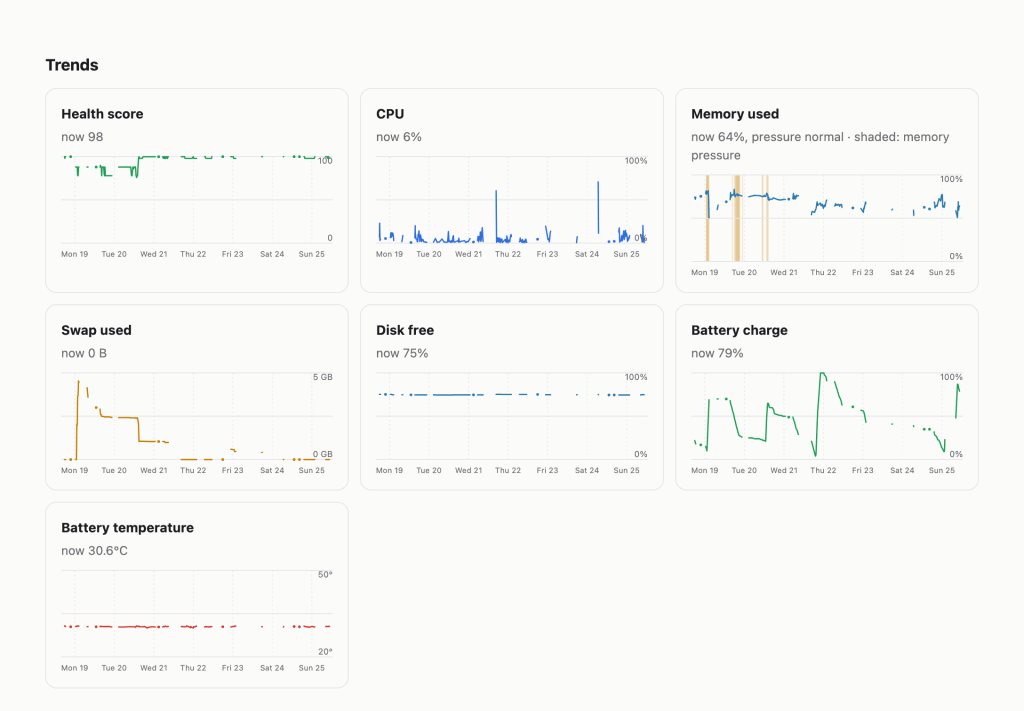
The full report from that week is online if you’d like to look at it.
Findings: my first version failed its own backtest
The week above is what the model says now. The first version said something different, and it was wrong.
Finding 1: one bad day was treated as a regime. The first RAM model measured the share of samples under memory pressure. On made-up test data it looked perfectly sensible. On my real week it told me, with total confidence, that 16 GB wasn’t enough and I should buy a bigger Mac.
All of that pressure came from about a day and a half when Chrome had grown far beyond its usual size. The rest of the week was calm. The model had weighed one stressed stretch as if it were my normal life. Anyone who has reviewed a model calibrated over a crisis window will recognise the shape of the problem: the tail mistaken for the centre.
The remediation was to change the unit of measurement from samples to days. A day only counts as “ran short” if it shows pressure more than once, because one blip isn’t a trend. Calling memory “not enough” now needs breadth (pressure on at least half the days) and depth (a meaningful share of the time), or genuinely heavy swap. And when a single app was behind nearly every stressed moment, the verdict names it, so the recommendation becomes “trim Chrome”, not “spend money”.
Finding 2: noise was read as signal. A battery’s measured capacity wobbles by around a percent from one reading to the next, depending on temperature and charge level. The first battery forecast treated that wobble as wear, so its predicted end-of-life date jumped around by months from day to day. A forecast that changes its mind daily isn’t a forecast.
The remediation was a smoother estimate (the median over three days) and a materiality threshold. No forecast is made until measured wear is clearly larger than the noise. On my battery the noise is about ±0.8%, so the honest answer today is “too little wear to measure yet”. I would much rather a model say “I don’t know” than invent a date with false precision.
Both fixes shipped in version 0.1.1. My real week is now preserved as a regression test, a day and a half of stress followed by six quiet days, so if a future change brings back the “buy a bigger Mac” verdict, the test fails before anyone sees it.
Limitations, stated plainly
Every model has them, and the good ones say so on the front page.
- Sampling frequency. One sample every 15 minutes will miss a ten-second spike. This tool is for patterns over days and weeks, not for catching a single freeze.
- Small samples. A week is a week. Each verdict states how many samples and days it rests on, and calls itself an “early read” until there’s enough history.
- It’s not a live monitor. If you want to watch your Mac in real time, use one of the excellent live tools alongside it. macverdict is what you ask on Friday about Tuesday.
- No data leaves the machine. Not a limitation, strictly, but worth stating. Everything stays local, and nothing is sent anywhere.
Try it
On a Mac with Homebrew:
brew install anirudhjayaraman/tap/macverdict
macverdict setup
Then, whenever you’re curious, macverdict insights gives the four verdicts and macverdict report opens the charts. It’s free, open source, and also installable with pip install macverdict. Give it a week before judging it. Like any model, it needs data before its opinions are worth much.
Provenance, as is now tradition
I built macverdict with Claude Code, Anthropic’s coding agent. I brought the questions, the distrust of the “memory used” number and the insistence on testing against real data before believing anything. Claude wrote most of the code and tests, and helped draft this post.
One last observation for the validation file. Among the apps “also contributing” to my slowdowns was Claude itself, running in the background, helping me build the tool that flagged it. To be fair, it was never the main suspect. That was Chrome. It’s always Chrome.


Leave a Reply